
How to Change from Bash to Tcsh Shell in OS X Terminal
 Bash is the default shell in Mac OS X and has been since 10.3, it’s generally considered to be the de facto shell standard in the unix world. That said, there are some people who prefer to use the tcsh shell, or perhaps you just want to break away from the norm. Changing the default shell is pretty easy, but you will likely run into problems when running bash shell scripts. If you want to experiment with tcsh and use it as your default shell, here’s how to do it from the GUI in three easy steps:
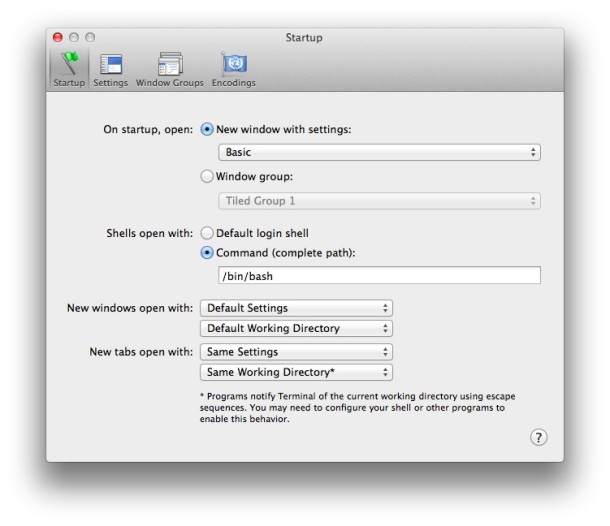
Change the default shell from bash to tcsh as used by Terminal app in three steps:
- Launch Terminal.app
- From the Terminal menu, select preferences
- In preferences, select “execute this command” and type /bin/tcsh in place of /bin/bash
That’s it. Now anytime you open a new terminal it will be the tcsh shell. To revert back to bash, follow the same procedure but replace /bin/tcsh with /bin/bash.
Note: most shell scripts for OS X are written specifically for bash, and switching to tcsh will make many of these scripts no longer function properly.
If you simply want to experiment with the tcsh shell, try typing
tcsh
at the Terminal prompt and you will load the tcsh shell temporarily.
To exit the tcsh shell this way, type
exit
at the prompt and you will exit tcsh and be back in the bash shell. You can do this with any shell to temporarily test another out, be it bash, tcsh, sh, zsh, or others.






Why don’t OSX bash scripts have #!/bin/bash on the first line to specify which shell will execute the scripts? That’s standard convention and negates the need to be in the same shell the script is written for.
Changing shells will not affect the execution of existing scripts. The two are totally unrelated. To properly change your login shell you would normally use the chsh command.
I have the same problem pleas help
Could anyone help me in installing .csh file on my MacOSX 10.6.4. If someone knows the appropriate commandes?…Thanks a lot!!
[…] to you, obviously this Bash scripting guide only works for the Bash shell. If you need to, you can change the default shell rather easily in the Terminal preferences, but Bash has been the default shell since 10.3 and […]
[…] change it in older OS X versions, you should be able to use the chsh command. But there are other suggestions as […]
I prefer tcsh for my shell (completion seems more user-friendly to me), but I script in bash (better for this in general). But the warning about potential script trouble is erroneous as I understand it. That’s the whole purpose of the shebang that should be at the beginning of every script – to specify the shell which the script should use to interpret the contents of the script. Almost all scripts simply use #!/bin/sh. In most unix variants (including OS X), sh is actually a link to bash nowadays. If you’ve got a shebang in the first line of the script, it doesn’t matter what command shell you launch the script from – it’s going to be interpreted using the shell specified in the shebang.
All that being said, I’m moving into the 21st century and making the switch to zsh. I highly recommend it to people interested in this post.
You change your shell with the following commands:
chsh
passwd -s
Only requirement is that the shell is defined in /etc/shells
This way you will also have your default shell when logging in remotely through ssh (or telnet if you still use that)
no, not really. tcsh was more popular in the early 90’s when bash was still pretty young.
(there’s also the fabulous zsh, which probably has more going for it as an “upgrade” from bash, but that’s just my opinion…)
Easy enough, but is there any real advantage for tcsh over bash?