
How do I type the Cent Symbol on a Mac?
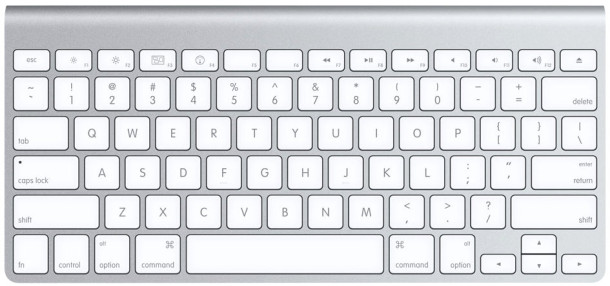
¢ is the symbol for the Cent, and typing it on your Mac may not be as obvious as it should be. But like most of the other special characters, it is actually really easy to type out:
Just hit Option+4 to type the cent symbol as shown here: ¢
Typing this should work in all versions of OS X and all Mac apps, assuming you are using a font that has support for the cent symbol of course.
If the currently active font does not support the symbol, a little square will appear instead, but typically that is limited to dingbats and other peculiar fonts, as all modern straightforward sans and sans-serif fonts should include the basic symbols for math, currencies, and monetary units. If not, you can always change the font to get it too.
While accessing the keyboard cents symbol is easy, but memorizing it… well, that may be another thing entirely.
Keep in mind that you can always access the general “Special Characters” menu in Mac OS X if necessary too, which will reveal every possible special character in an easy to browse hovering panel. That’s often a preferred approach to users who, like me, aren’t necessarily great at remembering keyboard shortcuts.






How can I find a percent sign on my Mac Keyboard
The percent sign typed on an Apple keyboard is shift 5, like this: %
Shift+5 on an Apple US Mac keyboard types the percentage symbol %
Remembering special characters on Mac OS is easier if you think about why they chose them the way they did. For example, I’m guessing that they chose Option-4 because the 4 key is also the dollar sign key, and it makes sense that the cent symbol would be tied to the dollar sign. When typing accents, you usually think about what letter it usually goes on, type Option-, and then the letter you want to put it on (for example, Option-e e creates the symbol é). The ≤ symbol is on the same key as the symbol.
Sigh. Looks like the greater than and less than symbols in my text ate the rest of my comment. The ≤ symbol is on the same key as the less than symbol. The ≥ symbol is on the same key as the greater than symbol.
These tips are for US qwerty keyboards, I assume?
One for us the other side of the pond is the Euro symbol, €. Option-2. Though it tends to be printed on the key, many people ask how to make it actually TYPE the symbol. It’s not immediately obvious.
The other one that people tend to need and not be able to find is #, or Option-3
On a MAC you can type:
option key and 4
and
you will get ¢ symbol