
Securely Delete Files in Mac OS X from the Finder
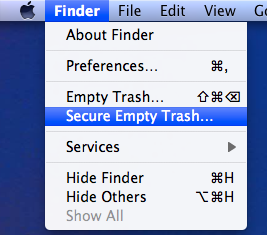 You can securely delete files from Mac OS X right from the Finder. This is by far the simplest method to securely delete something on the Mac, and the process is pretty straight forward, very similar to the normal procedure of deleting a file except that you will access a separate option to enable the ‘secure’ layer:
- Place files, folders, or whatever contents you want securely deleted into the Trash as usual
- Next, pull down the “Finder” menu and select “Secure Empty Trash” from the options (also accessible by command+right-clicking the Trash icon)
The process begins instantly, but unlike the normal approach to emptying Trash, you will find the process takes a bit longer.
The reason it’s slower is quite simple, and that’s because Secure Delete actually writes random patterns of zeros and other characters over the data rather than just freeing up the space on the disk, thus increasing security by making the file nearly impossible to recover since it has been rewritten over so many times. Essentially that means the file becomes inaccessible, at least by any reasonable or simple data recovery methods.
If you find yourself using this option frequently, you may want to just toggle the ‘always’ setting in Finder Preferences, which causes the Trash contents to be secure deleted every single time rather than on the per-trash basis that you have to access manually.
This is particularly useful for removing any sensitive data or files you don’t want anyone else to dig up, like when you’re transferring your Mac to a new owner. Note that deleting every single file from a Mac this way is not the most efficient approach of securely deleting old data, and if you do plan on changing the ownership of a Mac and want to be sure none of your personal information, files, or data is recoverable, you should go a step further and securely format the entire drive, which you can learn how to do here.






[…] with the command line but who want to retain secure file removal options should consider using this simple method of secure deletion, or by using the “Always Secure Empty Trash” option that is […]
[…] secure empty, which is also accessible via the Finder menu, will take a bit longer than emptying the Trash as normal, this is because the […]