
Convert PNG to JPG or Convert JPG to PNG

Converting a PNG file to JPG, or converting JPEG to PNG, is really easy in Mac OS X. You can use the built-in Preview utility to perform the file format change quickly, and Preview is a great choice since it’s bundled with all versions of MacOS and Mac OS X, meaning it does not matter what version of software you have installed on the Mac. No additional downloads are necessary, Preview is built right in on the Mac.
How to Convert PNG to JPG, or JPEG to PNG on Mac
Here are the necessary steps to convert the PNG / JPG as desired with Preview:
- Launch the origin PNG or JPG file within Preview app of Mac OS X, do this by double-clicking or dragging it into the Preview icon
- Navigate to the File menu and choose “Duplicate” (in modern versions of Mac OS) – this step is not necessary in older versions of Preview app so if the Mac is really old you won’t see the Duplicate option, you can therefore skip this and go directly to Export or Save As
- With the newly duplicate file open in Preview, pull down the File menu again and go down to ‘Export’ (or choose “Save As”)
- Select “JPG” or “PNG” under the ‘Format’ drop down list
- Click “Save” to export the file converted to the new image format
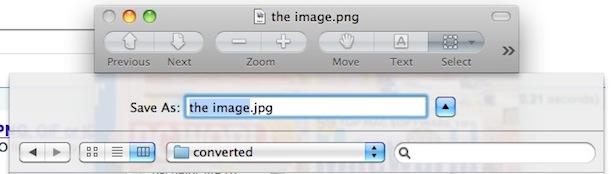
Your PNG file now has been converted and saved as a JPG file to the location you specified in Finder!
If you want you can go back and delete the origin file, that is up to you, if you want to keep both the PNG and JPEG version of the image.
Naturally you could modify the process and save any opened image file to a new image file format to do a similar conversion to other supported file types, many image formats are supported by Preview this way.
Overall using Preview to convert PNG to JPEG and JPG to PNG is probably the easiest method that is universally applicable to Mac users on just about any MacOS version.






Thank you. Worked great for me.
Re: Converting a png to a jpeg …
Duplicate….save as jpeg
Re: Converting a JPEG to a PNG …
“Save For Web & Devices”, NOT “Save As”, in PS CS5 will provide the option(s) for saving as a PNG-8 or a PNG-24.
i use colorsync utility
I have “upgraded” to lion and have received some png attachments in an e-mail. My wife can read them with her iPad, but all the iMac can see is an icon. I have gone through the steps using “export” and it “does its thing” and appears to be converting it to a jpg, but the result is still the same icon, not a readable document.
Re: OS X Lion – use ‘export’ instead of ‘Save As’
Thank you!
Thanks!!!!
It DOES NOT WORK for 10.11.6. There is no Jpeg option when using “export”.
Wrong, you can save as a JPEG in any Mac OS operating system that has ever existed since 2001. Ever. Paul, just because you can’t figure out how to do something doesn’t mean it does not exist.
You can absolutely save as JPEG in Mac OS 10.11.6, I do it every day 15 times a day minimum for my job because it’s faster than Photoshop for small edits. Just follow the instructions. Use the FILE menu and SAVE AS or EXPORT options there are JPEG, GIF, a million file options.
Thank you!! Worked awesome on my Mac with the instructions. I had tried searching the instructions on my computer before coming here.
Anyone have a clue how to “batch convert” .PNG to .JPG in Photoshop CS5 on a Mac Pro Dual? I have over 500 grabs (PNGs) for a project I must do that are taking up a ton of space and I can’t work with them as PNGs. JPEGs will be fine for my purposes. I know how to do batch conversions, do it all the time, but nothing’s happening when I try it with the PNGs. They just won’t convert in batch.
Do I have to do them one by one? You gotta be kidding me. Can’t find any help, forums or tutorials online. I can’t be the only one facing this challenge.
Please feel free to write me directly if anyone can help — TADesigns@aol.com
Thank you very much,
Ken
What about Windows7 ? how can change JPG to PNG ??
why are you asking about Windows 7 on a site for Apple Comps?
Doesn’t work. No jpeg option presented in save as menu
using version 10.5.8
Works fine for me under 10.5.8, with Preview version 4.2. JPEG is the second file format option down after GIF.
…Hussie..?
Worked great for me!
Garth, Try going through the steps again. I just did the process and it worked fine. I have OS X 10.11.5 and Safari 9.1.1
You are right Garth. It DOES NOT WORK. There is NO JPEG option or SAVE AS. Only options are under EXPORT = PDF, WORD, PLAIN TEXT, ePub and Pages 09. I have MAC 10.11.6. I used to have 10.5.8 and those options appear on old MACs, but not new ones. Very frustrating.