
Mac Setups: Mac Pro with Dual 23″ Cinema Displays and a MacBook Pro
May 8, 2010 - 5 Comments
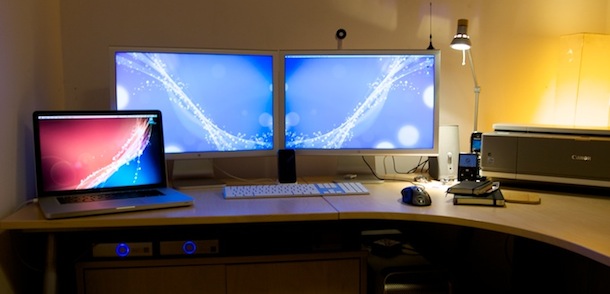
Can you find a more awesome Mac setup? Check out these machines and their stats, they’re sure to make you envious:
Mac Pro
* Intel Xeon W3540 2.93Ghz Quad Core
* 6GB DDR3 1067 ECC RAM
* ATi Radeon HD 4870
* 1TB OS X
* 640GB Windows 7 64bit
* Dual 23″ Apple Cinema HD Displays
MacBook Pro 15″
* Intel Core 2 Duo 2.53Ghz
* 4GB DDR3 RAM
* nVidia GeForce 9400M / 9600GT 512MB
* 320GB 7,200 Western Digital Black HDD
And of course there’s a set of speakers, a couple external hard drives, and iPod, and an iPhone.
This might just be one of best Mac setups I’ve seen. I certainly wouldn’t mind having that hardware on my desk!
[ via DeviantArt ]






People, the 2 Cinema Display are driven by the Mac Pro.
Dieter, there is no such thing as a Mac Pro 15″
The video card has two DVI output…
I also have just switched to mac and have a new macpro 15″ you noted a video card w two dvi output, where do you buy this and where would this fit in the laptio? or is it an external unit, your photo shows one cable coing out for video
How did you manage to connect dual 23″ displays with the Macbook Pro? Are you using a special DVI splitter of some sort?
I also have two 23″ cinema displays that I would like to connect to my old Macbook Pro (one generation older than yours), but I can’t find the right gadget to get them to hook up properly.
Any suggestions?
I have a MBPro connected to a 27″ Cinema Display (not thunderbolt) and a 24″ Samsung display, and can also use the screen on th MBP for a third monitor. Here’s how –
The Apple Cinema Display is connected to a miniDVI port adapter plugged into the MBP and the Samsung is connected with a $5 cable from Amazon the is DVI on one end to HDMI on the other, plugged into the HDMI port.
I’ve tried adapters, but this works flawlessly.