
How to Set Photo Booth to Flip Images on Mac
Photo Booth on the Mac defaults to flipping your images horizontally, this happens automatically without any user input and without it being noticed, it’s just how the camera within Photo Booth displays pictures, making it function more like a mirror rather than a traditional camera.
If you don’t images to flip like that, you can make an adjustment through the settings that will cause Photo Booth to show camera images on screen as if they were being seen from another person, rather than being flipped.
How to Make Photo Booth Flip Pictures on the Mac
Here’s the settings adjustment to make if you want to change this photo mirroring behavior:
- Open the Photo Booth app in Mac OS X
- Pull down the “Edit” menu
- Select “Auto Flip New Photos” so that it is checked
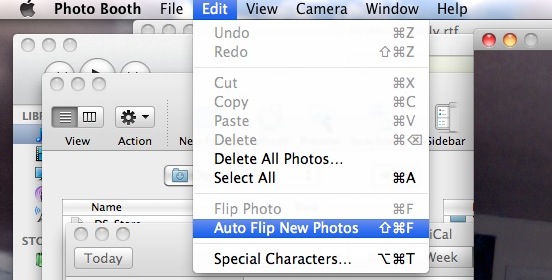
This will change the default Photo Booth camera setting to flip the pictures away from mirrored mode. The setting persists for all new photos taken within Photo Booth in Mac OS X, unless the setting has been changed back again (by unselecting it from the Edit menu and unchecking the Auto Flip function).
Note that you can also flip pictures on a per-image basis by using the same Edit menu. To do that, after an image has been taken, select it in Photo Booth, then go back to the Edit menu, but this time select “Flip Photo”. You can do this with image that has been taken and is stored within Photo Booth’s photo viewer timeline.
Remember, this flips the photo horizontally automatically. It’s not going to flip it vertically since that wouldn’t make any sense, though if you really wanted to you could do that yourself through another app like Preview by rotating the picture or directly flipping the image vertically.
Photo Booth for Mac is the best way to take selfies on the Mac using the built-in camera, but a lot of people use the app for other purposes too, like as a quick mirror, or for recording video messages and greetings, and much more. It’s also just a lot of fun, with a lot of goofy video effects to enjoy and have a good laugh with.






Very helpful, now my pics will be cute!! Thanks<3
I wanted the image flipped in real-time, and not after the photo was taken.
So, I used the iglasses app
I want to “un-mirror” the video live image of me that I see when I run photo booth. When photo booth is started up, the live image of me is actually a mirror image. It is NOT what someone who is looking at me from behind my computer screen would see. I’m right handed, but in the photo booth image of me, I appear to be left handed. Is there any way to make the live image shown of me on the screen in photo booth not be my mirror image?
Thank you. I needed a quick photo of a document to email, but the photo came out reversed. Your instructions showed me how to fix that. And just think – I’ve had this MacBook Pro since I bought it in 2009, and today’s the first time I ever used Photo Booth!
THANKS A LOT YOU SAVED ME
This was not useful at all for seeing what the photo would look like from another person’s perspective before taking it. Is there a way to do that?