
Save and Dial Phone Extensions Automatically on iPhone
 You can save phone numbers that automatically dial extensions with your iPhone. Essentially this allows you to add the extension number to a contact number, and when that contact is dialed, the extension will automatically dial after the call is answered by the automated phone system. There are so many uses for this as you can imagine, and it can really help to navigate through phone menu systems. Let’s learn how to set this up on any iPhone.
How to Add Extensions that Automatically Dial to a Contact Number on iPhone
- From the Contacts app on iPhone, edit or create a new contact card
- Enter a contact number as usual, let’s say 1-800-000-0000
- After entering the number into the iPhone, tap on the # button to bring up extra options
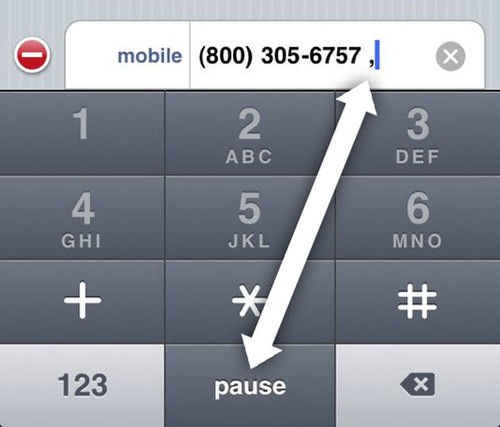
- Tap on the “pause” button to insert a comma, this causes a pause after the phone number has been dialed, which basically means it will wait for the answer
- Now enter the extension you wish to save to the number, let’s say 123
- Your finished result will look like: 1-800-000-0000 , 123
- Save the Contact as usual, and try it out by dialing if you’d like to confirm it’s working as intended
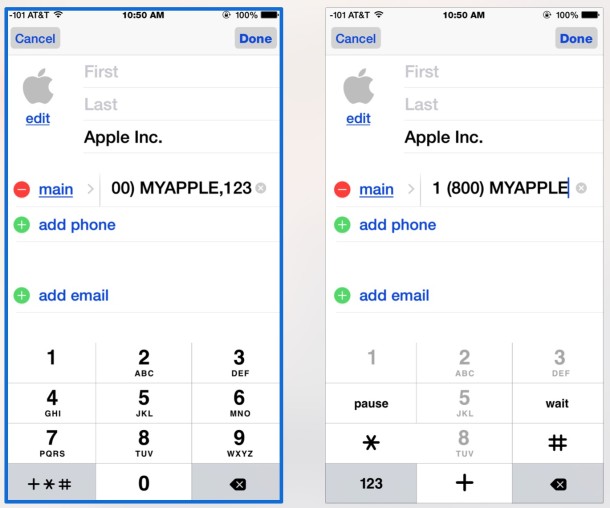
Now when you dial that saved contact from your iPhone address book, it will automatically pause and dial the extension! This is really helpful for customer service numbers or for when adding an office contact to your phone, and perfect for those numbers that ask “if you know your parties extension, you may dial it at any time”. How this works in practice is the number dials, waits for an answer from the automated phone system, and then the extension dials automatically to connect you to that extension. Incredibly useful.
This feature exists in all versions of iOS for iPhone, though it may look slightly different in modern versions vs prior versions of the Contacts and Phone app. For example, here’s how it looks prior to the overhaul of IOS, but the button and feature works exactly the same, regardless of appearance.
A similar trick allows you to create a ‘dial extension’ button for a contact, which rather than dialing the extension automatically after a pause, will just place a button onto the screen that will dial the extension when pressed. Thanks to LifeHacker for the tip!






[…] you’ve long been able to add automatically dialed extensions to contacts on the iPhone, the newest versions of iOS handle extensions much more intelligently, […]
This does not work on my iPhone.
I tried the exact procedure. When I dial a voice tells me that this number does not exist.
I don’t know how to produce the blank shown between the comma and the extension.
You’d have to add a contact in order to do that.
Basically;
Add a new contact, and in the numbers field input the number, followed by tapping the “+*#” button. You will now see “pause”. Press it and voila – add the extension.
This is a valuable tip, but it is not limited to the iPhone or any smartphone. I was using this with my dumbphone for the last few years.