
Turn an iPhone into a WiFi Hotspot with MyWi & a Jailbreak
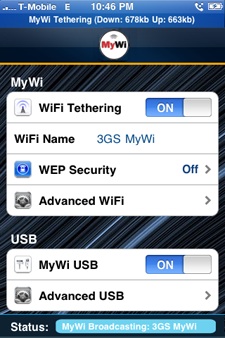 If you have an iPhone you can turn it into a WiFi hotspot very easily through the help of a jailbreak app called MyWi. This lets you wirelessly connect any other computer or hardware to the iPhone and use its cellular connection as your primary internet access. Outside of the official “Personal Hotspot” features offered by nearly all cellular carriers now, this is without a doubt the easiest way to tether your iPhone wirelessly, and use an iPhone as a wireless router. Do note this is an unofficial method, and some cellular carriers will detect the usage of tethering and may add a fee onto the data plan once they detect you doing so. This also requires the usage of a jailbreak, which is a separate process, but it allows you to install the MyWi app onto your iPhone.
Do note that most users will be better off using the official Personal Hotspot offered officially through their cellular carrier. It’s typically a small fee that gets added onto the iPhone data plan bill, and it can be prorated per month if you decide to use it for a week or so and then turn it off and disconnect that service for the remaining period of the month. Each carrier is different in what they charge, but all modern iPhones and cellular equipped iOS devices beyond iOS 4.3 will support the feature natively on the device itself. Nonetheless, the MyWi method does work as an alternate way to create a hotspot and tether the internet connection to another device or computer, and it’s actually the only way to get tethering working on devices that are not able to upgrade beyond iOS 4.3 for some reason or another.
How to Turn an iPhone into a WiFi Hotspot with MyWi
This is easier to do than you might think. You’ll need to jailbreak your iPhone and then install a popular third party application, here are the steps:
- Jailbreak the iPhone – You can do this several different ways depending on what iOS version and iPhone you have. Here’s the latest on how to jailbreak iOS devices, you’ll find the jailbreak tools to download if necessary if you need it, but do note that some iPhones will require a tethered jailbreak for now.
- Get MyWi – MyWi is available through the Cydia Store, after you have jailbroken your iPhone, launch Cydia and then search for “MyWi” where you can purchase and download the app. It costs $19.99 which is a steal considering you’re about to get a full cellular modem for just $20.
- Launch MyWi and Configure – Launch MyWi by tapping on the icon. Tap “On” next to ‘WiFi Tethering’ to enable the iPhone WiFi hotspot. You can also further configure things here, like a WEP key, network name, etc.
- Connect your Mac, PC, iPad, etc to your new iPhone WiFi Router – Now all you need to do is connect your hardware to the iPhone, you do this the same as you would connect to any wireless network, just find the newly started iPhone WiFi hotspot SSID and connect to it. Enjoy!
Remember that this is going to use your iPhone’s data plan, so unless you have a grandfathered unlimited plan you will want to keep a close eye on data usage and consumption. The MyWi app keeps track of data use for both upload and download, but you’ll want to watch it through your carrier as well. Checking iPhone data usage is easy on AT&T and I’m sure it’s similar on other cell providers too.
Note that MyWi will drain your iPhone battery faster than usual, but you can also use the app to tether your iPhone via USB so that you can keep the iPhone powered or charging while still using its cell connection.
A few additional notes on using MyWi and jailbreaking: You can download MyWi and use it in demo mode to get a free 3 day trial before buying the app, this lets you ensure that everything works before buying. Using an app like MyWi may violate your agreement with your wireless carrier, and although jailbreaking is not illegal, it may violate your warranty with Apple if you don’t undo the jailbreak before attempting to have the device serviced.
Finally, remember that many cell providers can detect the ‘unofficial’ internet tethering offered through these tools, and they may opt to charge you a separate fee for doing so. Nobody is responsible for that but yourself, so if you do decide to use MyWi and this approach, don’t be shocked if you wind up paying for tethering anyway. For that reason, many users are better off just paying for the official hotspot services through their carrier, assuming they’re on a new enough version of iOS to support the feature natively of course.






[…] is beginning to crack down on unofficial iPhone tethering methods, including users of MyWi, the unofficial iPhone WiFi hotspot app that is popular among jailbreakers. Customers are being notified that their service plans need […]
[…] is beginning to crack down on unofficial iPhone tethering methods, including users of MyWi, the unofficial iPhone WiFi hotspot app that is popular among […]
[…] but since these aren’t offered reasonably through carriers, users result to things like jailbreaking an iPhone to setup a wireless hotspot which can then be shared across their hardware. This isn’t Apple’s problem though, this […]
[…] much does 3G internet speed matter? This depends on how often you transfer data, for someone who tethers their iPhone with MyWi this is obviously more important than to my Mom who just wants to send a few emails and make […]
[…] you are using metered internet service either through a jailbroken iPhone WiFi hotspot, the Verizon iPhone hotspot, the recent Canadian telecom disaster, or any other bandwidth […]
[…] could become a wireless hotspot that other devices can access the internet from. (Yes, you can turn your iPhone into a Wi-Fi hotspot right now, but it requires a jailbreak which puts it out of the reach of most iPhone […]
Haha, this came out of the box on a Samsung Galaxy S half a year ago, but now other phones have it too with stock Android 2.2 Froyo (no need to jailbreak!)
Sorry to be a little late on my response… But for your info, the iPhone has had the tethering feature built in since iOS 3.0 which means since June 17, 2009 (so just a little more than half year… =x) So, im sorry your galaxy S had to “copy” the iPhone… i mean, they had that feature for over half an year right?… but yes, the feature was always there, was just not enable in the U.S. (AT&T fault’s) so if you are going to bash on something, at least have your facts about the product.
This is the single best reason to jailbreak an iPhone, hands down. MyWi used to cost only $5 too, those were the days, but $20 is nothing considering the alternatives.
Watch your data use but this is what your iPhone is SUPPOSED to be able to do, it’s a full wireless cellular modem. This and a MacBook Air 11.6 and you are a true road warrior.
Thank you very much for the advice. I had no idea that it is so simple to make your own router out of your iPhone. I wonder whether you could do the same with Blackberry or any other Symbian based mobiles. Nevertheless, this is very handy, I do not need to have multiple connections anymore.
[…] iphone wifi hotspot If you have an iPhone you can turn it into a WiFi hotspot very easily. This lets you wirelessly connect any other computer or hardware to the iPhone and use its cellular connection as your primary internet access. … Go here to see the original: Turn an iPhone into a WiFi Hotspot […]
Thanks for sharing the knowledge, I’m using MyWii for quiet some time