
Access Folders from Finder Windows with a Custom Toolbar
 This is a neat Mac trick I accidentally discovered: not only can you launch apps from the toolbar of a Finder window after placing them there, but you can drag folders into any Mac OS X Finder window toolbar as well, and it will stick there allowing for easy access.
The do this yourself, you just need to drag a folder into the toolbar of any Finder window. Any folder works, but there are some cool unexpected extra styling that comes with some folders that we’ll get to in a moment. The change then carries over to all other active Finder windows, with the folder icon appearing there.
Additionally, and this is where this gets really cool in terms of attention to detail, if you drag some of your core ~/ directories into the toolbar, not only will they stay in place, but they get custom icons like you can see in the screenshot! For example, you’ll get a music note for your ~/Music, a camera for ~/Pictures, and a movie reel for ~/Movies, etc. Check this out, it looks pretty cool:
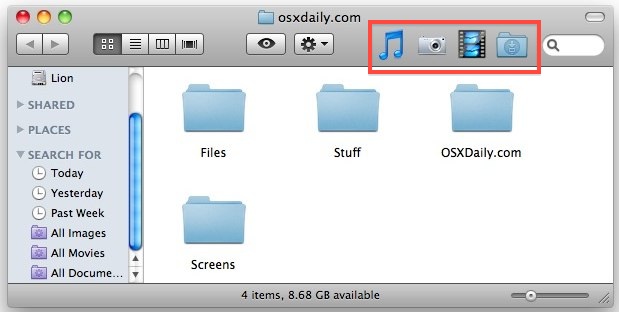
And you guessed it, clicking on those picture icons jumps right to that folder, for super quick access to where ever you want to go on the Mac file system.
If you don’t want folders in the Finder window toolbar anymore, just drag them off while holding the Command key.






[…] great little tip from OS X Daily on Wednesday evening made me wonder why no one has ever reported this before. We know that we can […]
[…] great little tip from OS X Daily on Wednesday evening made me wonder why no one has ever reported this before. We know that we can […]
This is an amazing trick!! Thanks for sharing.
[…] trick came via a comment on yesterdays post about customizing the Finder window toolbar, thanks to Bikorchi for the tip. stLight.options({ […]
CMD+T will put a link of your file or folder to a left sidebar “Places” for quick access as well. I use it a lot for temporary and quickly accessing files and folders; delete it after I am done.
This is a great idea, I am going to post a separate tip about it.