
How to Change the Name of an iPhone, iPad, iPod touch with iTunes
You can give your iPhone, iPad, or iPod Touch a custom name easily, or change it from its current name to something else if someone else happened to give it a name that you don’t like. This is helpful for when an iOS device transfers ownership, or if the name is perhaps just no longer appropriate for the device. Whatever the reason to change the devices name, it’s easy to rename any device either directly in Settings or from a computer with iTunes. Here we will cover the latter, showing you how to change the iPhone or iPad name on iTunes on either a Mac or Windows PC in just a few moments.
This works the same with any iOS device running any version of iOS and with any version of iTunes. So whether it’s an iPhone, iPad, or iPod, it’s all the same. Let’s get right to it.
How to Change the Name of iPhone, iPad, or iPod Touch in iTunes
This only takes a minute, but you’ll obviously need a computer, iTunes, and either Wi-Fi sync or a USB cable to finish the job.
- Plug the iPhone, ipad, or iPod touch, into your computer
- Launch iTunes
- Click and hover on the iPhones name in the iTunes sidebar until the familiar renaming highlighter comes up (or double-click the name in the sidebar)
- Type in the new name of the iPhone and hit return key to set and save the change, it will sync ot the iOS device instantly
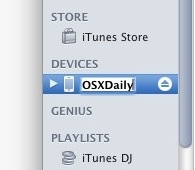
The name change is instant and will be reflected on the iPhone, backups, iTunes, and elsewhere the devices name is used.
The next obvious question is, what if you don’t have a computer with iTunes handy? That’s Ok, because if you want to rename the iPhone, iPod, or iPad without using iTunes, you can do that with any modern version of iOS too. Just follow these instructions to rename it on the iOS device without a computer, the whole name change process is done through Settings app, and it carries throughout to iTunes and iCloud once it has been set. There’s no right or wrong way to change the name, just pick whichever approach works for you, or just learn how to do both, then you can use either approach when it’s appropriate for the situation.
These instructions are geared towards the iPhone, mostly because a friend of mine just bought a used iPhone to setup as a pay-go phone and the phone still had the previous owners name on it. Not wanting to restore the iPhone because it came with a great music library and he didn’t have the original iOS backups, just renaming it was the best option.
Regardless, renaming any other iOS device including iPods, iPod touches, iPads, Apple TV’s, even likely the Apple Watch, or anything else that plugs and syncs to iTunes is exactly the same as this process.






It don’t work first off it has to show the device and itunes does not show my phone in the tool bar so this does not work. Maybe it worked back in the day but it don’t anymore.
Do it from iTunes? Are you mad?
This is how I changed my iPhone’s name so my neighbour will not find me or my name on bluetooth.
On iPhone 4S (iOS 6.0), I tap on “Settings” icon. After it’s launched, tap “General” (it’s on the 7th row), tap “About,” tap “Name,” then change the phone’s name. I would choose something that doesn’t reveal your name or other privacy-sensitive information.
Thank you so much, I’ve been trying to figure this out for ages. It also works on IOS9
thanks a million!!!!
Thanks so much. Such a simple task but your article made it easy. Cheers
thanks! i got a hand-me-down but still great looking iphone 4 and really want to bear my name :) thanks!
thanks man, it works
thanks! :-)
thanks a lot, i was wonderin how to change it but at last! i works ~ thank u so muchy ! :D
Thanks! It worked.
Thanks very much ! I misnamed mine as my hubby’s and it was driving me CRAZY trying to figure out how to change the device name. Have a great day ! :)
thankzzzzzzzzzzzzzzzzzzzzzzzzzzzzzzzzz
thanx a bunch, a bunch, a bunch, a bunch, a bunch and a bunch.
i was so pissed off due to mixing of two iphone app settings and organization due to the same name (i have two iphones with same name).
i think changing names of the iphone should help me reserving separate settings for both of my phones.
really appreciated!
Thanks! It helped!
thanks for the info, it really helped me…
No amount of hovering is going to make the name field editable. You need to double click the name to edit it.
IT WORKS MAN, LEFT CLICK AND DON’T LEAVE THE BUTTON FOR A WHILE (NOT MORE THAN 1-2 SECS).
IT WORKS.
[…] to iOS 5 is the ability to rename your iOS device directly on the device itself rather than changing the name with iTunes. This works on iPhone, iPad, and iPod […]