
Set a Mac Mouse to be Left Handed
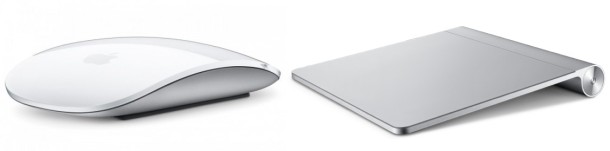
Most lefties have adapted to the righty-centric world of computing, but this isn’t necessary on a Mac. The Apple Magic Mouse, Apple wireless mouse, wired mouses, trackpad, and even most 3rd party mice have a symmetrical shape, so those that are left handed just need to adjust a few settings in Mac OS X to get the mouse on their dominant side.
We’ll show you how to change the mouse button to be left handed in Mac OS X, and also how to change the trackpad behavior to be for left handed people too.
How to Change Mouse Button Setting to be Left Handed on Mac
The main thing you want to do is change the “Primary mouse button” to be on the right button instead of the default left:
- Launch System Preferences from the Apple menu of Mac OS X
- Click on “Mouse”, look for “Primary mouse button:” and select the bullet box next to “Right”
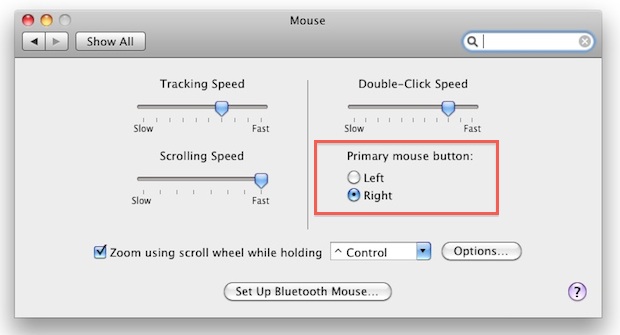
This reverses the behavior of the right-click (alternate click) so it becomes a left-click, so a lefties pointer finger becomes the primary clicker.
How to Change Trackpad Settings to be Left Handed on Mac
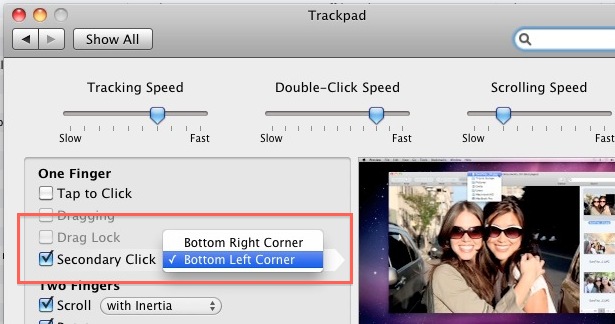
For the lefties using a MacBook Pro or MacBook Air, you can adjust the literal right-click to be a literal left-click instead:
- Go back to System Preferences and click on “Trackpad”
- Next to “Secondary Click” select “Bottom Left Corner”
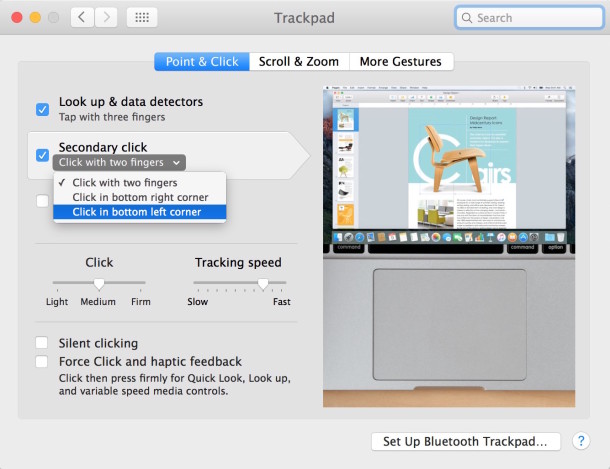
The literal right and left clicks are a little less necessary for trackpad users though because, regardless of which is your dominant hand, you can always just use a two-fingered click to activate the ‘right-click’ or secondary click anyway. Nonetheless it can still be a helpful setting to adjust.
These features exist in all versions of MacOS and Mac OS X, so it doesn’t matter what version is running on the Mac.
Enjoy your new left handed friendly Mac experience!






Why don’t you look up up “lefty cursors”? There are some for Mac but the windows ones might work as well. Do .ani work on Mac? The Mac ones are .cur and so are a lot of the Windows cursors. (Some people make them .ani even when they are not animated. Don’t know why.)
I have a well trained Apple Mouse for people who are righthanded.
I am left handed can someone please advice
The configuration does like this at all any more.
Mac operating systems are made for right handers only. It’s tiring reading the same explanations time and time again of how you can make a mouse left handed when no mention is made whatsoever of how to change the pointer direction. That’s because it’s not possible on a Mac. How can you point at something with the side of an arrow? This is something I’ve taken for granted with Windows as there are numerous downloadable left handed cursor sets. I’d been looking forward to buying an iMac but fortunately spotted this problem before I got my wallet out. This is such a basic requirement for any operating system that it can’t be just an oversight on Apple’s part. Apple simply (and deliberately) doesn’t care.
Try looking up ‘Mac lefty cursors’. Windows cursors may also work and there are a lot of lefty ones out there.
I don’t own a Mac either. I use my mouse left-handed and use lefty mouse pointers. I discovered a Cursor Editor that I can use to mirror right handed pointers in order to make them left handed.
This is for Mac users who want to set their Mac mouse or trackpad to be left handed, which will switch the cursor.
You can not use Windows programs to edit cursors on the Mac, it’s a different operating system.
Thanks so much. I developed arthritis in my right hand (long time programmer) and need to switch to my left hand. Thank you!
Have you tried your trackpad left handed with Lion.No recognition of gestures involving the thumb.
There are no options
viendo los ultimos posts me pregunto si pronto veremos un post llamado “como enceder tu mac” o “como abrir tu Macbook”.
:-)
No digo que no sea información útil, pero…
[…] Read the entire article here: Set a Mac Mouse to be Left Handed. […]
I saw this option when I was setting up my system once but like James (above) most of my left-handed buddies have just adapted to the right handed mouse. :(
-Chris
FOM
I am left handed and I long ago became accustomed to working with the right-sided world. I have changed the cursor click behavior in the past but ultimately it felt unnatural to me, old habits die hard even if it’s unnatural.