
Change the Text & Icon Size of the Mac OS X Finder Window Sidebar
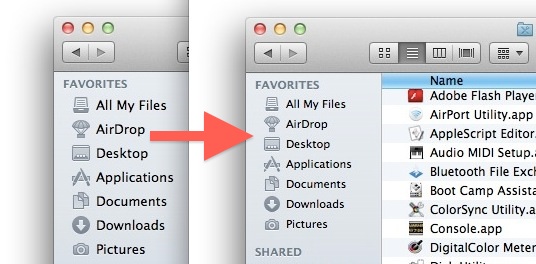
The font size of the Mac Finder window sidebar is customizable, allowing you to adjust to a larger or smaller font size of both the text and icons found in the Finder sidebars of OS X.
If you’ve been busy customizing the Favorites folders and colorizing the Finder sidebar icons, you might want to change the font and icon size of that sidebar text while you’re at it. This is possible in all semi new versions of OS X, but oddly enough, this isn’t in the “Finder Preferences” or “View Options” where you might expect to find it, and instead the option to toggle sizes is in the general System Preferences.
How to Change Mac Finder Sidebar Text & Icon Sizes
Here’s how to change the text and icon size in the OS X Sidebar easily:
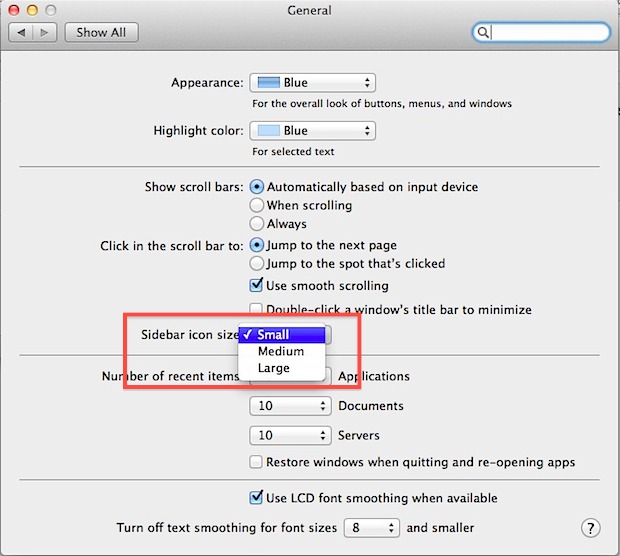
- Open “System Preferences” from the Apple menu and click on “General”
- In the middle of the preference panel, look for “Sidebar icon size” and select one of the three options: Small, Medium, Large
- Changes take effect immediately, close out System Prefs when you are happy with the
Medium is the default in OS X from 10.11, 10.10, 10.7, 10.8, and 10.9, which some people feel is too large, but I think this depends entirely on the Macs screen resolution.
For some comparison, “Small” is the default font size option in OS X 10.6, and the “Large” option isn’t the default in anything yet, but it’s big enough that it’s a great option for those with issues reading the smaller text size, kids, and also for Mac users with huge screen resolutions.






Parakeet is correct. I just measured carefully and the text size doesn’t change in the Finder sidebar when you change the icon size. I’d like to change that text size, but I can’t figure out any way to do it. Perhaps buried deep in a .plist or other system file somewhere?
Thank you for this! I hated the size of the Finder sidebar, and couldn’t find how to make it smaller. It looks really nice with the color Finder sidebar as well.
You might want to check the third bullet point, it’s incomplete.
Great, but I have a sticky problem. In Snow Leopard I added a couple of custom items to the sidebar. These no longer link to the original locations and I’d like to remove them. However, after the upgrade to Lion they’re stuck and I can’t remove them manually, either by dragging off the sidebar or by the Finder prefs.
I imagine there’s probably a Terminal command to reset the sidebar, or maybe deleting the Finder prefs. Any ideas??
Just hold down the “Command” key and then drag them off, they’ll disappear in a puff like dragging things out of the Dock
It doesn’t solve the problem with me, when you restart the problem appears again. It’s an osx bug and apple have to fix it.
Just right click on it and select “remove from sidebar”.
The text size actually doesn’t change with the “Large” selection, but only the icon size. I prefer the small setting, but then again I rarely use the sidebar and hide it most of the time.