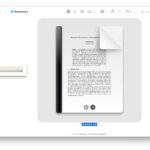
Spilling coffee on something is generally considered a bad thing, but not if you have a brown leather iPad Smart Cover. TwoLivesLeft accidentally got some coffee on their iPad case, and then had the hilarious epiphany “I had a wonderful, horrible idea: I’d stain the cover with coffee“. The result? A surprisingly attractive appearance that looks like beautifully refined leather, akin to something dug out of an old dusty library.
Speaking from my own experience of spilling coffee on porous things, the Smart Cover will undoubtedly smell like liquid crack for a very long time. Whether that’s a bad thing is your call, but I won’t be trying this myself. if you’re brave enough to give it a go we’d love to hear about it.
Fascinating discovery by CultOfMac, best of luck to anyone who tries this.
The iPad is a great device to read on, and if your digital library is feeling a little bare then you’ve come to the right place. We’ve found some of the best places to get free ebooks, ready to be downloaded and opened with iBooks on your shiny new iPad (or iPhone, iPod, Kindle, Nook, or Android, for that matter).
Project Gutenberg Top 100 – Full of classics, if you’re only going to visit one source for free ebooks, Gutenberg should be it. They have over 38,000 free ebooks available, and their top 100 list is basically a mirror of the Western Canon of literature. Grab titles from the popular lists, and then search category or by your favorite author to load up on a nearly infinite amount of reading. Audiobooks are offered in some cases too.
Gutenberg Bookshelf by Category – Looking for books on a specific topic? This is the place to go. Sorted by alphabetical category.
Gutenberg Harvard Classics – A 51 volume anthology of world literature classics, this collection was created in 1909 to provide the core elements of a liberal arts education by reading just 15 minutes a day. Free is slightly cheaper than a Harvard education.
Gutenberg is probably the best source online, but other sites offer free ebooks too:
ManyBooks – Plenty of classics and a wide variety of formats
ePUbBooks – Free .epub ebooks, plenty of classics though most are also on Gutenberg
FeedBooks – Free books from the public domain, varying quality
SneeKidsBooks – A handful of childrens picture books like the Three Bears and Little Bo-peep
If you download the books onto a Mac or PC, emailing them to an iPad or iPhone is generally the easiest way to transfer them over quickly without syncing. From there they can be directly imported into iBooks or the Kindle app.
Know any other quality sources for free ebooks? Chime in the comments.
I carry my iPad around naked, that means no cases, no covers, no stands, just the iPad. But what if you’re on the go and quickly need an iPad stand? I was recently in this situation and discovered several different methods to concoct quick and dirty iPad stands for free using common items. I picked the three best choices based on the likelihood of encountering the required materials, you won’t win any design awards here but if you’re in a pinch you should find one that works for you:
1. DVD Case: The first solution uses a DVD jewel case and is surprisingly stable. It takes about 30 seconds to setup, all you need is a plastic DVD case and a piece of string, cloth, ribbon, or wire. Basically just invert the DVD case and tie the string from one side to the next, then flip the little plastic tabs up to form feet to rest the iPad on. If you can’t imagine how that might work, watch the video below, it’ll all make sense:
The DVD case is my preferred method and looks the most reasonable, and it finally provided a use for a friends 10 year old Blockbuster DVD that was never returned. You won’t always have access to DVD cases though, and in that case, method two or three may be a better fit.
2. Coat Hanger: Wire coat hangers are ubiquitous and you should be able to find one in nearly any household or hotel room, making this a reasonable albeit flimsier option for those in dire need of a quick iPad stand. It’s ugly but is actually quite supportive, though the iPad may slide around a bit on the wire frame. Watch the video below beforehand, it’s not complicated but it’ll prevent you from wasting a hanger or two trying to figure it out on your own.
3. Legos: If you’re visiting somewhere with a kid (or kid at heart) who plays with Legos, you can build a quick iPad stand out of Lego blocks. There’s no video instructions but you’ll find a fully configured stand on Flickr that’s fairly easy to follow to base your own from. This is obviously the most time consuming of the three options, but it gives you a great excuse to play with Legos so that’s a plus, right?
Beautiful. Alluring. Gorgeous. Perfection. Amazing. Exemplary. Smart. Revolutionary. Stunning. It’s everything you could dream of and more. This amazing iPad stand will be the envy of everyone who sees it, because who doesn’t want a toilet plunger resting on their desk? Featuring a handsome wooden handle and a ravishing lightly used black rubber cup (complete with mystery sediment stained around the rim), this gorgeous toilet plunger is easily the best toilet plunger to ever grace the iPad as a stand. Read more »
If your iPad 3 is getting too hot to handle, the solution is to use the iPad outdoors in three feet of snow. Three feet of snow is required because there is a direct correlation between the iPad generation and the amount of snow required to cool the device, thus iPad 3 requires 3 feet of snow. For those of you who don’t have access to three feet of snow, try placing the iPad 3 in a freezer at least three feet under ground, while holding three fingers in the air for at least three seconds while counting backwards from three.
This is obviously a joke, and you’ll notice we haven’t mentioned anything about the mythical iPad 3 heat problem, mostly because it doesn’t exist and we don’t want to reward manufactured controversy. This was funny enough to post on a Friday though, so enjoy a tip that’s about as useless as the original Consumer Reports BS that started it all.
Want a free instant macro lens for your iPhone camera? Carefully apply a tiny drop of water to the lens, flip the iPhone over, and voila, you can suddenly take extreme close ups of just about anything. I know that sounds a little weird, but it works, and the results are fairly impressive.
The drop of water has to be tiny and fit pretty much perfectly on the camera lens, aim for a droplet between 1/4 and 1/2 a centimeter wide, just enough to fit on the lens but not go over its border. You’ll want the droplet to be as circular as possible too, otherwise you’ll end up with strange edge effects. I managed with a finger tip but it’s generally easiest to use the end of a pen or pencil to apply such a tiny water drop.
Here are a few sample images of extreme closeups of a $10 bill and another iPhone screen, taken with a good old iPhone 4 and a water droplet on the lens: Read more »
What happens when you merge classic Super Mario Bros with the modern classic Portal? It’s hectic, it’s a ton of fun, it’s Mari0. Basically you get old school Mario re-imagined with a portal gun and a variety of Portal puzzles and mechanics. There’s also an insane four player co-op mode, level editor, and downloadable third party map packs.
Mari0 is completely free for Mac OS X, Windows, and Linux, download it from the developer below:
The game is somewhat maniacal but that’s what makes it fun. As expected, controls are a cross between Mario and Portal: Left-clicking a mouse will shoot the entry portal, and a right-click gives you the exit portal. Mario himself is moved around with either the arrow keys or the classic WASD triangle with spacebar as jump.
Grab the game now, or check out the video below if you aren’t convinced yet:
You might want to grab this quick though, as LoopInsight mentions, Nintendo probably won’t let this one stick around for long.
Remember the old flip phones? Of course you do, they were huge and ugly and half of them wouldn’t fit in a pocket even when folded up, but oh were they cutting edge in 1998.
Soon you’ll be able to have that same terrible user experience with the iPhone. From the company who brought you the ridiculous 80′s block iPhone case comes a late 1990′s early 2000′s giant flip-phone case for the iPhone. It’s both hideous and hilarious, and it will certainly be popular in that laughably retro stupid way.
Unfortunately it’s not available quite yet, we’ll all have to wait until later in the year to grab the flip case for about $24, so put it on your Christmas list. Read more »
If you want to play around with Android 4 Ice Cream Sandwich (ICS) but don’t have an Android phone or tablet, you can download the official Android SDK, or better yet, grab a preconfigured virtual machine that will run ICS in VirtualBox. Other than providing an interesting look at the primary competitor to iOS, virtual machines are useful for compatibility testing, and developers and designers should find some value in adding an Android VM alongside their Windows & Internet Explorer VM’s, giving this some practical use beyond the novelty factor.
Here’s how to run Android 4 ICS in VirtualBox: Read more »
Launch Cydia and add the source repo: http://repo.ithemes.it
Search Cydia for “iOS 86″ and install it
Search Cydia for “Winterboard” and download that
Launch Winterboard to find and activate iOS ’86 theme (complete the look with a white wallpaper)
I haven’t had the time to test this quite yet, but apparently the theme doesn’t change other UI elements or any icons outside of the iOS 5 native set, so if an app isn’t bundled with iOS don’t expect a nice retro black and white icon. Nonetheless, this is a great first start and it’s pretty cool for those of us who were impressed with the original concept. Read more »