Subscribe to OSXDaily

Subscribe to RSS Subscribe to Twitter Feed Follow on Facebook Subscribe to eMail Updates

Shared on Facebook

Shop at Amazon

Ad

OSXDaily on Facebook

Search iPad 2

New iPad 2 TV Commercial: Love

Nov 21, 2011 - 8 Comments

iPad 2 Kid Fort

Apple started airing a new iPad 2 commercial titled “Love” last night, it follows the same theme set by past iPad 2 ads closely, and shows a variety of people using the device in different ways. Here’s the text:

For some, it’s a lifelong passion. For others, it’s something discovered yesterday. We all have things that speak to us. They drive us to get up early, and stay up late. Getting lost in the things we love, has never felt quite like this.

It’s another great iPad 2 ad, especially the ending shot of a kid using an iPad inside a homemade fort surrounded by plenty of dinosaurs. The full video is embedded below.

iShred: the Snowboard with an Embedded iPad 2 [Video]

Nov 17, 2011 - 2 Comments

iShred

For those of us in the northern hemisphere, ski and snowboard season is upon us, and while it seems like everyone on the mountain has an iPod or iPhone, the guys at Signal Snowboards took the Apple love a step further with the iShred. Yup, the the iShred, it’s a snowboard built to honor Steve Jobs, and it includes a built-in iPad 2 near the nose of the board, and it even has a fancy Apple-esque glowing logo on the bottom of the aluminum base.

They put together a video showing the board being made from scratch, and then a pro rider taking it out for a spin. It looks cool but the alu doesn’t handle too great:

“First run was awesome, the things like a missile. It doesn’t like to turn, but it’s pretty fast and heavy.”

Watch the video below or just check out a couple screenshots:


Read more »

iPad 2 vs Kindle Fire [Video]

Nov 16, 2011 - 6 Comments

iPad 2 and Kindle Fire

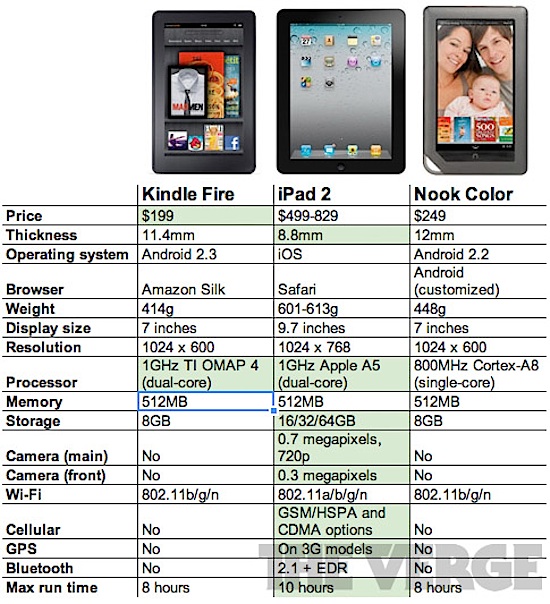
The Kindle Fire is out, but if you’re like me you’ve sat on the sidelines to wait for reviews and videos of performance before pulling the buy trigger. Those are starting to appear now, and while it’s obvious the iPad 2 blows the Kindle Fire away in speed and overall utility, the Fire holds up reasonably well considering it’s just $199.

How does it stack up to the iPad 2? The video below from iDo is a pretty fair comparison for some basic tests of booting, loading web pages, and streaming videos:

We also embedded The Verges video review of the Fire below, it’s not a comparison but it’s a good quick look at the device:
Read more »

iOS 5.0.1 Released [Download Links]

Nov 10, 2011 - 63 Comments

iOS 5 Download via OTA Update

iOS 5.0.1 has been released to the public, the update addresses the battery problems that were associated with iOS 5 and the iPhone 4S, but also brings multitasking gestures to the iPad 1 and resolves several other bugs and issues. The update comes as build 9A405 and is highly recommended for all iPhone, iPad, and iPod touch users running the newest iOS.

Download and Update to iOS 5.0.1

There are several ways to get iOS 5.0.1:

  • OTA Preferred method: download through Over-the-Air update by tapping on “Settings” > “General” > “Software Update” and then tapping on “Download and Install”
  • Download from iTunes: launch iTunes and you will get an update notification

If you’d rather download and install the firmware yourself and you know how to use IPSW files, use the links below.

iOS 5.0.1 Direct Download Links

These are direct download links from Apple’s servers. Right-click and “Save As” to avoid problems:

For those wondering, GSM is generally AT&T and CDMA is generally Verizon.

The brief release notes are as follows:

- Fixes bugs affecting battery life
- Adds Multitasking Gestures for original iPad
- Resolves bugs with Documents in the Cloud
- Improves voice recognition for Australian users using dictation

From our own experience, iOS 5.0.1 makes a significant difference in battery life. How does it stack up for you?

Apple Working Quickly to Release iOS 5.0.1 with Battery Fixes, Beta 2 Out for Devs

Nov 4, 2011 - 4 Comments

iOS 5.0.1 Beta 2

Apple is working quickly to release iOS 5.0.1 to the general public, with the second beta version available to developers in just two days. The update aims to resolve some of the complaints about iOS 5 battery life and bring several other fixes and features to the latest release, including a security fix for iPad 2 and bringing multitasking gestures to iPad 1.

The build comes as 9A404 and is available for iPad, iPad 2, iPod touch 3rd and 4th gen, and iPhone 3GS, 4, and 4S.

If you are not a developer but are encountering issues with inconsistent battery life, try some of these general battery tips or these focused specifically on the iPhone 4S.

Jailbreak for iPhone 4S & iPad 2 Coming Soon

Oct 28, 2011 - 9 Comments

iPhone 4S with iOS 5 jailbroken

An official jailbreak for iPhone 4S and iPad 2 running iOS 5 is coming sooner than later, as evidenced by iPhone Dev Team member MuscleNerd posting several screenshots of the works in progress. In fact, they jailbreak has already been achieved, but there are unspecified “hurdles left” before the jailbreak will see a public release.

There are currently no time estimates, but typically these teaser screenshots and videos start to appear soon before a first beta jailbreak becomes available. The iPhone 4S and iPad 2 have been noticeably absent from the current iOS 5 jailbreak, both devices share much of the same internal hardware including the A5 CPU, and has posed a challenge to jail break. It’s unclear whether this will be a tethered or untethered jailbreak.

MuscleNerd also posted the following video to YouTube, showing the jailbreak off on an iPad 2 running iOS 5:
Read more »

Bypass the iPad 2′s Passcode & Lock Screen with a Magnet or Smart Cover

Oct 20, 2011 - 6 Comments

Bypass the iPad 2 passcode Well here’s a security flaw in iOS 5 that will quickly get patched: anyone with a magnet (or a Smart Cover) can bypass the iPad 2′s locked passcode screen and access whatever app was previously left open. The passcode bypass was discovered by 9to5mac, who recorded a video demonstrating the security breach (embedded below).

From a locked iPad 2:

  • Hold down the power button until the the slider appears across the top
  • Close the iPad 2′s Smart Cover or swing a magnet over the magnetic points around the screen rim, then remove the Smart cover or magnet
  • Click “Cancel” at the bottom of the lock screen

You’re now at the iOS 5 springboard, but the biggest security threat is when users have left an app open with sensitive data, since the lockscreen is bypassed directly to it. This could mean

Protection Against the iPad 2 Lock Screen Bypass:
For the time being, iPad 2 users are encouraged to disable the “Smart Cover unlocking” feature found in Settings > General.

Here’s the video showing the password bypass:

Siri for iPad 2 and iPhone 4 Are Coming Soon… Unofficially

Oct 15, 2011 - 14 Comments

Siri on iPad 2

Siri, the personal voice assistant that comes with iOS 5 on iPhone 4S, is being ported to both the iPad 2 and iPhone 4. This isn’t official from Apple though – at least not yet – it’s the work of several iOS developers.

First off, it doesn’t quite work yet, but considering the port has only been in progress for a day or two that’s not terribly surprising. Nonetheless, Siri’s UI elements have been successfully loaded onto iPad 2 and iPhone 4, indicating that it should run on both devices if the full port can be completed and some of the technical obstacles overcome.

Siri is most likely to first appear for iPad 2 since the iPad 2 and iPhone 4S share much of the same hardware, specifically the A5 CPU and GPU. You’ll almost certainly need a jailbreak in order to use this, which shouldn’t be challenging considering iOS 5 is jailbroken already, for one to transfer the Siri software over, and also to be able to spoof an iPhone 4S in order to access the Siri servers at Apple.
Read more »

iOS 5 Now Available [Download Links]

Oct 12, 2011 - 338 Comments

iOS 5 download available now

iOS 5 has just been released by Apple. The hotly anticipated update brings a variety of major new features to the iOS platform, including Notifications, iMessage, wireless syncing, iCloud support, Twitter integration, Reminders, in addition to over 200 overall feature updates or enhancements.

You can update to iOS 5 through iTunes, plug in your device and launch iTunes and you will get an update notification. Be sure to backup your existing iOS installation before proceeding.

Download iOS 5

Other than updating through iTunes, you can also download iOS 5 IPSW directly from the links below and install the firmware manually.

Build number is 9A334, these links are hosted on Apple’s servers, if you are having trouble downloading IPSW, right-click and choose “Save As”.

Apple TV 2 has also been updated, but is technically on iOS 4.4 with a custom build of 9A334v.

iOS 5 is compatible with iPad, iPad 2, iPhone 3GS, iPhone 4 CDMA & GSM, and iPod touch 3rd and 4th generations. iOS 5 also marks the first time that the CDMA and GSM builds of iOS are the same version. All new Apple hardware including iPhone 4S will ship with iOS 5 pre-installed.

iOS 5 GM Download Available to Developers

Oct 4, 2011 - 32 Comments

iOS 5 GM released

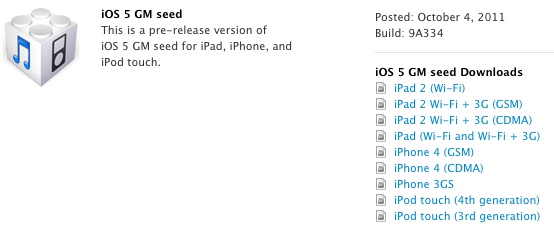
Shadowed in the iPhone 4S news and other Apple announcements today, the iOS 5 GM build 9A334 has been released for developers to download from the iOS Dev Center. Alongside the iOS 5 GM, Apple is requesting for developers to submit their iOS 5 compatible apps to be ready for the public release date of October 12.

As expected, the iOS 5 GM build will run on iPad 2, iPad, iPhone 4, iPhone 3GS, and the 3rd and 4th gen iPod touches. Also pushed to developers today is Mac OS X 10.7.2 GM, which includes iCloud support, which will allow you to sync through iCloud with iOS 5.

You’ll need iTunes 10.5 Beta 7, 8, or 9 to install the GM, and no OTA update is available.

For those who aren’t in the iOS and Mac dev programs, you only have to wait another week or so to get the free official downloads. Unofficially, anyone can install iOS 5 GM since there is no UDID activation, but do so at your own risk.