Subscribe to OSXDaily

Subscribe to RSS Subscribe to Twitter Feed Follow on Facebook Subscribe to eMail Updates

Shared on Facebook

Shop at Amazon

Ad

OSXDaily on Facebook

Search Mac Setups

What Happens When Two Mac Fans Get Married?

May 24, 2012 - 13 Comments

Mac Wedding picture

What do you get when you combine two Apple fans on wedding day? A wedding picture featuring husband and wife using their MacBook Pro’s, of course.

We typically post interesting Mac setups on Saturdays, but Gabor P sent in this cute picture of he and his wife using their Macs on that special day, and we had to put it up.

For those wondering, the Macs are:

  • Wife: MacBook Pro 13″ Mid 2010 , 2.66GHz Core 2 Duo , 4GB RAM , 320GB HDD
  • Husband: MacBook Pro 13″ Early 2011 , 2.3GHz i5 , 8GB RAM, 256GB SSD, 750GB HDD

Congratulations to you both!

Mac Setups: Mac Music Studio & Development Workstation

May 19, 2012 - 15 Comments

Mac Music Studio & Development Workstation

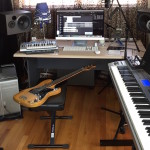
This weeks Mac setup is brimming with hardware for both work and play. Coming to us from Terkel G, this awesome workstation features a couple of decked out Macs, iOS gear, and lots of other hardware for programming and making music. Hardware shown includes:

  • iMac 27″ top line 2011 model
  • Apple Cinema Display
  • MacBook Pro 17″ fully upgraded
  • iPad 3
  • iPhone 4S
  • Dell XPS 22″ Monitor
  • Akai MPK MIDI Keyboard
  • Akai MPC5000 Drum Machine
  • Senheizer Mic
  • TC Electronick Sound Card

I don’t know a thing about music but this setup looks pretty great. The floating speakers above the desk is a nice touch too.

For anyone else who was wondering about the vi/vim cheat sheet wallpaper, we’ll post a link if we get our hands on it.

Want your Mac setup featured on OSXDaily? Send in a good picture or two with a list of hardware and a brief description of what you use your Apple gear for to osxdailycom@gmail.com

Mac Setups: iMac, MacBook Air, and Beyond

May 12, 2012 - 4 Comments

Mac Setup with an iMac, Galaxy Tab, iPad, and more

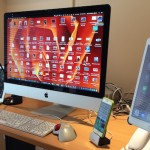
Most Apple fans own several iProducts since it’s so easy to go from a Mac to an iPad to an iPhone, but Fabiano F. has a setup that goes beyond Apple gear and branches into other mobile platforms, including Palm, Android, and even a Kindle. Hardware shown from left to right is:

  • iPhone 4S
  • Palm Treo 650
  • iMac 21″ with an Apple wireless keyboard and Magic Mouse
  • Galaxy Tab 2
  • iPad 2
  • Kindle
  • MacBook Air 11″

This is a great Mac setup on a clean glass desk which matches Apple gear so well. It may be an unpopular opinion, but the home screen of the Android tablet is kind of nice with the weather widgets and other customizations, test Android 4 yourself within the constraints of a virtual machine and you’ll see some of the obvious pros and cons to a widgetized home screen. Maybe widgets will come to iOS some day, beyond Notification Center?

Check out past Mac setups, and send in your own setup shots to osxdailycom@gmail.com, include a list of hardware and a brief description of what you use it for.

Mac Setups: Three Displays & MacBook Air

May 5, 2012 - 11 Comments

Dual Apple Cinema Displays

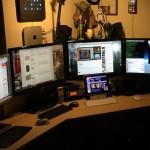
This awesome Mac setup shot was sent in all on its lonesome with very little information, but as you can see it’s a great looking setup so it’s worth a post anyway. Here’s what I can identify in the picture:

  • MacBook Air 13″ running the iTunes Screensaver
  • White iPad
  • White iPhone 4
  • Apple Cinema 27″ display
  • Third party (Dell?) 27″ display
  • Auxiliary 17″ display
  • AudioEngine speakers?
  • Magic Mouse and Apple wireless keyboard

It doesn’t look like the MacBook Air is driving all three displays, so presumably there is a Mac Pro or Mac Mini somewhere under the desk, and the screen on the far left looks more like a Linux desktop than Mac OS X so there’s probably a PC somewhere in the mix too. A bit of a mystery, but it’s pleasant to look at so thanks to Michael H for sending this in!

Got some great pictures of your Mac setup? Send them in to osxdailycom@gmail.com, include a brief mention of what you use it for and the hardware shown.

Mac Setups: iMac + MacBook Air + iPhone + iPad

Apr 28, 2012 - 16 Comments

iMac, MacBook Air, iPad

It seems like all Mac users these days have an iPhone or iPad to compliment their setups, and this weeks Mac setup shot from Andreas H has the best of all worlds. Hardware shown is:

  • iMac 27″ (Mid 2010) – wallpaper is here
  • MacBook Air 13″ (Mid 2011)
  • iPhone 4S, black, 32 GB
  • iPad (3rd Gen) 32 GB Wifi+4G
  • Apple Bluetooth Keyboard
  • Apple Magic Trackpad

Outside of the picture is an Apple Magic Mouse, an old PowerBook G4 12″ from 2003, an Apple TV2, two AirPort Extremes, two AirPort Express, and assorted other peripherals.

Want your Mac setup featured? Send pictures of Apple & Mac setups to osxdailycom@gmail.com and include some brief hardware details and what you use it for.

Mac Setups: iMac 21″ & MacBook Pro 13″ with Lots of iGear

Apr 21, 2012 - 3 Comments

It’s rare to find a Mac user that doesn’t have other Apple gear, and this Mac setup from Steve B is no exception. The setup includes a little bit of everything:

  • 21″ iMac (late 2011)
  • 13″ MacBook Pro (late 2011)
  • iPad (3rd gen)
  • iPhone 4
  • iPod touch (1st gen)
  • iPod Touch (latest gen)
  • iPod Shuffle (1st gen)
  • iPod Shuffle (latest gen)
  • Magic Mouse
  • Wireless Keyboard
  • Apple TV (2nd gen)
  • AirPort Extreme

Like Mac pron? Who doesn’t! Check out more Mac setups, and don’t forget to submit your own Apple gear shots to osxdailycom@gmail.com, please take a decent picture, include a list of hardware shown, and include a brief mention of what you use the gear for.

Mac Setups: Husband & Wife Workstation

Apr 14, 2012 - 13 Comments

Husband and wife Mac desk setup

This weeks Mac setup is loaded with great Apple gear and comes to us from husband and wife Cesare and Monica. Hardware from left to right is:

  • iPad 1
  • iPhone 4 64GB
  • iMac 20″ (early 2008) 4GB RAM 200GB HD
  • iPad 3rd gen 64GB
  • iPhone 4S 64GB
  • MacBook Pro 17″ (mid 2007) 8GB RAM 500GB HD
  • 1988 Apple HQ Mug
  • MacBook Pro 15″ 8GB RAM 256GB SSD with external display

The printer is a Hewlett-Packard OfficeJet 6500 WiFi model (related, you can force other printers to be AirPrint compatible), and not pictured is a MacBook Air 11″ used for travel.

Want your Mac setup featured? Send pictures of Apple & Mac setups to osxdailycom@gmail.com and include some brief hardware details and what you use it for.

Mac Setups: MacBook Pro with Triple Apple Cinema Displays

Apr 7, 2012 - 8 Comments

Three Apple Displays

How’d you like to drive three external displays from a single MacBook Pro? That’s exactly what this weeks Mac setup is doing with the help of an external video card. Coming to us from journalist and blogger Pierra D, here is the hardware pictured:

  • MacBook Pro 17″ (2009) – 8GB RAM and dual 256 GB SSD
  • Apple Cinema Display 27″ (center)
  • Apple Cinema Display 22″ (left)
  • Apple Cinema Display 20″ (right)
  • Additional external displays driven by ViDock External GPU with a GeForce GT 120
  • iPhone 4
  • iPod shuffle
  • Magic Mouse
  • Bluetooth Keyboard
  • Wacom Intuos 4M

Anyone can install dual hard drives on a MacBook Pro by removing the built-in Super Drive and using a replacement bay to hold a hard disk or SSD instead. These are offered through a variety of companies and are a good solution for individuals who don’t use the DVD drive on a portable Mac, some replacement bays even include a caddy for the SuperDrive to turn it into an external device instead.

I hope external video cards become more common and more powerful, other than allowing for fully powered external displays like shown here, they offer some serious promise for dramatically enhanced gaming even from Macs with weaker video cards like the MacBook Air.

Want your Mac setup featured? Send pictures of Apple & Mac setups to osxdailycom@gmail.com and include some brief hardware details and what you use it for. We get tons of submissions so we can’t post them all.

Mac Setups: Clean & Simple Minimalist Desk

Mar 31, 2012 - 22 Comments

Minimalist Apple desk setup

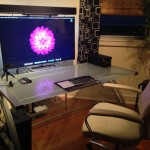
Developer John R. sent in this beautifully simple Mac setup, featuring a very clean desk area with some great Apple gear. The hardware is used primarily for iOS development and web development and design, and consists of the following:

• MacBook Air 11″ 1.6Ghz i5 4GB RAM 64GB SSD  (2011)
• Thunderbolt Display 27″ (2011)
• iPad 3rd gen (2012) 64GB Wi-Fi & 4G LTE with a red Smart Cover
• Apple Wireless Keyboard
• Apple Magic Trackpad
• Apple Magic Mouse
• Desk (White Glass, IKEA)

Not shown in the picture, but elsewhere in the setup includes:

• iPhone 4S 16GB White, used to make the picture (2011)
• Airport Extreme Base Station (2011)
• Airport Express (2011)
• Apple TV 3rd gen (2012)
• Apple Remote
• Canon Network Laserprinter
• Western Digital 1TB External HD

I love these simple and clean setups and often wish my desk looked even half as elegant.

Want your Mac setup featured? Send in pictures of Apple & Mac setups to osxdailycom@gmail.com and include some brief hardware details and what you use it for. We get tons of submissions so we can’t post them all, yet at least.

Mac Setups: MacBook Air 11″ & Mac Mini Web Development Workstation

Mar 24, 2012 - 5 Comments

Web Developers Desk

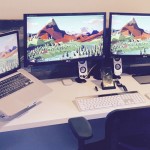
This weeks great Mac setup comes to us from Eddie B who uses his Apple gear for web design and development. The MacBook Air serves as the primary work machine and the Mac Mini, resting below it, functions as a web server. Here’s the full hardware list:

  • MacBook Air 11″ (2011)
  • MacMini (Late 2009) used as a web development server (Git repo, test server, etc)
  • Dual Apple Cinema 20″ Displays (second screen powered by an EVGA UV Plus 19)
  • Apple Wired Aluminum Keyboard
  • Magic Mouse
  • iPad 2
  • iPhone 4
  • Griffin Elevator Laptop Stand

I’m a big fan of the Apple Cinema Displays, both old and new models have classic designs, even the later model 20″ displays shown don’t look aged whatsoever. It’s also pretty amazing that an ultra-portable Mac like the 11″ Air is powerful enough to function as a primary workstation, they really do provide the best of both worlds to users looking for portability and power.

For those in the market for a laptop stand, the Griffin Elevator laptop stand shown in the shot is hard to beat. I have the same stand for a MacBook Pro and it’s highly recommended for those who use an external monitor with a Mac laptop, it raises a laptop to eye level while providing for huge amounts of airflow underneath.

Want your Mac setup featured? Send in pictures of Apple & Mac setups to osxdailycom@gmail.com and include some brief hardware details and what you use it for.