Recent Comments

Shared on Facebook

Support Us

Mac Picks

iPhone & iPad Picks

Mac from PC Picks

Search System Update

Mac OS X Security Update released for download

mac os x security update Fire up Software Update, Apple has released a security update for Mac OS X. Several potential exploits are patched in the update, one of them looks similar to the PDF exploit that was used for the web based easy iPhone jailbreak that was patched with iOS 4.0.2. Who knew that Mac OS X and iOS shared some of the same vulnerabilities? Other security issues fixed involve PHP, Samba, libsecurity, CoreGraphics, ClamAV, CFNetwork, and ATS.

As usual, the security update requires a system reboot.

Download Snow Leopard Graphics Update

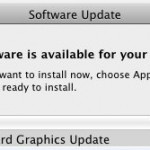
snow leopard graphics update

Apple has released a Graphics Update for Snow Leopard, and this is particularly good news to Mac gamers. Remember those pesky Starcraft 2 crashes I wrote about two weeks ago? This update specifically addresses some of the problems with Starcraft 2 for Mac as well as other issues with Team Fortress 2, Portal, and Aperture 3.

If you are a Mac gamer it is highly recommended to install this update. You can download the graphics update through the Software Update control panel, accessed through the Apple menu.

Here are the release notes from Apple:

The Snow Leopard Graphics Update contains stability and performance fixes for graphics applications and games:

Addresses frame rate issues occurring in Portal and Team Fortress 2 by Valve, on iMac (Late 2009 and Mid 2010), Mac mini (Early 2009 and Mid 2010), Mac Pro (Early 2009), MacBook (Early 2009 and Mid 2010) and MacBook Pro (15-inch, Mid 2010) or MacBook Pro (17-inch, Mid 2010) models.

Resolves an issue that could cause Aperture 3, or StarCraft II by Blizzard, to unexpectedly quit or become unresponsive.

Resolves an image corruption issue that may occur when disconnecting and reconnecting external displays while the system is running.

The hardware and software affected by this performance update are the following: MacBook (13-inch, Early 2009), MacBook Pro (17-inch, Mid 2010), MacBook Pro (13-inch, Mid 2010), MacBook Pro (15-inch, Mid 2010), iMac (21.5-inch, Late 2009), Mac Pro (Early 2009), Mac mini (Early 2009), Mac OS X 10.6.4, Mac mini (Mid 2010), iMac (21.5-inch, Mid 2010), iMac (27-inch, Mid 2010), MacBook (13-inch, Mid 2010), Portal, StarCraft II, Team Fortress 2

Mac OS X 10.6.4 available for download

Fire up those Software Updates because Mac OS X 10.6.4 is ready for download. Addressing numerous bug and security fixes, it is a recommended download for all Mac users.

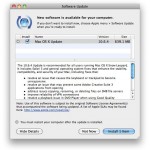
mac os x 1064

It looks like if you haven’t upgraded to Safari 5 yet, this software update handles that for you. The update comes in at a whopping 639.1 MB on my MacBook Pro 2010 model which makes for a pretty hefty download, but on another Mac right next to me the download is about 300MB, so the download size clearly varies from machine to machine and fixes that are relevant to the hardware.

Here’s what Apple says about the update:

The 10.6.4 Update is recommended for all users running Mac OS X Snow Leopard. It includes Safari 5 and general operating system fixes that enhance the stability, compatibility, and security of your Mac, including fixes that:

  • resolve an issue that causes the keyboard or trackpad to become unresponsive
  • resolve an issue that may prevent some Adobe Creative Suite 3 applications from opening
  • address issues copying, renaming, or deleting files on SMB file servers
  • improve reliability of VPN connections
  • resolve a playback issue in DVD Player when using Good Quality deinterlacing
  • resolve an issue editing photos with iPhoto or Aperture in full screen view
  • improve compatibility with some braille displays

You can read more at Apple.com

Mac OS X 10.6.2 Update Released. Intel Atom Support Officially Missing, breaks Hackintosh Netbooks

Screen shot 2009-11-09 at 4.33.01 PM Mac OS X 10.6.2 has been released, for most Mac users this is great news because it fixes over 40 problems and bugs, including the rare but very problematic user account deletion bug. If you have an official Apple Mac then go right ahead and update to Mac OS X 10.6.2, but if you have a Hackintosh Mac Netbook… well you will want to hold off. It has been confirmed that the final release of 10.6.2 kills Intel Atom support officially. Hackintosh Guru StellaRolla reports:

The netbook forums are now blowing up with problems of 10.6.2 instant rebooting their Atom based netbooks.

A quick glance at the Hackintosh forums on MyDellMini.com confirms this:

So, I can tell you 10.6.2 DOES NOT WORK with the Mini10v.

OSX tries to start, but it hangs before you can see the apple and system ist trying to boot again … you are in a loop…

StellaRola goes on to note that the OSx86 community is pretty crafty and a modded kernel will likely surface in the near future. In any event, if you have a Hackintosh, hold off on the official 10.6.2 until more information is available.

You can read more about the Mac OS X 10.6.2 Update from Apple.com

[ Sources: Gizmodo: 10.6.2 bug fixes and StellaRola: Official: Atom Not Supported in 10.6.2 and MyDellMini.com Forums ]

Enable iPhone MMS

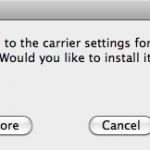
iphone mms AT&T iPhone users of 2009 can now officially join the cellular world of 2002, with the ability to finally send and receive MMS messages. You have to upgrade to iPhone 3.1 and download a new carrier file to enable MMS on your AT&T iPhone. After reading so many negative reviews about the iPhone 3.1 update, I am holding out on this ancient technological ‘upgrade’ from AT&T until Apple sorts out the 3.1 bugs, I waited 7 years I think I can wait a few more weeks/months. If you already have 3.1 installed, or you don’t mind installing 3.1 with the risks, then plug in your iPhone and open iTunes to get MMS capabilities. You can read more from Apple here:

Apple.com: Enabling MMS on iPhone 3.1 for AT&T customers

Rough Start to 10.5 Upgrade

Welcome to Mac OS X 10.5 Leopard! This was my first experience since installing the 10.5 upgrade, let’s hope that was a fluke. I’m super excited for Leopard! – Paul H.

Mac OS X 10.4.10 released

Mac OS X 10.4.10 update has been released today, covering a series of security and bug fixes, adding a few additional features, and including some other improvements. Nothing too amazing is in the update in terms of features (especially when compared to what we’ll see in Leopard), but it is still worth downloading, so be sure to get it.

Apple: About the Mac OS X 10.4.10 Update

Mac OS X 10.5 Leopard delayed until October

Apple has delayed the release of Mac OS X 10.5 Leopard several months from it’s originally scheduled date of June 2007 to October 2007. The statement released by Apple says that the iPhone has distracted the operating system development team, and that the original deadline is no longer obtainable. Rumors are already circulating in the Mac web with some suggesting that Apple has delayed the release to include new features that have yet to be announced. We’re disappointed by the delay, but excited for whatever Apple is working on. Read the press release from Apple below:

Read more »

Mac OS X 10.4.9 Update Released

Looks like we’ve gotten one step closer to Leopard with the release of Mac OS X 10.4.9 today. Plenty of updates, fixes, some new features, and performance tweaks are included. While it’s unlikely there will be any problems with the update, some prudent users often wait a day after a release to insure a trouble free update, figuring that if there should be any trouble it will exposed by the second day. Whether you install it today, tomorrow, or next week, it’ll be waiting for you in Software Update. Read on for more info directly from Apple:

Read more »

Reminder: Early Daylight Savings this Sunday for USA

To all the US Mac users out there, this is just a reminder that Daylight Savings time is coming early this year, so be sure to install the update from Apple to have your clocks working properly. While some news networks are predicting a mini-Y2K and all sorts of chaos, the worst that could really happen on your personal Mac is the time will be inaccurate. The Daylight Savings update has been available for a while now via Software Update, so if you haven’t installed it yet, now is the time. For earlier versions of OS X and for more information in general, check out this Ars Technica article:

A comprehensive Daylight Savings guide for your Mac