
Subscribe to OSXDaily

Subscribe to RSS Subscribe to Twitter Feed Follow on Facebook Subscribe to eMail Updates

Shared on Facebook

Shop at Amazon

Ad

OSXDaily on Facebook

Search iOS 5 beta

iCloud Restore in iOS 5 Video

Jun 26, 2011 - 4 Comments

iDB, the same guys who brought us the iOS 5 wireless syncing video, are now showing off another hot feature in iOS 5: restoring iOS backups directly from iCloud.

The video shows how smooth the process is. From a blank iOS device, you just login to iCloud, select the backup to restore, and then all your apps and settings are quickly downloaded to the iPod touch (or iPhone or iPad) all from the free iCloud service. Is this feature awesome or what?

Currently iOS 5 remains in beta which limits these features to registered developers, but iOS 5 will be released this fall to mere mortals. We can’t wait.

Jailbreak iOS 5 Beta 2 using Redsn0w

Jun 24, 2011 - 8 Comments

jailbreak iOS 5 beta 2 with redsn0w Just moments after the freshly released iOS 5 beta 2 was available, it has been jailbroken using Redsn0w 0.9.8b1. This is the same version of redsn0w that worked to jailbreak the first beta of iOS 5 and therefore doesn’t require any additional downloads, but it does include the same caveats as before.

In order to work, make sure you point redsn0w at the iOS 5 beta 1 IPSW file when asked, and then you can go about the jailbreak as usual. Redsn0w 0.9.8b1 continues to be a tethered jailbreak, but will work for iPod touch 3G, iPod touch 4G, iPad 1, iPhone 3GS, iPhone 4 GSM, iPhone 4 CDMA.

This has been confirmed by MuscleNerd of Dev Team fame, who reminds everyone that this redsn0w release is intended for jailbreak developer use only.

iOS 5 Beta 2 Released to Download

Jun 24, 2011 - 15 Comments

iOS 5 Beta 2

iOS 5 beta 2 has been released to download, the new build is 9A5248d, supports wireless syncing, and likely includes a hoard of bug fixes and improvements. The second iOS 5 beta supports the same hardware as before, running on iPad 2 WiFi GSM & CDMA, iPad, iPhone 4 CDMA & GSM, iPhone 3GS, and iPod touch 3G & 4G. Backup your hardware and get downloading.

You can download directly from iOS Dev Center

As usual, this release is intended for developers and you’ll need a dev login to access the IPSW files. If you’re just experimenting, remember you can always downgrade from iOS 5 beta back to iOS 4.3.3 if you decide you don’t like it.

For non-developers, iOS 5 will be released in the fall.

iOS 5 Beta 1 Expires on August 4th

Jun 18, 2011 - 10 Comments

iOS 5 If you run iOS 5 beta 1 on your iPhone, iPad, or iPod touch, you might be interested to know the beta includes an automatic expiration date of August 4th.

For those with proper access to the newest beta releases from iOS Dev Center, this won’t be an issue as long as you upgrade to the newest betas as they become available from Apple. This leaves those who had a friend activate their UDID or who used the VoiceOver tweak to run iOS 5 on an iPhone without a dev account – this could very well effect you. If you are running the beta without a dev account, I suggest downgrading from iOS 5 beta before this becomes a potential problem, you don’t want to be stuck with a useless iPhone on August 5th.
Read more »

Downgrade iOS 5 beta to iOS 4.3.3

Jun 13, 2011 - 83 Comments

Downgrade iOS 5 beta to iOS 4.3.3 Alright so you’ve had your fun playing around with the iOS 5 beta, but you’re tired of dealing with the quirkiness and bugs related to a beta OS. Now, contrary to popular belief, you can downgrade back to iOS 4.3.3 without much effort. Unlike downgrading from other iOS versions, Apple still signs iOS 4.3.3, so you don’t need to do anything funky. For the purpose of this walkthrough, we’ll assume you’re using an iPhone.

First a few quick notes and warnings. You probably noticed when installing iOS 5 beta the warning from Apple:
“Devices updated to iOS 5 beta can not be restored to earlier versions of iOS. Devices will be able to upgrade to future beta releases and the final iOS 5 software.”

Apple warning iOS 5

In other words, Apple says iOS 5 beta is a one way street. Apple probably issues that warning for good reason, and it’s probably wise to take their advice and not attempt downgrading for whatever unspecified reason they give. While this should have no effect on your iPhone UDID assuming you activated it with a dev license, nobody knows for sure until the next beta comes out. Be sure you have a backup of your iOS device, and as alway, we are not responsible for you screwing up your hardware so proceed at your own risk.

So you’re comfortable ignoring Apple’s advice and all those warnings and want back to 4.3.3… here’s what to do:

How to Downgrade iOS 5 Beta to iOS 4.3.3

There are actually a few methods to downgrade back down to 4.3.3 from iOS 5, but we’ll cover the easiest way. For the purpose of this walkthrough we’ll reference iOS 5 beta 1 and iTunes 10.5 beta so be sure you have that handy before getting started.

  1. Put your iPhone into DFU Mode: turn the iPhone off, hold down the Power and Home buttons concurrently for 10 seconds then release the power button, continue holding Home button until iTunes tells you an iPhone in recovery mode has been detected – when you get that message and the iPhone screen is black, you know you’re in DFU mode
  2. Remove any host file modifications that you may have made in the past (like when fixing iTunes error 3194, etc) – if you haven’t made any changes to your hosts file related to Apple’s servers, don’t worry about this
  3. Within iTunes, click on “Restore” from the summary tab – now you have two options, you can either attempt to restore from backup which has limited success, or just restore directly to iOS 4.3.3 IPSW

Let iTunes do its magic and you should be back to 4.3.3 without issue. You can also do this through Xcode, but this method is by far the easiest. Yes, it does work with iPhones who used the Voice Over bug to skip iOS 5 UDID activation.

Alternatively, use TinyUmbrella
If the above method doesn’t work, you can always try downgrading with the help of TinyUmbrella, but you’ll still need iTunes 10.5 beta. You can grab TinyUmbrella (direct download links: Mac or Windows). The TinyUmbrella method is basically the same as above, but you can force TinyUmbrella to handle the hosts change for you by doing the following option within the app:

  • Launch TinyUmbrella and go to the “Advanced” tab
  • Uncheck “Set Hosts to Cydia on Exit” – this allows you to use Apple’s servers and is the same as manually removing any Cydia hosts from your hosts file

After that’s done, you can restore the iPhone as usual through iTunes 10.5 beta.

Redsn0w 0.9.8b1 Download Released to Jailbreak iOS 5 beta 1

Jun 10, 2011 - 11 Comments

Redsn0w 0.9.8b1 Jailbreak for iOS 5 beta 1 Redsn0w 0.9.8b1 was just released to jailbreak iOS 5 beta 1 on the following hardware: iPod touch 3G, iPod touch 4G, iPad 1, iPhone 3GS, iPhone 4 GSM, iPhone 4 CDMA. This jailbreak is tethered, meaning you will need to connect it to your computer on each reboot.

Important notes about this version of Redsn0w:

  • Redsn0w 0.9.8b1 does not “hacktivate” iOS 5 beta 1, thus you are still required to have a registered UDID from Apple to use iOS 5 b1
  • Unlockers and anyone with preserved unlockable baseband need to stay away from this and iOS 5 beta, you will lose your unlockable baseband if you update
  • This version of redsn0w is intended for jailbreak developers only, the Dev Team reminds us that there are many broken components in the jailbroken iOS 5 beta so this is purely an experimental release intended for devs of Cydia apps to test compatibility on the new iOS – this is not for wide consumption

If you are comfortable with all of these limitations, proceed.

Download Redsn0w 0.9.8b1

This version of redsn0w is available for Mac and Windows users:

The iPhone Dev Team suggests this version of redsn0w will continue to work to jailbreak upcoming iOS 5 betas assuming you save your b1 IPSW and point it at that file when jailbreaking, so they recommend preserving your 5b1 IPSW files for future use.

If you’re brave and don’t mind losing some essential features of your phone, you can install iOS 5 beta on an iPhone without a dev account or UDID activation by utilizing a bug in Voice Over, but this is not a recommended method, and there is no word on compatibility with this version of redsn0w.

iOS 5 Includes Emoji Keyboard for Everyone

Jun 9, 2011 - 4 Comments

iOS 5 Beta includes an Emoji Keyboard

iOS 5 release includes a built-in Emoji keyboard that is accessible to anyone and is not region restricted. This is a change from past iOS releases where you would either need to jailbreak or install a 3rd party application in order to use Emoji from the iPhone, iPod touch, or iOS in general.

Emoji is a Japanese reference to emoticons, which are little picture characters that have become extremely popular as an enhancement to SMS and online communication. Outside of using emoji to convey messages, you can also use the emoji icons to create customized iOS folder names, like the camera icon alongside the folder name in this screenshot:

Emoji iOS folders

Heads up to @manda907 for discovering this.

Install & Run iOS 5 on an iPhone Without a Developer Account

Jun 7, 2011 - 28 Comments

iOS 5 bug to run iOS 5 without developer account

If you want to try out iOS 5 but you don’t have a developer account, you can do so using a crafty technique that takes advantage of a very simple bug in the Voice Over system. This has been confirmed to work on the iPhone 4 and iPhone 3GS, but other iOS devices probably don’t work.

Warning: This is reposted for informational purposes only. We are not responsible for anything you do to your iOS device. There’s a reason iOS 5 beta is limited to developers, it’s buggy, it’s hard to downgrade, and it could lead to other problems. Because this is obviously a bug, future iOS 5 betas will fix this, and your iPhone could be trapped on an outdated beta. You may lose the ability to make phone calls.

None of this is recommended. Proceed at your own risk.

Read more »

iOS 5 Jailbroken Already

Jun 7, 2011 - 5 Comments
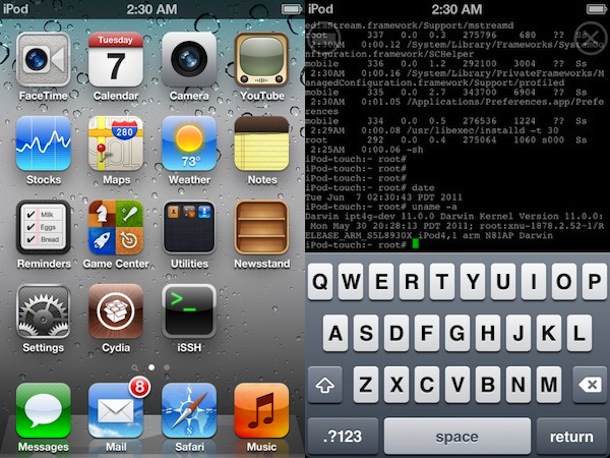
iOS 5 beta jailbroken

Update: Redsn0w 0.9.8b1 is out to jailbreak iOS 5 beta 1, it has a tethered boot and is not intended for use beyond developers.

The good old limera1n exploit works to jailbreak the first beta of iOS 5, according to renowned jailbreak dev @MuscleNerd, suggesting a public jailbreak will be available for iOS 5b1 soon.

The pictures above were tweeted by MuscleNerd and clearly show iOS 5 beta 1 with Cydia installed alongside another shot showing ssh connecting to localhost. A later picture, shown below, shows Cydia running on the jailbroken device. This jailbreak was said to require a tethered boot on an iPod touch 4th gen.

Read more »




