Burning an ISO in Mac OS X is very easy thanks to the built-in Disk Utility application that is included from Apple on every Mac. With Disk Utility being bundled with Macs directly from Apple, it also has the huge added bonus of being free, and although there are plenty of paid options out there, why buy something new or install new apps if you don’t need to? With that in mind, here’s how to use Disk Utility to Burn an ISO image onto a disc using just your Mac, and completely for free.
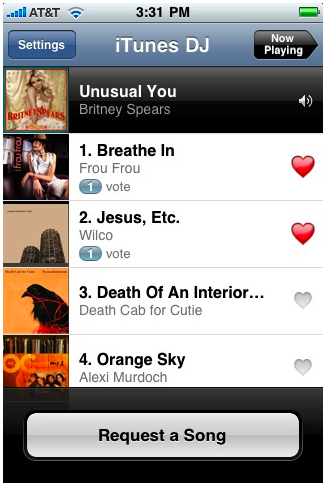
The new version of the Remote app for iPhone [iTunes link] has a great social feature that allows party guests with the app installed to connect to iTunes shares, see what’s currently playing, add songs to playlists, vote on songs to be played, and make requests.
As the linked posterous blog states: “This is the future of the juke box. The democratization of music wherever you are.”
How cool is this for iPhone party goers? It’s only a matter of time before this makes its way into bars, lounges, and nightclubs.
iTunesHelper or iTunes Helper, is a program from Apple that runs in the background and monitors for the connection of any iPod or iPhone to the computer, if an iPod or iPhone is detected it will automatically launch the iTunes application. The functionality is the same on both Mac OS X and Windows PC’s, and there is no serious ramification to disabling it (other than that iTunes will no longer auto-launch upon connecting your iPhone or iPod).
Disable iTunes Helper in Mac OS X
iTunesHelper.app is autoloaded during system boot in Mac OS X, but if you’re having problems with the iTunesHelper app you can easily disable this from auto-loading by going to System Preferences -> Users -> Login Items, clicking on the iTunesHelper application and then clicking on the minus (-) button at the bottom of the list (thanks Gord!). Unselecting the checkbox next to iTunesHelper application hides it during system launch, as seen in this screenshot:
Disable iTunes Helper in Windows
Go to Start Menu -> Run, type in ‘msconfig.exe’ and hit enter. A system configuration utility will pop up and click the “Startup” tab, from there navigate to iTunesHelper.exe and disable it by unselecting the checkbox next to the app name.
Why you would want to disable iTunes Helper
Sometimes iTunesHelper freaks out and causes system hangs, CPU drain, and other frustrating problems. Otherwise, you may just not want iTunes to automatically launch if you connect an iPod or iPhone, you can disable that setting within the iTunes settings, or you can disable iTunesHelper itself. My cousin was recently having all sorts of problems with the actual iTunesHelper daemon running in the background, so I helped him disable it completely, and his problems were resolved.
By default, Mac OS X Snow Leopard boots using a 32 bit kernel. But did you know you can switch between the 64-bit kernel and 32-bit kernel upon boot?
This should be useful to advanced users who may need to perform such a feet, though the average Mac use likely has no business forcing one kernel to load over another.
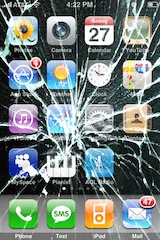
Do you need iPhone Insurance? For such an expensive phone, I think the answer is yes. iPhone Insurance is not really something I thought of, and I’m guessing something that most users don’t think of until it’s too late and you actually need it. After several of my friends accidentally broke, lost, or otherwise rendered their iPhone’s unusable, I got a bit more curious about iPhone specific insurance options. This list is by no means complete but it’s just what I discovered in my research for insuring the device.
iPhone Insurance Options
AT&T Wireless Insurance – this is tacked onto your regular monthly iPhone service bill at the rate of $13.99/month. Your iPhone will be insured directly through AT&T. There’s a $99-$199 deductible though, so keep that in mind, it may be just as expensive to renew your contract with AT&T for that price. Note: You need to call AT&T to verify this!
State Farm – the cost for State Farm to cover your iPhone (and Mac, might as well cover them both right?) is pretty cheap but vary from region to region. According to CNET, the yearly cost of their plan that covered their Mac and iPhone was $35. That figure should serve as a baseline, and not a rule. The deductible for the plan varies based on what your premium is. Note: commenters point out that some State Farm agencies will not cover the iPhone, this seems to be on a state by state basis, you’ll have to call your agent to know for sure.
Other iPhone Insurance Providers – there’s a slew of insurance providers out there but whether or not they will cover your iPhone is another story. Your best bet is to call your local insurance company and ask them questions specifically about iPhone coverage. I contacted my Home Owners provider and they said my iPhone and Mac are already covered by my existing policy, but, there’s a $500 deductible per incident! The high deductible obviously makes relying on this insurance pointless for just the iPhone, but they did offer to have a lower overall deductible for a considerable amount more per year – not even close to worth it in my case, I’d have to lose 3 iPhones a year just to break even.
Readers Suggestions – I have no experience with SquareTrade but apparently they offer iPhone Insurance too, please do your own due diligence to determine if the iPhone plans they offer are right for you. Additionally, Best Buy offers iPhone Insurance through their Geek Squad service (thanks reader Mike!) but apparently they are expensive.
The bottom line is if you’re trying to insure your iPhone the best bet is to just call around and see who has the best rate, just be sure to check on deductibles and limitations. You don’t want to buy an insurance plan for your iPhone only to find out it’s not covering accidental damage or has a large deductible. Hopefully none of us will actually need (or wished we had) insurance for our iPhones, but should the case arise, it’s good to be prepared right?
Last week we wrote that some people thought of Snow Leopard as a disappointing upgrade because there wasn’t a new GUI included in it, specifically the ‘marble’ interface that has been speculated to exist for a while now. Those of us that have installed iTunes 9 may have noticed that the new iTunes application features a refined, shinier, and more modern looking GUI coating. Is this a sign of things to come for Mac OS X? I think it looks pretty sharp, so I certainly hope so. Until Apple releases a GUI update, I’m sure it’s only a matter of time before a third party creates an app to spread the new iTunes 9 interface across the Mac OS X Finder, much like the Uno app did prior to 10.5. What do you think?
In case you somehow missed the news today, Apple has released iTunes 9 available immediately for download, and iPhone OS 3.1 for the iPhone and iPod Touch, also available now. Both updates seem worthwhile and right in line with what the Apple Rumor Mill has been suspecting, although they don’t add anything jaw-dropping in terms of new functionality or features, there’s a bunch of bug fixes and small feature additions and improvements. iTunes 9 wasn’t showing up under Software Update for me so I just downloaded it manually from Apple via the iTunes download website.
iPhone OS 3.1 updates
– iTunes U content organization
– Redeem iTunes Gift Cards, codes, and certificates in the App Store
– Display available iTunes account credits in the App Store and iTunes Store
– Save video from Mail and MMS into Camera Roll
– Option to “Save as new clip” when trimming a video on iPhone 3GS
– Use Voice Control on iPhone 3GS with Bluetooth headsets
– Paste phone numbers into the keypad
– Warn when visiting fraudulent websites in Safari (anti-phishing)
iTunes 9 updates
– iPhone / iPod Touch App organization and synching of home screen
– New Media Syncing options
– Better Genius Mixes
– Twitter and Facebook connectivity & sharing
So you want a small lightweight portable Mac OS X machine, the closest thing Apple has in this area is the MacBook Air which is $1600 or more. No doubt about it, the MacBook Air is a great machine but I don’t want to spend anywhere near $1600 for another laptop when I already have a MacBook Pro. I’m thinking a small budget, like really small by Mac standards, how about $250 or less? Impossible you say? Wrong! It’s possible and I did it! Here’s how you can too. Be warned, this is not sanctioned by Apple, and it’s breaking the Mac OS X EULA agreement.
What You Will Need
* $200-$250, expenses vary based on your particular model, coupon code, and luck at the Dell Outlet
* 8gb USB key or external USB hard drive you don’t mind formatting
* Mac OS X 10.5 install DVD or image
* some patience
Finding a Cheap Dell Mini 10v for Hackintosh Purposes
So now you need to find the cheap Dell Mini 10v, the refurbs from Dell Outlet serve this purpose wonderfully. Combined with a discount code from the DellOutlet Twitter, and you have yourself a very affordable Hackintosh. My final price was $204 shipped!
Twitter: DellOutlet – follow DellOutlet on Twitter to get product discount codes, I got one for 15% off from here. They pop up once a week or so and have a limited duration.
Dell.com/Outlet – Mini 10v – check stock and sort by price, it’s a live search so you can constantly refresh it and see different stock from other people dumping their carts. I have seen a Mini 10v for as low as $219 BEFORE using the 15% coupon!
Hackintosh: Installing Mac OS X on the Dell Mini 10v
Gizmodo Guide to install Snow Leopard on the Dell Mini 10v – this is based on the information from MyDellMini forums but it’s made a bit easier to follow and has some nice pictures of progress. If you want to install Snow Leopard on your Mini 10v, this is a great guide to follow.
MyDellMini – Install 2GB RAM Upgrade on Dell 10v – I followed the videos here to upgrade the memory. Ok I admit, the RAM upgrade was a total pain, but OS X smokes with 2gb of ram on the Mini 10v so if you’re technically competent and have the patience, it’s the best $19 you’ll have spent in a while. For what it’s worth, OS X runs just fine with only 1GB of RAM but you will see a noticeable speed bump with the 2GB upgrade.
MyDellMini Forums – this is a wildly helpful bunch of people that are quick to help and extremely knowledgeable on the topic, if you have any questions or run into problems at all, this is probably the best place to go.
MyDellMini Forums: Snow Leopard – Now that Snow Leopard is out I’d love to get it running on my little Hackintosh, but I’m going to wait until the process is a bit more streamlined before attempting this. If you follow the MyDellMini forums though, you’ll see many people have successfully installed it already, it’s just a bit complicated. I imagine the Hackintosh community will sort this out pretty soon, it’s a smart group.
Final Thoughts on Hackintosh
Considering how vibrant the Hackintosh community is, particularly focused on Netbooks, I think it points to a hole in Apple’s current product line: a cheap, lightweight, super-portable Mac. Until Apple fills this niche with something (the rumored Mac Tablet, or whatever), I’ll bet the Hackintosh community continues to grow, especially when people are pinching pennies in a recessionary economy. Hopefully Apple steps up and delivers, an Official Mac Netbook or equivalent would be awesome and I would buy one!
Apple certainly means well with the Software Updates, but sometimes I get update notifications I just don’t care about, or just don’t want to install for whatever reason. If you’re in this situation and you have a version of OS X before the App Store that ran exclusively in a native Software Update window, like Snow Leopard and prior, you can easily ignore those software update packages to stop having them show up. (Yes you can ignore Mac App Store updates too, here’s how).
Ever wanted to know if your Mac is using a 32-bit or 64-bit kernel? It may seem geeky and in the weeds, but it’s now relevant. Snow Leopard 10.6 is the first Mac OS X version to ship with a 64 bit kernel, and obviously your Mac has to have a 64 bit processor to utilize that kernel, but some 64 bit Mac’s are not defaulting to the 64 bit kernel.
So how do you know which kernel version your machine is using? How do you know if you’re running 32 bit or 64 bit Mac OS X? Well, there’s a simple command to determine if you are using a 32 bit kernel or a 64 bit kernel and the command is actually the same for both, it’s the output that will tell you which kernel version you are using.
Mac OS X Snow Leopard comes with a beautiful space themed default desktop picture.
If you haven’t installed Snow Leopard yet but you want to share in the nice eye candy, try downloading some full resolution background pics!
You can click on the thumbnail to the left to download the full version of the default Snow Leopard background, but this nice looking space wallpaper is not the only new desktop background image included in Mac OS Snow Leopard.
Indeed if you want the other new default wallpapers you can get a full collection of them elsewhere on the web, you can get the rest at Uneasy Silence or Wallpapers for Mac (links removed now that they are no longer active – update with a comment below if you have an alternative source).
The desktop background pictures included in 10.6 Snow Leopard are beautiful and diverse, if you haven’t seen them yet, be sure to check them out and download them all.
Me personally, I really enjoy the Snow Leopard space wallpaper, I think it looks fantastic on the Mac but also on other devices, heck even an iPhone or iPad, or Windows computer it looks great as wallpaper on.
My one and only email client is the web based Gmail, and for years I’ve been using Google’s Notifier menubar add-on to check for incoming messages, but that has changed. Notify is very similar to Google Notifier, only better – it allows for multiple accounts with tabbed separation, growl notification, and a very sleek modern GUI that fits right into Mac OS X beautifully. If you’re a Gmail Mac user, don’t miss this one!
TechCrunch has an interesting op-ed piece today about why Snow Leopard is seen as disappointing to some casual Mac users who upgrade. The readers digest version? It doesn’t look or feel different enough. TechCrunch author MG Siegler basically argues that to the average user, changes in the look and feel of an operating system are what users notice most. Snow Leopard looks the same as Leopard, therefore in the eyes of most users, it is the same.
“…it’s fairly hard to tell that you’re actually using something that is any different from the previous version. Yes, there are many little, subtle changes all over, but aside from maybe Quicktime X, there is nothing that immediately strikes you as being different. I’d be lying if I said this wasn’t a little disappointing to me.”
Interesting argument, and I partially agree, but for me Snow Leopard has brought vast speed improvements to the Mac OS X Finder, iTunes, Preview, and Safari, which make the upgrade more than worth it. Like MG Siegler, I was a little disappointed to not get the rumored ‘marble’ GUI change that has been long discussed, but Snow Leopard won me over anyway with the functionality improvements. I know that TechCrunch isn’t an outlier in thinking this way though, a friend of mine who recently installed Windows 7 told me that although he still prefers Mac OS X, Windows 7 just looks more modern and fancy with all it’s transparency, gradients, and 3d effects.
What do you think? Are you disappointed that Snow Leopard doesn’t look and feel different enough?
Everyone can make an iPhone ringtone using iTunes or Garageband, but is Apple ready to sell pre-made ringtones to iPhone customers?
That’s that latest word from the Apple rumor mill, with CNET making the claim that on September 9 2009, Apple will be releasing an iPhone Ringtone Store.
Remember, this is just a rumor, but it sounds like it could be happening.
Personally I just use the default ringtone because I like it, but anytime I have changed my iPhone ringtone I just create a new one with iTunes since it’s so easy.
Would people really pay for pre-made ringtones for the iPhone when they can make them easily on their own? If the rumor is true, we’ll see in a week!
Anyway, there are a lot of interesting ringtone tips if you’re interested in this topic. You can make your own, convert your own from songs or audio files, and so much more. But soon, maybe there will be an official method to buy ringtones too directly to the iPhone… we’ll see.
If you’re an iPhone 3G or iPhone 3GS owner and you’re on the AT&T network, you’ll be pleased to hear that AT&T is finally stepping out of the cellular stone ages and on September 25, 2009 will FINALLY enable MMS on the iPhone! It’s kind of amusing to be excited to get a 7 year old technology onto the otherwise wildly modern iPhone, but AT&T has been disappointingly slow with enabling the MMS service for iPhone users. Currently if you’re an AT&T subscriber and someone sends you an MMS message, you might get an annoying text message with a URL to a shoddy webpage and login/password to access a super reduced quality image of the original sent. I say *might* get the annoying message because on average I receive about 30% of incoming MMS’s this way, the remaining 70% get lost in the mystery AT&T MMS abyss and I don’t get any notification at all. Hooray AT&T! Welcome to 2002! err 2009!
The Hackintosh community just keeps on growing, and this particular guide is sure to roil some feathers. Lifehacker has an excellent walkthrough from start to finish on how to build a screaming desktop Mac Hackintosh that runs Snow Leopard, for under $900! Assuming you order the same parts, the incredible specs of the machine you end up with are as follows:
* 8GB of RAM
* 3.1 GHz
* 8GB of RAM
* 1TB Hard Disk
* GeForce 9800 GTX+ 512mb Graphics Card
* DVD Burner
* Mac OS X 10.6 Snow Leopard
LifeHacker sums up the specs of this build versus something comparable at the Apple Store as follows: “In short, my $900 “Hack Pro” sports better hardware than any Mac that Apple sells short of the $3,300 8-Core Mac Pro” – Wow! Now obviously building this machine takes some tech savviness, but if you want a powerful Mac and don’t have $3000 to spend, the Hackintosh build is a very compelling weekend project.
I actually have my own Hackintosh but it’s a Netbook and I simply love it. Several of my techy friends also have Hackintosh’s that are both Netbooks and Desktops and they are enthralled with the machines as well – the primary reason for creating a Hackintosh for them? Cost savings. The interesting thing is we are all ‘real’ Mac owners as well, but instead of buying a brand new machine we each opted to go the Hackintosh route.
Check out the Lifehacker article for the walkthrough of building a desktop Mac, or follow some of our other Hackintosh links:
QuickTime X is really cool and one of the many great improvements in Snow Leopard, but I was really surprised to find out that QuickTime X no longer automatically plays movie files on open, you’d think since I just opened the file I’d want to watch the movie! Thankfully resolving this is just a matter of entering a command in the Terminal.
While digging around to figure this out I also uncovered some more QuickTime X hacks, like forcing QuickTime to stay full-screen even when it’s in the background, or how to force the titlebar to always show or always hide.

 The new version of the
  iTunesHelper or iTunes Helper, is a program from Apple that runs in the background and monitors for the connection of any iPod or iPhone to the computer, if an iPod or iPhone is detected it will automatically launch the iTunes application. The functionality is the same on both Mac OS X and Windows PC’s, and there is no serious ramification to disabling it (other than that iTunes will no longer auto-launch upon connecting your iPhone or iPod).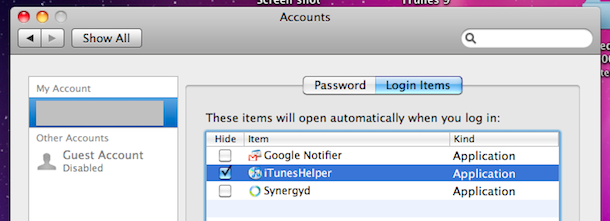

 Do you need iPhone Insurance? For such an expensive phone, I think the answer is yes. iPhone Insurance is not really something I thought of, and I’m guessing something that most users don’t think of until it’s too late and you actually need it. After several of my friends accidentally broke, lost, or otherwise rendered their iPhone’s unusable, I got a bit more curious about iPhone specific insurance options. This list is by no means complete but it’s just what I discovered in my research for insuring the device.
 Readers Suggestions – I have no experience with SquareTrade but apparently they offer iPhone Insurance too, please do your own due diligence to determine if the iPhone plans they offer are right for you. Additionally, Best Buy offers iPhone Insurance through their Geek Squad service (thanks reader Mike!) but apparently they are expensive.
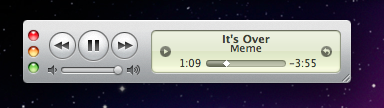 Last week we wrote that some people thought of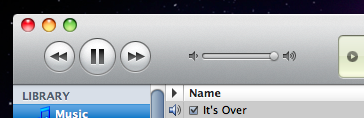
 In case you somehow missed the news today, Apple has released iTunes 9 available immediately for download, and iPhone OS 3.1 for the iPhone and iPod Touch, also available now. Both updates seem worthwhile and right in line with what the Apple Rumor Mill has been suspecting, although they don’t add anything jaw-dropping in terms of new functionality or features, there’s a bunch of bug fixes and small feature additions and improvements. iTunes 9 wasn’t showing up under Software Update for me so I just downloaded it manually from
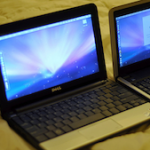 So you want a small lightweight portable Mac OS X machine, the closest thing Apple has in this area is the MacBook Air which is $1600 or more. No doubt about it, the MacBook Air is a great machine but I don’t want to spend anywhere near $1600 for another laptop when I already have a MacBook Pro. I’m thinking a small budget, like really small by Mac standards, how about $250 or less? Impossible you say? Wrong! It’s possible and I did it! Here’s how you can too. Be warned, this is not sanctioned by Apple, and it’s breaking the Mac OS X EULA agreement.
  Apple certainly means well with the Software Updates, but sometimes I get update notifications I just don’t care about, or just don’t want to install for whatever reason. If you’re in this situation and you have a version of OS X before the App Store that ran exclusively in a native Software Update window, like Snow Leopard and prior, you can easily ignore those software update packages to stop having them show up. (Yes you can
  Ever wanted to know if your Mac is using a 32-bit or 64-bit kernel? It may seem geeky and in the weeds, but it’s now relevant. Snow Leopard 10.6 is the first Mac OS X version to ship with a 64 bit kernel, and obviously your Mac has to have a 64 bit processor to utilize that kernel, but some 64 bit Mac’s are not defaulting to the 64 bit kernel.
 My one and only email client is the web based Gmail, and for years I’ve been using

 If you’re an iPhone 3G or iPhone 3GS owner and you’re on the AT&T network, you’ll be pleased to hear that AT&T is finally stepping out of the cellular stone ages and on September 25, 2009 will FINALLY enable MMS on the iPhone! It’s kind of amusing to be excited to get a 7 year old technology onto the otherwise wildly modern iPhone, but AT&T has been disappointingly slow with enabling the MMS service for iPhone users. Currently if you’re an AT&T subscriber and someone sends you an MMS message, you might get an annoying text message with a URL to a shoddy webpage and login/password to access a super reduced quality image of the original sent. I say *might* get the annoying message because on average I receive about 30% of incoming MMS’s this way, the remaining 70% get lost in the mystery AT&T MMS abyss and I don’t get any notification at all. Hooray AT&T! Welcome to 2002! err 2009!
 The Hackintosh community just keeps on growing, and this particular guide is sure to roil some feathers.
  QuickTime X is really cool and one of the many great improvements in Snow Leopard, but I was really surprised to find out that QuickTime X no longer automatically plays movie files on open, you’d think since I just opened the file I’d want to watch the movie! Thankfully resolving this is just a matter of entering a command in the Terminal.



