
CoconutBattery – Get Extended Battery Information of Mac Laptops
 If you own a Mac laptop, you’ll want this great app. CoconutBattery provides the usual current battery charge information, but that’s not what makes it cool.
Anyone that has owned a device operated by rechargeable batteries can tell you that over time the capacity diminishes. That is what makes CoconutBattery so unique, it provides detailed information on your batteries life, comparing original and current battery capacity of a MacBook, MacBook Pro, or MacBook Air.
This is a very useful tool for MacBook owners, and it’s free too.
You can also save battery data at will, allowing you to compare your batteries health and lifespan to usage statistics and the time passed. This is particularly useful if you are always on the go and are curious how much usage you can really get out of a single battery.
CoconutBattery can also tell you how many loadcycles your battery has had in total, the age of your Mac, if the battery is charging, and if your charger is connected.
Grab Coconutbattery from the developer, it’s free and works great on MacBook, MacBook Air, and MacBook Pro.
Once you download CoconutBattery just launch the app to access your battery details of the MacBook it is running on.
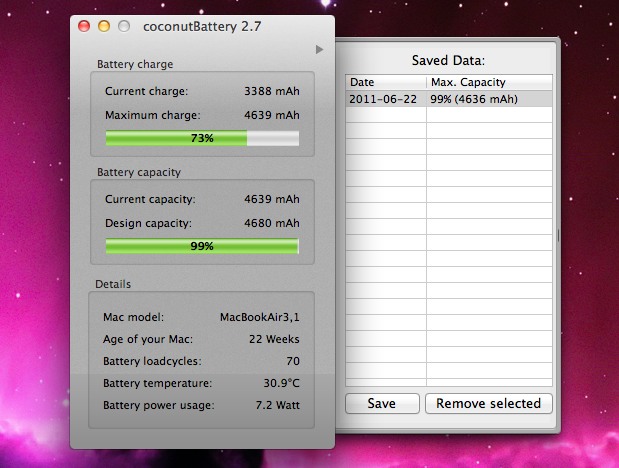
The interface is simple and easy to use too, what’s not to like? Check it out if you’re a portable Mac user, it’s a great way to keep a historical record of MacBook and MacBook Pro battery cycles and battery life capacity.
Of course this is not just helpful for raw knowledge, but it can also be informative for when to replace a battery on a MacBook or MacBook Pro. If the cycle count is pushing a very high number and battery performance is terrible, that may be an indicator it’s time for a battery replacement service. Some Mac batteries are easier to replace than others though, it just depends on the model of the MacBook or MacBook Pro. MacBook Air is difficult to replace the battery of and requires opening the enclosure, as do all newer MacBook Pro and MacBook models too.
This is one of my “must-have” tools for Mac laptops, but you can always get battery cycle details from the System Information tool in Mac OS as well.







This app doesn’t work with the latest model MacBook Pro’s. It first determined that my machines was 123 months old!!! Then determined that my battery was charged to 6 times the maximum capacity… Finally, it said that battery was only good for another -2469 cycles. Sounds to me like this app needs a serious upgrade…
try downloading the latest version, 2.6.6, it should work fine with the new macbook pros
http://www.coconut-flavour.com/coconutbattery/files/coconutBattery_2.6.6.zip
it works with mine, shows age of mac as 3 months
Hi, i have the same problem that ronan.
I have 21 cycles, 3 months ols and a 95% of capacity.
I’ve done everything that i read from the apple forums and help in the authorized service.
Do i have to send it back to apple?
Any sugesstions?
[…] This is a fun little program that quickly gives you information on when and where your Mac and iPod were built (it claims to check any Apple products based on serial number, but we couldn’t test this feature). There’s also an ability that allows you to check your serial number against a database to see if your Mac was reported stolen, which could be useful for those who have purchased a used Mac or iPod via Craigslist and eBay. If the Coconut name sounds familiar, its because the developer also makes CoconutBattery, a great app for Mac laptop owners. As you can see, my MacBook was made in China (aren’t they all?) and built between the 15th and 21st of May, 2006. I’ve heard that some users are reporting Macs built in the USA, Spain, and Ireland, but all that I have seen and owned are from the People’s Republic. […]
God. My MacBook is only 2months old, had 19 Battery-loadcycles but my current battery capacity is only 93%. Seems to go down a % every week or so. Do I have a problem battery?
the content of this site really makes me stop by more often. keep on the good work guys!