
Instant Dictionary Keystroke in Safari for Mac: Control-Command-D
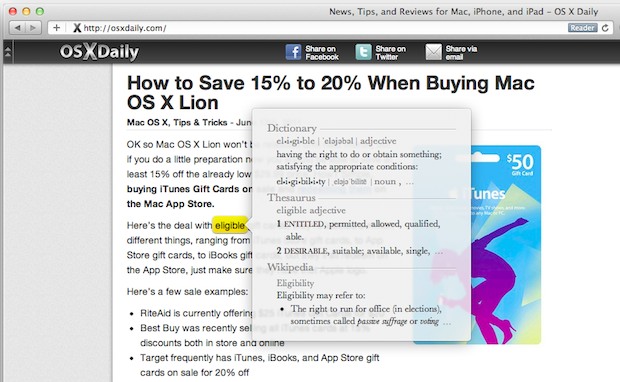
Here’s a very useful key combination that allows you to instantly summon a dictionary from the web browsers in Mac OS X.
If you’re in Safari (and many other Mac OS X apps and browsers), hit control-command-D keystroke together while you hover over a word, a dictionary will pop up with that words definition!
Very useful if you’re reading something and want to clarify the meaning of a word, spell checking, and whatever else you might need a dictionary for. Students and educators in particular should find this extra useful, but really, we all sometimes need help with definitions or spelling from time to time, right?
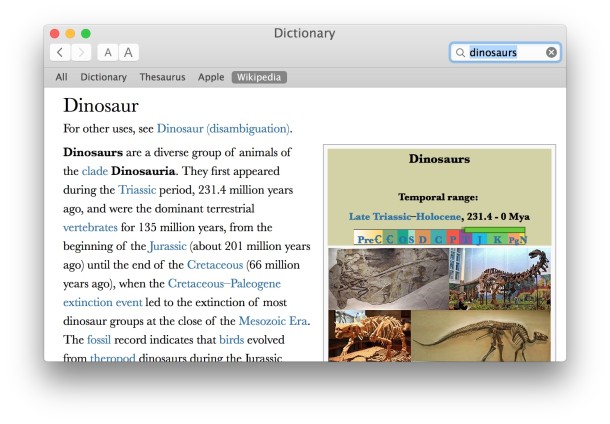
If you’d prefer to see the Thesaurus pop up instead, simply go into Dictionary.app’s preferences and switch the Thesaurus to be on top of Dictionary.
This is an old Mac trick that still works it’s magic, cool stuff. I had long forgotten about this but it was originally only supported by Safari before being more widely adopted by all major browsers. Neat stuff.
Later versions of OS X support this keystroke as well as the handy tap-to-define method.






this is sick! love it thanks
Any one knows if is possible to add a translator mode to de apple dictionary. would be really helpful and fast to have and option on the apple dictionary to translate word.
[…] anyone?). If you’re wondering where the word list is coming from, it’s tied to your Mac OS X dictionary, which is also readily available via a keyboard […]
If you ctrl click on a word in a text entry box, then go to the Spelling selection on the menu, you can actually have the Aqua dictionary check the spelling as you type and underline misspelled words.
Wow! That is helpful, even better than my beloved dictionary widget :)