
How-to Manually Adjust the MacBook Pro Keyboard Backlight
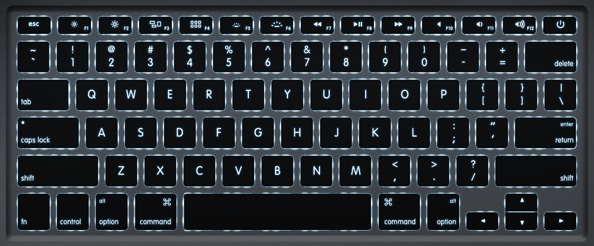
Want to manually adjust the backlighting on your MacBook Pro keyboard? You can do that easier than you might think. With the push of a few buttons, you can turn the brightness of the keyboard backlighting up, or you can turn the brightness of the keyboard backlighting down (or even off). The secret is simply to know which keyboard buttons to press to control keyboard backlighting and to adjust it manually.
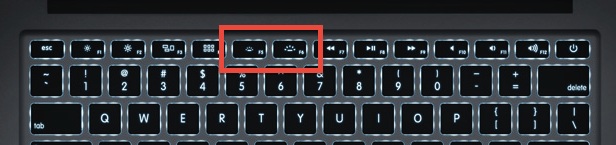
On MacBook Pro, MacBook Air, and MacBook with backlit keyboards, you will use F5 and F6 to turn keyboard backlighting brightness up or down.
• Use F5 to turn the backlit keyboard brightness down
• Use F6 to turn the backlit keyboard illumination brightness up
These two keys are at the top of the keyboard on Macs that support the feature. This includes all new model MacBook Air and MacBook Pro machines, though older Macs may not have the dedicated keys and may require using the “Function” (FN) key to initiate the changes yourself.
How to Stop the Mac from Automatically Adjusting Keyboard Backlighting
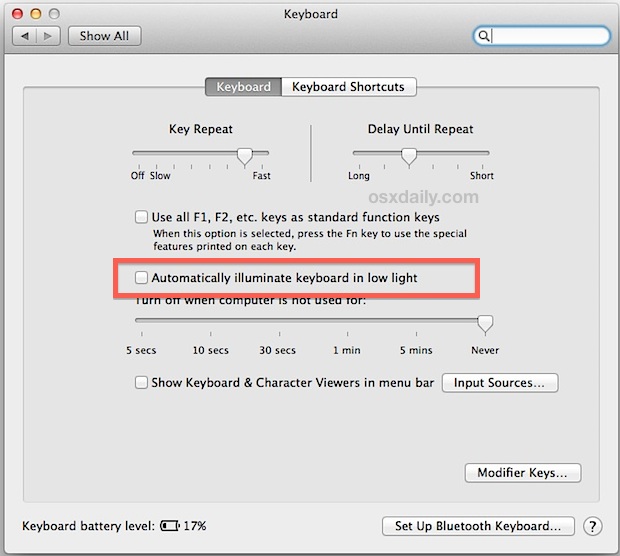
If you want the Mac laptop to stop automatically adjusting keyboard backlighting intensity on it’s own, you can turn off that setting:
- Go to System Preferences from the Apple menu, selecting the “Keyboard” preference panel
- Find and uncheck the box for “Automatically illuminate keyboard in low light” to gain full manual controls
Once upon a time Mac laptop users didn’t have these direct controls, and had to rely on third party software for similar functionality of turning up or down the backlighting brightness.
Third party utilities are no longer needed to gain manual adjustments for the MacBook keyboard illumination, as it is now built natively into Mac OS X on all supported Macs, including the MacBook Pro and MacBook Air. Accordingly, this article has been updated to support the new built-in methods to control backlight keyboards, though we retained the original method with LabTick for posterity and for those who would prefer to use the menu bar item.
Below is the older approach that continues to work for Macs that do not have the manual support keys, or for users who would prefer to use the third party utility for Snow Leopard to control the key brightness:
One of the many “fine touches” that I enjoy about my MacBook Pro is the keyboard, and it’s very nice back light effect. Normally, the keyboard back light only turns on when the MacBook Pro light sensor detects a dark room, but with Lab Tick now its possible to take full control of the power beneath your finger tips. Lab Tick is a very resource non intensive application that cleanly installs itself as a menu item, with options to load your brightness settings on boot. This application is a must for MacBook Pro users and personally, I think it should be included as an option in Mac OS X.
Update: Manually adjusting the MacBook keyboard backlight with Labtick
The menu interface is clean and unobtrusive, after installing it you’ll find the menu bar item along with things like Time Machine, Caffeine, and Spotlight.
Again, remember that Labtick is not necessary on newer Macs with direct control of keyboard backlighting, but if you want to have it in your menu bar anyway then Labtick serves that purpose.






There is one problem though when i turn the lights off my keyboard flickers like crazy any known fix?
I Love this thing it works like a dream My thanks go to the developer
Hi, i have a MacBook (13-inch, Aluminum, Late 2008).
I can’t use increase or decrease the brightness of the keyboard illumination. And i can’t see the check setting of it in keyboard setting.
When i type keyboard it at night, i can’t see the key.
So anybody here can help me for this problem?
Hi
I’ve installed this but I cannot see any icon on my bar ;-(
Please help!
Intel Core 2 Duo with version 10.7.1
Thanks it works :p
dim the lights and hold down f8,9,and 10, this will resolve the keyboard not illuminating in a low light condition.
By the way, I have a unibody model, MBP 5.1.
My wifi and bluetooth is also shut of when I look at the icons up by the watch…and can´t figure out how to turn them on/fix them?
I have a MBP without a screen (removed ´cause it was broken, I use the MBP as a desktop computer now), and I have never seen the keyboard light on.
I want it on all the time, and I tried changing the settings, and I installed Lab Tick. I also tried covering different parts of the computer (where is the light sensor located?) to make the computer thing it´s dark.
Nothing have worked.
What can I do? And how do I know if the light actually is broken, or if it´s just a matter of settings/software problems?
Thanks!
Hey! It works great!!!! Thx 4 giving the info.!!!
This app is just what I exactly need!!!!!!!
Does anyone know if there is a way to make the keyboard backlight turn off when watching a video in fullscreen mode? I have a 15 inch Macbook Pro core i5 running Snow Leopard 10.6.3. Thanks!
Does anyone know if there is a way to make the keyboard backlight turn off when watching a video in fullscreen mode? Thanks!
I have a Mac Os X version 10.5.8 and I was wondering if I can change my keyboard to a light one!
Great app that works as expected and provided a very useful utility to me and apparently a lot of other people. One thing I don’t get however, is several people have stated that their backlight completely stopped working within the first year. Rather than get it going with this app, why not take it back to apple? They’ve always taken care of my issues very promptly. Don’t forget, On the macbook pro at least, F5 & F6 control the keyboard backlight. And for those trying to get backlighting going in windows; it’s time to stop using windows. There is almost nothing you cant do better without windows. If theres a windows app you need to run try Wine, Iwork will open any office document, etc.
Hats off to you sir!! My macbook’s keyboard was so dim, thought the bulb had gone or something. Your app is so simple to install & easy to use! Thanks for bringing back my mac! B
I have a macbook which has lighted keyboard purchased in June 09. While I am on mac the keyboard lights up which is why I purchased this model. I loaded windows xp but the keyboard won’t light up. Is there an easy way I can have the light on keyboard while using windows. Mature user.
Hey there i seriously need help here, like pronto!
i was on facebook, and was viewing my friend pictures when suddenly, my mouse pad cant click on anything, what should i do?!
im using a mouse here, a USB cabled one, it just keeps double clicking and doesnt allow me to click on anything, and im seriously going crazy!
please help me, ):
Works perfectly with my new Macbook Pro .
Macbook Pro 15″ 4GB Ram 256 MHZ 250GB Harddisk.
[…] Pro’s with the keyboard backlight is this awesome app from Lab Tick that allows you to manually control the keyboard backlighting via a menubar item. Yes, you can control the MacBook Backlit keyboard illumination via the function […]
Hi
Is there any application for widows 7 to control keyboard backlight. I have recently purchased Mac book pro and struggling to make windows work normally. Initially I had graphic, sound, backlit, poor battery life and touch pad issues, still struggling to resolve low battery time, backlit and touch pad issues.
Thanks in advance.
Cheers
i’m trying to change the light level but when i press the button for that it shows that it’s locked how can i change that
I am using Vista on Macbook Pro but I am having some problems with the backlight. It is always on but I cant seem to turn it off. Can anyone help me?
You can manually turn the keyboard lit by pressing the F10 key on your mac
You can manually turn the keyboard lit by pressing the F10 key on your mac
thanks jen. everywhere else i looked it kept saying f6 and f5. f10 did the trick…. (4 years later)
Fantastic! Thank you for finding this! Exactly what I need.
Fantastic App – Thanks so much for making this available – I LOVE IT!!!!
Just brilliant! Many thanks for this. I often have to work in dimmed light and this just made my life a whole lot easier! Simple but very effective. What else have you got?
I’m just about to send off my MBP for a new display. Its only 2.5 years old and its going to cost me nearly £500 ($700 ). New cheap Laptop or New MBP screen, a big decision!
Just brilliant! Many thanks for this. I often have to work in dimmed light and this just made my life a whole lot easier! Simple but very effective. What else have you got?
I’m just about to send off my MBP for a new display. Its only 2.5 years old and its going to cost me nearly £500 ($700 ). New cheap Laptop or New MBP screen, a big decision!
I have lab tick, and its nice, but I’m very frustrated that just randomly my keyboard illumination has completely turned off. Sure I can manually fix it with Lab Tick, but it really upset me that all of a sudden for no reason I don’t have a lit keyboard anymore. I just want to know why, and fix it, because honestly, Lab Tick can get annoying at times, and I paid over two grand for this laptop, and in less than a year it already has a functional problem with the feature I loved the most. How much is it going to cost to get my computer to function like it normally did with the regular illuminating keyboard?! How can I get it back? Someone help!
I have stopped banging my head against my non-illuminated MB.
Thanks. Nice one!
Thanks! I hated the way the keyboard light just had a mind of it’s own! Now I am back in control. :) Great solution.
Works great, THANK YOU
Hello, please, I need your help guys!
I bought my MBP 3 months ago, but since 2 weeks ago, the light won’t turn on!
I’ve installed this program but when I double-click to open it, there’s only a screen with a lot of numbers and letters, what is it?
I’m new to the mac world as well.
Thanks from Brazil
Clarissa
This little utility is the only answer I found to the problem my macbook pro developed.
The keypad was just the perfect illumination when I bought it, but less than a year later it had just dimmed itself down to being almost invisible in a dark room. I could NOT find any way to adjust this– read way too many posts and board– but now I can!
A Big Thank You!
Installed this on my MacBook Pro and for some reason it doesn’t work – any suggestions?
[…] The MacBook Pro’s keyboard background light only comes on when its light sensor detects a dark room; however, if you want to manually control this feature manually you can download this handy application. […]
Dream come true!! many of MAC’s factory settings are thoughtful, but the dim keybaord was annoying. Thanks a million for maximizing one of the key selling features of the Macbook Pro
great application!!!
changing keabord light was really annoying me
[…] The MacBook Pro’s keyboard background light only comes on when its light sensor detects a dark room; however, if you want to manually control of that feature you can download this handy application here. […]
THANK YOU FOR THIS! I got tired of sitting in a pitch-black room with my Powerbook thinking it was smarter than me, constantly turning my keyboard light off.
Hello,
Please help. Is it possible to use the backlit illumination keyboard with windows XP software on a macbook pro
Your help or tips would be appreciated.
Thank you,
Jean-Louis Beek
Thanks for the tip I just recently purchased a 17″ macbook pro core 2 duo . and so far it has actually been fun to get up and go to work as I know I won’t have to reboot 3 times a day with my old windows thinkpad. I hope mac really keeps going in the direction it has in the past few years and puts a woopin on the market share , as this product is the bomb.. great tip and util thanks ..
scuba
I’m glad you like it :-)
Cheers,
Alex
Great app–it works fine in Lion (OS 10.7), by the way.
good to know. thanks!