
Private Browsing is a Little Known Safari Feature in Mac OS X
 Here’s a very useful feature that is widely overlooked by Mac Safari users, the ability to enable Private Browsing. What does that mean exactly? Basically it allows you to browse the web without a trace; nothing is added to the history, autofill, downloads window, and no information about what you are viewing or reading on the web is saved or cached.
This handy privacy trick is extraordinarily useful for many situations, particularly if you are on a public computer and you’re doing anything private, say checking your email, bank balance, or one of those special websites that you may or may not partake in viewing. These perks make this little known trick something that should be better known and certainly receive more widespread usage, whether to satisfy personal preferences to maintaining some secrecy or just because you like the added benefits to your own privacy, it’s valuable for all Mac users.
Flipping into Private Browsing in Safari on the Mac is extremely easy, all you need to do is head to to the Safari menu and scroll to the Private Browsing option. Then, a confirmation window will now appear and clarify if you’d like to enable private browsing, listing what it does and doesn’t allow. Click OK and you’re good private and good to go.
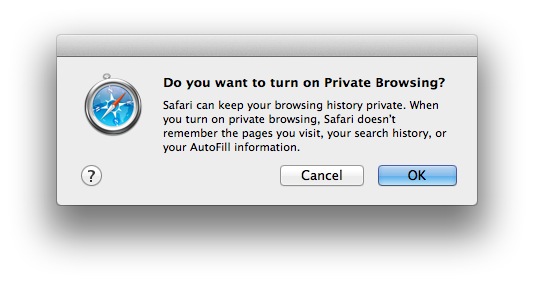
The popup shows some details about the feature, but Apple describes the functionality much more thoroughly as follows:
“When you browse the web, Safari stores information about the websites you visit. If you’ve turned on password saving in AutoFill preferences, Safari also stores any user names and passwords you enter. If you browse the web on a Mac that’s also used by other people, they can view your browsing behavior by reading the history list or the list of stored passwords. To prevent others from gaining access to this information, use Private Browsing.
They also covers some of the benefits of cookies and how privacy mode will impact those, for better or worse:
“Many websites also store information on your computer, in cookies and other places. Cookies can be helpful: for example, a gaming website might store information that tells the website who you are, so when you revisit the website, it remembers your scores. However, some websites store tracking cookies and other data so advertisers can show you ads for products that match your interests. To inhibit third parties from viewing this kind of information, use Private Browsing.”
Apple’s official description goes on further to reinforce that browsing history, downloads list, autofill details, search box, website local cache storage, and cookie data, is also either discarded or never stored at all.
So in summary, never use a public Mac to browse the web without toggling this feature on first, it’s a simple security precaution that could potentially help you, not to mention preserve some of your privacy in general, whatever it is that you do online. :)






So i cant look at porn on my university’s server shoot
cmon, we all know that it should really be named to “Porn Browsing”. Checking your bank balance, pawshaw!
Yes but cookies are still saved so always log out of sites, clean the cookies, and Exit out of the application. Many public computing facilities do these things automatically in their kiosk mode. Remember that this private browsing does not hide your external IP address to the world – so browse like yo’ momma’s watching!