
Cam2Web – Quick and easy Webcam setup for your Mac
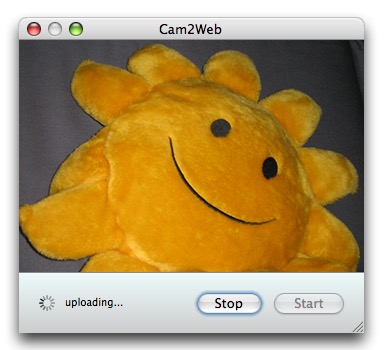
Chances are if you have a new consumer Mac it has a built-in iSight camera, just waiting to be used. If you’ve ever thought about setting up a webcam but figured it would be too difficult, fear not, because it doesn’t get any easier than this.
Cam2Web is a tiny free no frills app that is so simple to setup for camera-to-web functionality that users with ftp knowhow can’t possibly go wrong in getting it to work.
All you’ll need is a Mac with an iSight camera, and FTP access to a server that you can upload to. No really, that’s it!
Setup of cam2web is beyond simple, it is literally this easy to get going:
- Get cam2web from the developer home
- Launch Cam2Web
- Adjust FTP settings accordingly with server and authentication
- Click “Start Uploading”
- Load the specified URL in a web browser to see the camera images
Now you can broadcast whatever to the world!
If you want a live update effect, simply embed the specified JPG file into an html document with some basic refresh code.
This is a super simple solution for uploading images from a webcam to the web for general use and access. The viewing side is obviously not particularly secure so you wouldn’t want to put the camera on anything you want to remain private and not shared with a URL (or a password protected URL anyway).
If you know of better camera to web solutions, share with us in the comments below!






Could not get it to work. Have no idea how to fill in the blanks; like who is my “host”? (what host?) App did not close normally… had to “force it” to close by clicking Apple icon and “Force Quit”. Not an easy app to install for a newbee.
hi, i hav a mac on my contact settings there r cooler effects is there anyway i could put those pics from the contacts onto facebook?
You may have to force quit it in the apple menu at the top!!
what the hell.. I can’t quit this program.. It is totally useless and unhandy!
I can’t quit it.
I downloaded Cam2Web and it won’t close and I can’t shut down my computer…. what do I do to get the program out as I have not completed my website to move it on.
I think the reviewer may have read the blurb and not actually tested the product. Won’t work for me…
This app. isn’t that simple.
Its not working for me.
How does it know where to place the image and which cam to use.
A few more words to explain exactly how it works would be appreciated.
Simplicity can sometimes be interpreted as arrogance.
LuvYa4eva.
Ludo
OK call me an idiot, but I can’t figure this out. When it uploads a picture, the picture is not from the iSight but rather an image of the URL…
Am I a total moron?