
Shutdown your Mac Without the Warning Dialog
 If you want to quickly shut off your Mac without seeing the warning dialog and without any sort of confirmation from the familiar power dialog box or otherwise, you can do that with a little known key modifier trick. Be aware that this approach is fairly abrupt, so you’ll want to use this sparingly for most purposes.
To shut down a Mac without seeing the warning dialog box, try holding down the ‘Option’ key while selecting “Shut Down” from the Apple Menu.
Holding the Option key while choosing to turn off the Mac will cause the system to shutdown without the two minute dialog box coming up to verify your shutdown or restart plans.
Do be careful with trying this one out casually, because there’s no warning, and the power controls box does not appear at all. Instead, all of your open apps will immediately begin to quit as the OS X shut down process begins and completes itself without any further user intervention (some apps with certain background processes may intervene unintentionally, such as Terminal with an active system specific task, but don’t rely on that since it certainly doesn’t apply to most users).
This is the power confirmation dialog box that gets skipped during this shut down process:
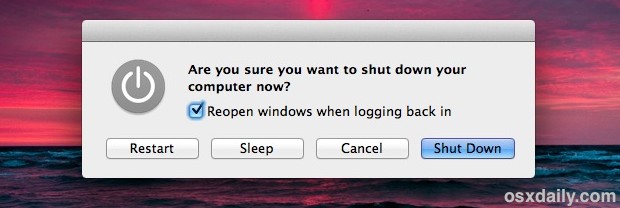
Even if the Auto-Save and Window & System Restore features of Mac OS X will save you sometimes from losing data, some apps don’t support those features, and with an abrupt system shut down, the Mac may not have enough time to generate adequate cache for the active applications to be able to gracefully restore. So again, use this sparingly, since most users like to keep their data.






rocketmouse, J.Ericsson:
Instead of opt-click, there are “full shortcuts” to do this (without the menu)
^⌥⌘⏏ – shutdown
^⌘⏏ – restart
⌥⌘⏏ – sleep
No dialogs… :)
Yes, I’d like to know if there is any way to bypass the option key click, as rocketmouse requested. Please advice, folks! Thanks.
I’m still looking for the tweak that allowed me to shut down Leopard WITHOUT dialog and WITHOUT holding down the option key. That setting didn’t transfer and I don’t remember what it was. I must have done that before I started saving tips like that. If anybody knows what it is, please let me know! I keep forgetting the option key…
to make things even faster for shutting down, just hold ctrl+option+command+eject for about 1.5s. no warning is given with this combo either
This is awesome. It’ll be my bridge until I finally remember all of those Sleep, restart, and shutdown keyboard shortcuts…
A lot of dialog boxes (confirmation prompts) can be bypassed by holding the option key and this since OS9.
Good tip as always.
[begin rant]
I’d like to give this tip to that annoying guy on the mac commercials , that smug little twerp , I would like to shut him down without a warning dialog.
If anything makes me dislike my mac, it is the embarassment of being associated with that commercial, and that lanky queef mac-turd who looks like some Manhattanite bike riding yuppy trust funder who spends his days at Starbucks drinking $8 frappucinos pretending to be a film student or actor. God forbid, if the average mac user is like that at all, I want to invest in the lamest greybox pc I can find. What a weird advertising ploy for Apple to focus on the ultimate lazy and worthless stoner sacks of the MTV generation.
[end rant]
I kinda like the guy.