
Display Disk Space and File Info on the Desktop of Mac OS X
Jun 1, 2007 - 6 Comments

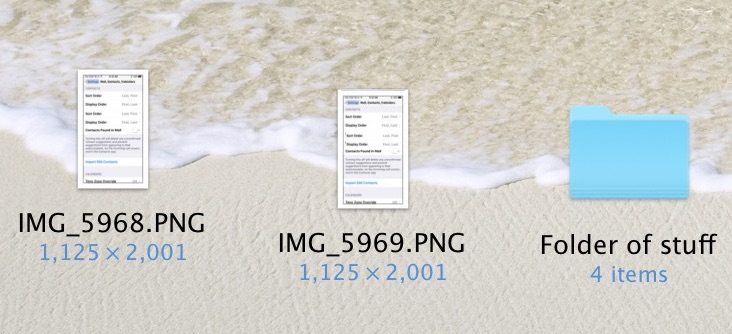
Want to see available disk space of drives and volumes on the desktop of Mac OS X? Perhaps you’d like to see information about files and folders that are on the Mac desktop as well, including dimensions of images, and data about file counts contained within folders. You can reveal this information easily with a hidden trick in OS X.
This is one of my favorite Mac OS X tips, allowing you to see some useful information right on your desktop.
How to Show Disk Space & File Info on Mac Desktop
Here’s how to enable this feature, which is handy particularly for those managing a lot of external media volumes and hard drives:
- from the Desktop, navigate to the ‘View’ menu down to ‘Show View Options’ (or just hit Command-J)
- From the View Options screen here, you’ll want to click the checkbox next to “Show item info”
- Close out of view Options and the icons on your desktop will show the extra data
Now your data drives will show total and free space, and images will show dimensions!






Great stuff!!! just a little tick makes all the difference :-)
You can use a tool called Disk Space Analyzer to analyze your disk space on mac.
Hi,
Thank you, so much, for having this simple little “trick” to keep track of folder sizes. Apple should be better at providing all these little tips. You guys (gals too?) are really giving a wonderful service to everyone. Thanks. God bless you.
Jerry
Regarding harddrives…
Check this dude out… A genuine OSX Leopard harddrive
LOL
http://www.c-h-a-o-s.com/2007/05/17/c-h-a-o-scom_chaos_leopard-ready-hdd/
This is a easily overlooked and great feature for sure, you can also enable it in individual folder views which is very useful and shows the number of items in folders
Great!! I never knew about this but I like it and used it immediately!