Safari maxing out 7,909.9% CPU – WTF?
Sep 20, 2009 - 12 Comments
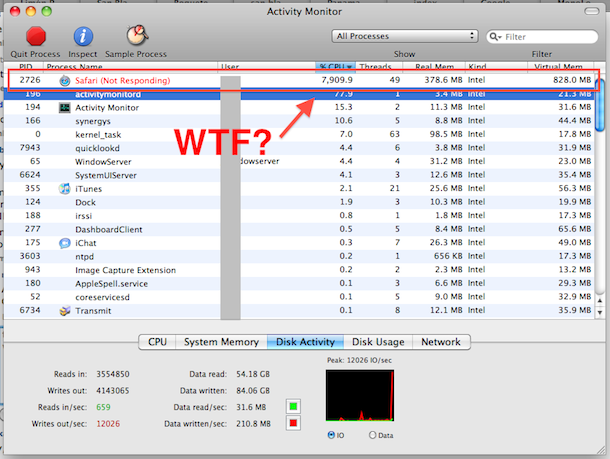
Here’s something you don’t see everyday, Safari in an epic freakout and taxing 7,909.9% CPU usage. WTF?

Here’s something you don’t see everyday, Safari in an epic freakout and taxing 7,909.9% CPU usage. WTF?






You need to put this on fail blog! XD
[…] to stop shipping Flash pre-installed with Mac OS X? I wasn’t. I posted the above screenshot last year after I experienced the most epic Flash disaster my Mac had ever […]
Good blog man Thanks
The truth is, Safari could not really use up that much CPU as there is not really that much! It is just that Safari needs that much to dodge the Not Responding Section. Just quit Safari, and it would be normal. I have several macs and it work for me.
[…] Macs uptime and reboot historyWireless Network Security: Change your WPA Encryption from TKIP to AESSafari maxing out 7,909.9% CPU – WTF?Disable Spotlight in Mac OS X 10.6 Snow LeopardUse Firefox to Stop Annoying Web […]
Check out ClickToFlash. It blocks Flash and allows you to load it when wanted it with a simple click. It’s rejuvenated my Safari and keeps the beachballs at bay and the fans spun down.
A must-have plugin for Safari.
Dale, I just popped over to that site you mentioned. My CPU usage was about 35%. No big deal at all.
Dale, that site is in java…new bad news.
visit the following site with FF or Safari and the CPU use rises to near max.
http://sheffer.king-online.com/client_temps/dailycamera.php
Yup. Anything Flash related. My fans some on FULL BLAST. CPU is through then roof. And sometimes Safari literally its, and I send the automatic report to Apple.
I HATE FLASH. Always have. And any site I encounter with it? I just close the window.
Adobe Flash is the new Micrososft. LOL
http://superuser.com/questions/36884/what-does-it-mean-when-a-cpu-exceeds-of-cores-x-100
that shows 700% but do you have a 70 core machine?
I have had this occur while browsing/loading flash-intensive sites. I had to close Safari, go there with FireFox.