
Get the iTunes Mini Player back in iTunes 9
Oct 20, 2009 - 4 Comments
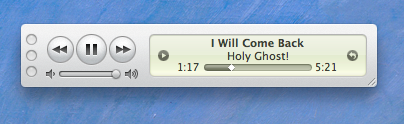
I always put iTunes into mini-player mode to conserve screen real estate, so I was pretty annoyed when iTunes 9 took away this feature when clicking the green resize button in the iTunes window. Thankfully getting it back is very easy but it’s an extra step, option-click the green maximize button to enter into the iTunes 9 mini player mode.
Note: as one of our readers points out below, the behavior of the green button was changed in iTunes 9.0.1 update, you no longer need to option-click if you upgrade to the latest version.
So, that’s iTunes 9, but it’s different again in iTunes 10, iTunes 11, and iTunes 12. Apple likes to keep everyone on their toes! When iTunes 13 and iTunes 14 comes out, it will surely be different again too…. maybe!






[…] iTunes MiniPlayer has always been around, but it’s been improved upon in the latest version. To access the revamped mini player, […]
haha i love holy ghost
itunes update fixes that to normal, good song btw!
Someone isn’t big on software updates