
Quickly tell if a file has been modified by looking at the red Close window button
Oct 23, 2009 - Leave a Comment
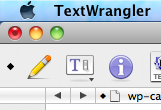
Here’s a nifty Mac trick: Do you see the little black dot inside the red ‘close’ window button in that screenshot? That means the file has been modified!
That little dot indicator offers a simple and great way to tell if a file needs to be saved or if the file has been altered in any way while it’s active in an application.
When you save the file, the black dot disappears until another change has been made.
Try it yourself, it works in most Mac apps this way!
Do you know of any other little handy tricks like this in Mac OS X to determine if files have been edited or modified by a simple glance? Then share them in the comments below!





