
Delete Flash Cookies

Adobe Flash cookies are not deleted when you remove your browser cookies, because they are stored independent of your browser, meaning Flash cookies from Safari are accessible via Firefox, and vice versa. The interesting thing about Flash cookies though is that they could technically track your web browsing long after you have left the site that originated the Flash cookie, this is particularly the case with some advertising networks that appear ubiquitously around the web. Flash cookies actually have another name, they are known as Locally Stored Objects, or LSO’s, but whatever you want to call them, here is how to delete and remove Flash cookies, or LSO’s.
Delete Flash Cookies in Mac OS X
* Flash cookies are located in two locations, shown as follows:
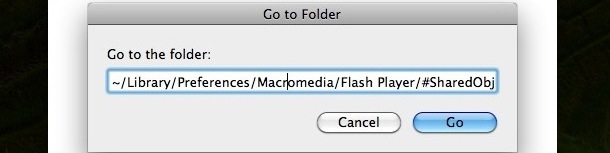
~/Library/Preferences/Macromedia/Flash Player/#SharedObjects
~/Library/Preferences/Macromedia/Flash Player/macromedia.com/support/flashplayer/sys/
Note that ~ signifies the user home directory
* You can navigate to these directories by using the Finder or by hitting Command+Shift+G and pasting the above location one at a time into the Go To Folder box and hitting “Go”
* You’ll now see a directory with a bunch of randomly generated names like VDZJH1CX
* Delete all of these folders if you want to delete ALL Flash cookies
* Repeat with the other directory listed above to completely remove all Flash cookies from your Mac
Now if you’ve used an Adobe AIR application, you might want to delete those AIR cookies too since they can track things outside of their realm as well, these are a little more tricky to delete because they are in the following location format:
~/Library/Preferences/AIR App Name/Local Store/#SharedObjects/flash file.swf/flash object.sol
You’ll need to know the specific Adobe AIR application name to delete the AIR cookies.
If you want to read more about Locally Stored Objects (Flash Cookies) check out Wikipedia’s entry on LSO’s, it is informative and helpful in understanding the technology.
I want an easy way to delete Flash cookies!
If you don’t want to go mucking around in various Mac system preference folders, try out this application called Flush. Flush is very easy to use and will delete the Flash cookies itself, so you don’t have to do much except launch the app. Flush works with Mac OS X Leopard and Snow Leopard.
Download Flush Now
Flush Developer Home
Another option is to use Kill Flash Cookies, the cross platform compatible LSO deletion tool discussed below:
I have a PC running Windows or Linux, how do I delete my Flash cookies?
Easy, try out the aptly named Kill Flash Cookies, it’s got the most simple GUI in the world and it deletes flash LSO files in an instant whether you’re running Mac OS X, Windows XP, Vista, Windows 7, or Linux. Try it out!






How do I clear LSO or flash cookies on my iPhone? Do I need to jailbreak
excellent, I like to do this manually as you know what you are getting rid of. there is a plugin for firefox that does this I think.
Using good old Terminal.app we can do the following:
rm -RPfv ~/Library/Preferences/Macromedia/Flash\ Player/\#SharedObjects/*
rm -RPfv ~/Library/Preferences/Macromedia/Flash\ Player/macromedia.com/support/flashplayer/sys/*
# prompt for confirmation before attempting to remove each file
# just reply with ‘y’ or ‘n’; abort with ctrl-c
find ~/Library -type f -iname “*.sol” -exec rm -Pi ‘{}’ \;
[…] Flash is completely uninstalled from your Mac. You may want to go one step further and delete your Flash cookies yourself, since the app doesn’t always grab them on the way […]
Flash Cookies are not evil if you know how to control them. I have uninstalled Opera and Safari for Microsoft Windows computers because they don’t allow you to do the following.
View my post here.
http://www.google.com/support/forum/p/Chrome/thread?tid=1210467d8af6a3cf&hl=en
Compared Flush to KFC in Snow Leopard. Flush left one LSO that it did not list. KFC deleted it.
Just an fyi…..
[…] discussed ways to manually delete flash cookies in Mac OS X before, but now there’s a little app called Kill Flash Cookies that does it for you, […]
[…] discussed ways to manually delete flash cookies in Mac OS X before, but now there’s a little app called Kill Flash Cookies that does it for […]
I went to the macromedia.com link above. Typical! The font was too small to read, so I zoomed in, and in and in, everything else gets bigger, but guess what? The crappy applet doesn’t. Just about sums up what a POS flash is on the web. Sooner flash dies the better.
Use the Flash settings manager:
http://www.macromedia.com/support/documentation/en/flashplayer/help/settings_manager02.html
Note: The Settings Manager that you will see is not an image; it is the actual Settings Manager. Click the tabs to see different panels, and click the options in the panels to change your Flash Player settings.
Hmmm… what would happen if these folders were cleared out, then changed to ‘Read Only’?
perhaps you can add this? What sort of information is relayed with these “flash cookies” or LSO’s? And are they readable by other websites – ie: if I watch some videos on youtube, then go to say yahoo, can they tell what videos I watched? Or even that I visited youtube? Or is it harmless information such as volume levels, or window size, etc… Thanks again.
Thanks! Good info to know.