
Mac To-Do List Managers
If you’re looking for a free Mac ToDo list manager, look no further than these apps. We highlight our favorite three to-do list apps, and one of them already comes with your Mac!
Mac ToDo List Manager Software
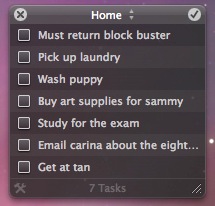 Our first ToDo list manager app for the Mac is called Anxiety, and on top of having a very attractive interface, it has some pretty great features. Anxiety sits seamlessly in your menubar and syncs with both iCal and Mail, so you can be sure your to-do tasks are managed regardless of where you check them off. Done with your doctor appointment? Check it off in Anxiety and it will be removed from iCal, and vice versa. You can have multiple todo lists, easily add new task items to the lists, and get more information on each todo list item by simply double-clicking it which will bring up the relevant iCal event. This is definitely our top desktop software choice for a Mac todo list manager, check it out!
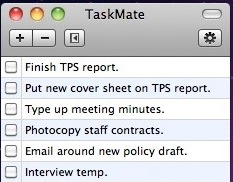 TaskMate is another great choice for a to-do list manager app, it is extremely lightweight and allows you to easily add new todo tasks or delete completed ones. TaskMate is very no frills, there’s no fancy syncing or iCal integration, just pure todo list task management. If you don’t want or need the syncing features of Anxiety, but still want a great and simple to use to-do list manager app, TaskMate is a perfect choice.
TaskMate home
Download Taskmate
Doesn’t the Mac come with a free to-do list task manager?
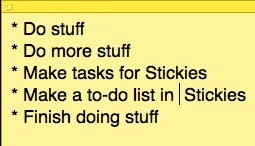 Mac OS X doesn’t ship with a to-do list manager per se, but you can add and set iCal events to notify you of tasks that need to be done. An even simpler approach to Mac task list management though is to just use the Stickies app that is located in your Applications folder. There’s no fancy features, checkboxes, or syncing, but you can easily type in or delete any to-do list task and since it comes with your Mac already, you won’t need to download or install anything else.






Use use TodoPlus. I have tried docens of task management software and websites, but finally decided to create my own software – not because I wanted to make money – but because I wanted a to-do list software that supported subtasks and filters and not all the advanced project team network management stuff. It is also faster than website based task management systems.
actually ical DOES have a to do list. just go to view menu, and show to-do list. it has check boxes as too. Not sure if it syncs with your iphone, but i bet it does. :)
Don’t leave out Things from Cultured Code. Amazing project management/task management… Really helps me out. Only thing I wish they had was a MobileMe sync feature.
i just use my brain
I have Fluid running as a SSB with Toodledo.com which works on the iPhone and Firefox(using that on Windows) pretty smoothly as well.
There’s a free Widget called « lists » that’s really nice and easy to use
I prefer using Fluid to create a menu bar app for accessing Google Tasks. Local apps are great, but instantly synced access anywhere I am is what I need :-)
guide: http://www.suberapps.com/2009/02/04/run-google-tasks-on-your-menu-bar/