
How to Flip & Rotate Pictures in Mac OS X with Preview

The Mac OS X Preview application has a a few little known image adjustment features for rapid image orientation flipping or rotation that are quite powerful, and if you’re looking to make quick adjustments to rotate a picture or mirror vertically or horizontally the general orientation of any image file, a great Mac app to do so is bundled on every MacOS and Mac OS X machine from the get go with Preview.
Using the app to complete these tasks is quick and easy, here’s how to adjust orientation of either a single picture or multiple pictures at the same time.
How to Rotate / Flip a Single Picture in Preview
To rotate or flip a single image, you just need to do the following:
- Open the Picture into the Preview application
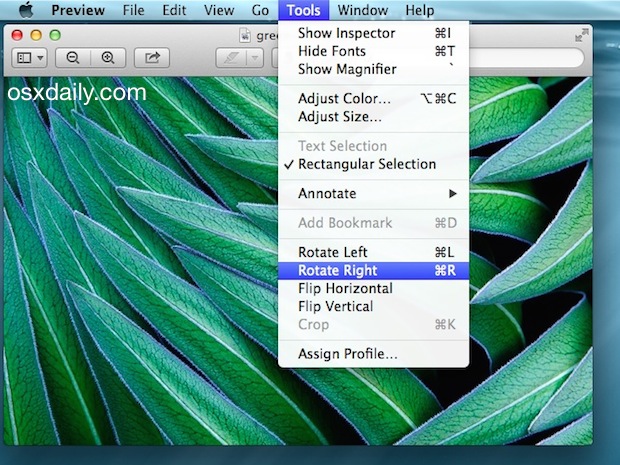
- Pull down the “Tools” menu and select one of the following:
- Rotating the Picture: “Rotate Left” (Command+L) or “Rotate Right” (Command+R)
- Flipping the Picture: “Flip Horizontal” – flips sideways, like a mirror – or “Flip Vertical” to flip the picture orientation up/down
- When finished, hit “Command+S” to Save the change to the picture orientation
Rotating and/or Flipping Multiple Pictures at the Same Time with Mac OS X Preview
If you have a group of pictures on a Mac that need rotating or flipping, you can accomplish what is basically batch rotation or orientation flipping of all the images by using the Preview app as well. Starting off from the Mac OS X Finder:
- Select multiple images in Finder and open them all in Preview
- Hit “Command+A” to Select All, or choose “Select Al” from the File menu
- While all images are selected, go to the “Tools” menu and choose your rotation or flipping adjustment:
- Rotating All Pictures: Select “Rotate Left” or “Rotate Right”
- Flipping All Pictures: Select “Flip Horizontal” – flips sideways, like a mirror – or “Flip Vertical” to flip the picture orientation up/down
- Go to the File menu and choose “Save” while every image file is still selected to Save All changes in all pictures, preserving the orientation change across the board
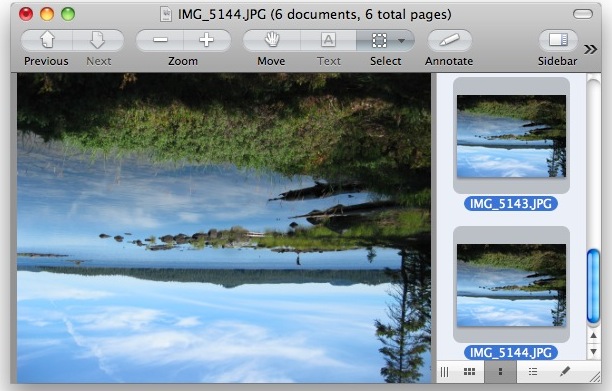
You can also use the same rotation keyboard shortcuts when modifying pictures in bulk through the Preview app if you’d like, and make quick progress of the entire task by selecting all images (Command+A), then mass rotating all of the selected images together by using either Command+R (for rotate right) or Command+L (for rotating left). Hitting Command+S will then save all the changes to the orientation, and you’re done!
Whether or not it’s faster for users to go with the keyboard shortcuts or the File and Tool menus is purely a matter of preference, the end result is the same.






My “flip horizontal and flip vertical” option is not highlighted, how can I make it so I can access those tools?
So all good with this – thank you very much!
Now… How do you rotate photos on iOS? 45 degrees is the best I can do in Photos
Thank You
Saved Me A Lot Of Upset , Took Me Two Seconds! Thank You For Your Help, Much Appreciated, Flip It Was So Easy , Very Happy X
This helped me FLIP (not rotate) a photo!
Flipping the Picture: “Flip Horizontal” – flips sideways, like a mirror – or “Flip Vertical” to flip the picture orientation up/down
This website helped me
If this doesn’t work use a mirror!!!
The best way to rotate is import all pictures into iPhoto.
In iPhoto, rotate pictures is native, in other words, you can easy find on the menu (photos) and rotate several at once
lol iPhotos is dead, all hail the new Photos App!
Thanks! Awesome tip.. saved me a lot of time!
lake superior looks better upside down like that, nice tip tho preview is pretty cool