
Use the Tab Key to Switch Between Dialog Buttons in Mac OS X
 Would you prefer to use the keyboard to speed up navigation around your Mac? That’s what the Full Keyboard Access setting allows for. Using a Keyboard option, you can have the Tab Key able to switch between dialog buttons, fields, screen items, controls, and anything else in a dialog box within Mac OS X. This can greatly enhance the speed at which you use your Mac, but it’s a feature that Apple has never chosen to enable by default. Additionally, tab key navigation can be a very helpful setting for accessibility purposes, since it’s often easier to leave your hands on the keyboard than move around a mouse or trackpad.
If you’ve never tried this setting, or you know you like it and want to have such a feature that is fairly common to other operating systems, you can quickly enable tab navigation in virtually every release of Mac OS X.
How to Enable Tab Key for Navigating Mac Dialog Boxes, Buttons, & Controls
Here’s how to turn on tab key navigation on the Mac:
- Launch System Preferences from the Apple menu
- Click on the “Keyboards” preference panel
- Select the “Shortcuts” tab (sometimes called “Keyboard Shortcuts” in older versions of Mac OS X)
- Look near the bottom of the window for a mention of “Full Keyboard Access: In windows and dialogs, press Tab to move keyboard focus between:” and click to select the radio button next to “All controls”*
- Close System Preferences
* If that sounds confusing, see the below screenshot for clarification. The setting is easily overlooked.
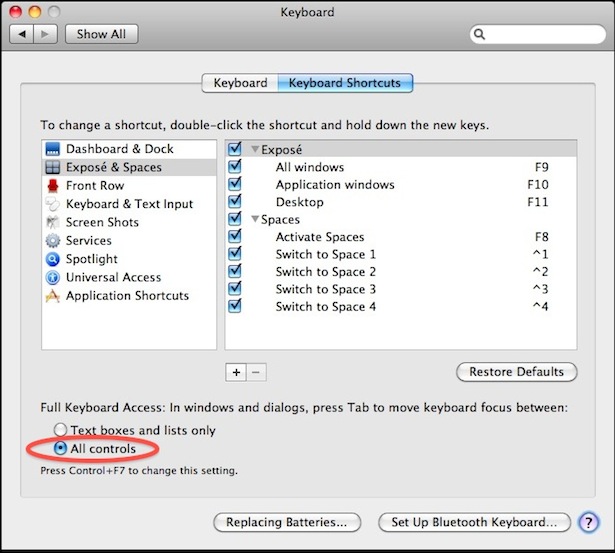
Navigating the Mac with Tab Key, Arrows, & Space Bar
Now anytime you have a dialog window pop up you can quickly navigate to the alternate choices and options by using the keyboard.
- Navigate between screen options by simply hitting the Tab key
- Use the Spacebar to select / choose the currently highlighted item (like a mouse click)
- When an item has been selected on screen with Tab, use the Arrow keys to navigate up, down, left, and right (you can also use this to control dials)
Give it a try yourself, and you will quickly see just how useful this great feature is!
As you can see in the System Prefs, you can also toggle the feature between the two options by pressing Control + F7 on the Mac keyboard too.
Note the difference here, by default in Mac OS you can only use Tab to move between “Text boxes and lists only”, the “all controls” option isn’t described well, but it’s literally everything in a window or dialog box of Mac OS X that becomes controllable through this option.
Of course, if you decide you don’t like the feature you can just go back to Keyboard system preference panel and disable it again, that’s up to you.
Tab key dialog navigation is a feature that exists with basically every version of macOS and Mac OS X (regardless of how the system software is spelled or capitalized) so whether you’re using macOS Big Sur, Catalina, Mojave, High Sierra, Sierra, El Capitan, Yosemite, Mavericks, Lion, Snow Leopard, Tiger, or just about any other Mac OS release you’ll find the feature available to use on the Mac.
Do you use tab key navigation on the Mac? Do you have any tips or tricks for navigating by tab on the Mac? What do you think of this feature? Let us know your experiences and tips in the comments below.






Thank you so much!! :)
This is very useful information.
Thank you so much.
The use of the Spacebar’ to select the currently highlighted item in the dialog box is a crucial missing detail! Please edit it into the main article body.
Thank you! That was the detail I was looking for so I appreciate your commenting it.
OMG Thank you! Why did none of the website include this. I was losing my mind wondering why it would ignore my selection after pressing enter.
Great points, thanks for the feedback.
We have updated the article to discuss using the tab key for navigation, arrow key for moving about within a selected item (like dials and menus), and using the spacebar for a click / selection.
Tab navigation only works partly in 10.10.5. It works in Illustrator for example, but in Photoshop if you tab to “Don´t save” in dialogboxes and then hit Space it selects “Cancel”. It´s enormously frustrating :-/ And isn´t it wonderful that two applications from the same manufacturer works in different ways?
In the application Espresso I´m not able to use tab to get to buttons in dialogue boxes at all.
heres another Adobe oddity. in photoshop if you have a document open and you close it and don’t want to save it, you can hit D (for don’t save) and it will close the doc and not save. no other program though.
Tab-Navigation in OS X 10.10 Yosemite didn’t work properly… in some Apps it works… in other programs not :(
solution: not found yet
use control+7
https://osxdaily.com/2014/08/05/toggle-tab-window-navigation-mac-os-x-keystroke/
Hi Scott,
Use Apple + ` (back quote) to navigate among different windows of same application , in this case your different mail windows.
OMG. Thank you from 2020.
Hi – found this info helpful but I still have a problem when using Mail. If I have several programs open (in their windows) and I have been working on one or two emails I’m still writing, hitting Apple+tab just brings me to the Mail main window. The only way I can navigate to the specific email I’m writing (in its own window) is by dragging away the other windows, including the main Mail window? What am I missing? I use the current version of Yosemite (March 2015). Thanks –
try CMD + <
German Keyboard, it's the button at the right of the left shift button
Thanks so much. A very helpful tip! Exactly what I was searching for.
Thank you so much.. I look so stupid.. after using it for nearly 7 years, I happen to search this feature now and found your information easy to use.
thank you for educating me. :)
[…] can also manually enable Tab key navigation from the System […]
thank you sooooo much for this – it was driving me insane & i couldn’t for the life of me figure out how they sold macs to the blind
you have to use your spacebar!!
awesome!!!!!!
I can’t get it to work properly. I can move the highlight but that’s only a sort of frame. So when I push return it still chooses save rather than don’t save when in a save dialog.
I’m also seeing that same thing… I’d love to know how to make it “work” via the keyboard entirely. The one thing I miss from Windoze are the keyboard shortcuts.
Use ‘Spacebar’ to select the currently highlighted item.
Thanks, this was the only thing missing from the article.
thanks for this great tip
Great! Thanks so much!
Thank you so much!
indeed very useful — thanks for sharing this tip.