
Minimize App Windows Into Dock Icons with a defaults String in OS X

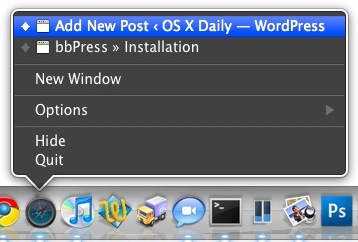
If you’re tired of having your Mac Dock full of thumbnailed versions of minimized windows, you can change the Dock’s minimize behavior with a simple Terminal command that will minimize windows into the parent applications Dock icon. You can then tell which windows are minimized by looking for the diamond next to the window name (see the attached screenshot below for an example).
This is very helpful in particular if you’re working with a limited screen resolution, or if you have a Dock that is loaded to the brim with applications and folders.
To enable this feature yourself through the defaults string, launch the Terminal and enter the following command:
defaults write com.apple.dock minimize-to-application -BOOL YES
The change takes effect immediately. Minimize an app window and you’ll be able to find it now through the right-click menu of the Dock icon, symbolized by the diamond icon appearing next to it’s name as shown here:
To reverse the behavior and go back to the default just use the following command string instead:
defaults write com.apple.dock minimize-to-application -BOOL NO
With how useful this is I’m surprised it’s not an option somewhere within the Mac OS X GUI preferences.
Update: New versions of OS X make this much easier and no longer require a defaults command string to implement, instead you can toggle the feature on through Dock Preferences and minimize all windows into the apps respective icon. This persists throughout OS X from Snow Leopard to Mavericks and beyond. Great news for Mac users who like this feature!
Note that using the defaults command string continues to work to enable this feature in the latest versions of Mac OS X, it’s just no longer necessary to turn to the terminal to complete the task.






Unfortunately, this tip only works in Snow Leopard.
[…] Dock app icon and selecting the window directly. Yes, we have covered this tip before but it was by changing the minimize behavior via the command line, I find it much more simple to do this tricks through the GUI whenever […]
The same to me. It doesn’t work on 10.5.
I agree with Rushabh, this works better:
System Preferences > Dock > tick checbox “Minimize windows into dock icon” (lower part of the window)
The command line provided in the post also gives me the same error Coinneach gets :(
Doesn;t work on 10.5
i get the following error
Unexpected argument YES; leaving defaults unchanged.
Is this SnowLeopard only??
Or you could check the Minimized windows into Application Dock in the Dock System Preference
Hey, there is an option in the GUI
System Preferences – Dock- Minimize windows into dock icon