
See a Preview of Fonts in Cover Flow & Quick Look of Mac OS X
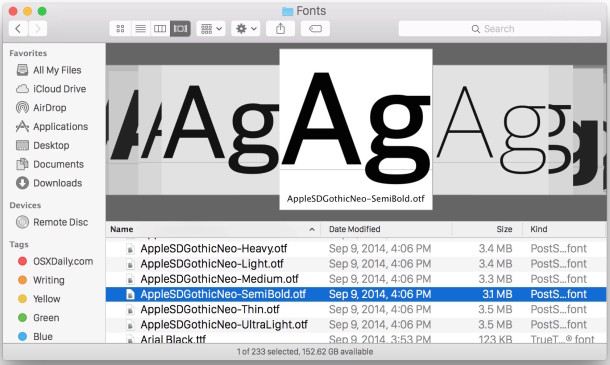
Want to get a quick glance at a font style or a preview of the appearance of a font face before you install the font on a Mac? There are multiple ways to do this, and we’re going to show you two methods to see previews of fonts using the Finder of OS X. The first trick uses the Cover Flow view of the Finder to get a look at a font, and the second trick uses Quick Look to view a preview of a font.
See Preview of Fonts in Finder with Cover Flow
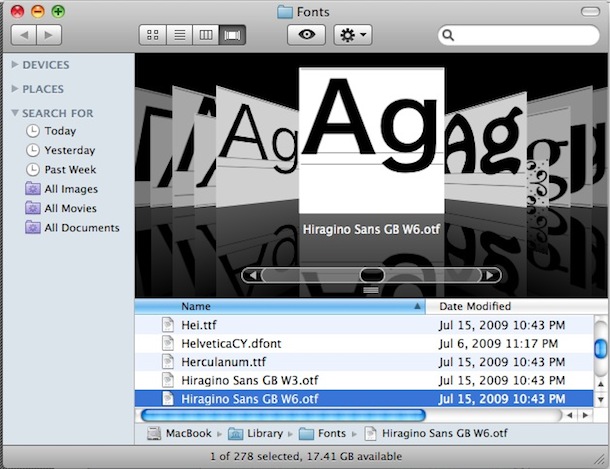
You can easily and quickly preview fonts within Mac OS X by navigating to the font directory in /Library/Fonts/ and changing the Finder view to Cover Flow mode. Now flicking through all your available fonts is easy as can be, and you’ll see a little preview of each font rendered in the Cover Flow view.
View a Preview of a Font with Quick Look
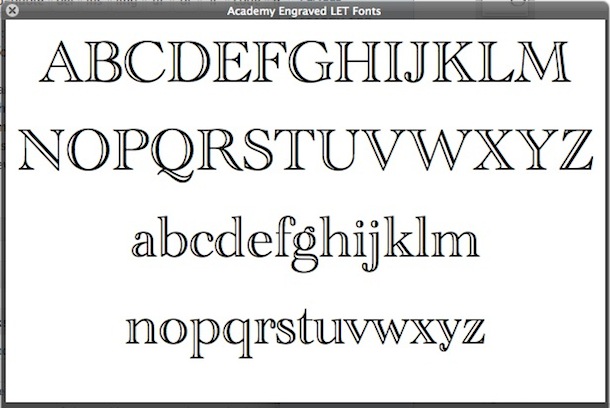
An alternative method to preview fonts is navigating to /Library/Fonts/ (Hit Command+Shift+G in the Mac Finder and type in the path) and then selecting list view, and then hit the Spacebar to enter into Quick Look mode, you’ll now be able to scroll through every font and see the full alphabet rendered in the selected font in lowercase and uppercase.
You can use either of these tricks is just about every version of OS X. This is a Finder based approach to font previewing, but if you’re already in a typographical application and you’re thinking about using a font, you can preview fonts before using them with this trick in an app.






This is a GREAT tip! I hated having to install fonts before I could actually see what they look like. It NEVER occurred to me to use Cover Flow (or Quick Look) to preview fonts! What a brilliant solution to a common headache for so many. Kudos!
[…] discussed other approaches in the past that use Quick Look or Cover Flow view within the /Library/Fonts/ directory to see a complete alphabetical preview of any font face, but this is undeniably faster and easier […]