
How to Access the iPhone Equalizer
The iPhone default audio settings are a little flat for some types of music, and if you’re not thrilled with the way it sounds you will find it remarkably easy to adjust thanks to the iPhone’s built-in equalizer option.
Technically the iPhone equalizer is part of the Music app, it’s not an equalizer in the sense of manual sliders that you can adjust on your own, but there are tons of preset options for a wide variety of music or audio needs, and you’ll certainly find one for your audio preferences, whether you’re listening to ebooks, rock, classical, electronic, podcasts, or anything in between.
How to Access & Adjust the iPhone Equalizer
Here is how and where to modify the iPhone equalizer settings so that you can set them to how you’d like audio and music to sound:
- Open the ‘Settings’ app (usually located on your Home screen, unless you moved it)
- Scroll down to and tap on “Music” (or ‘iPod’ on older iOS versions)
- Now tap on ‘EQ’
- Scroll through the list to find the settings right for you
- Select the preset equalizer settings you want to use by tapping on them
- Exit the EQ settings by clicking the home button or by manually navigating out of the Settings
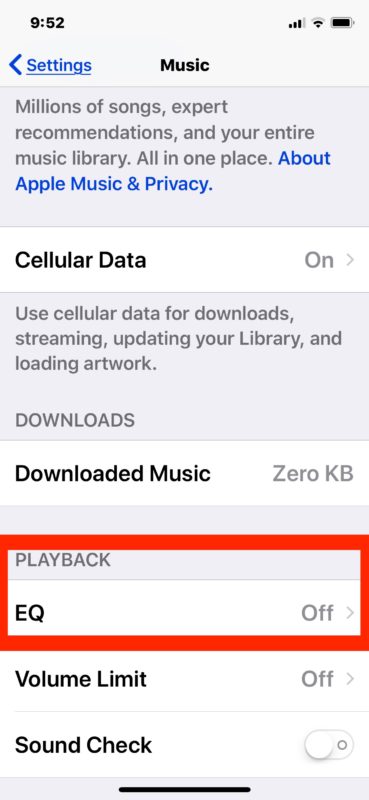
Note: I highly recommend having a song playing while you are trying out different EQ settings, the changes are quite different and you will immediately hear how each sounds as it impacts treble levels, bass, amplification, and all the equalizer magic.
You may want to change your iPhone’s equalizer settings to fit different audio output, for instance I use ‘Small Speakers’ when I’m using Apple’s earbuds, but I’ll use a more specific genre theme with higher quality headphones, external speakers, or my iPhone/iPod dock . It makes a surprisingly big difference, so play around and find one that works for you.
This same protocol works for adjusting the equalizer on every other Apple portable iOS based product, from the iPhone, to the iPod and iPad. Note that the appearance of EQ settings may be slightly different depending on the version of iOS in use on the device, for example here’s how it looks in much older system software releases:
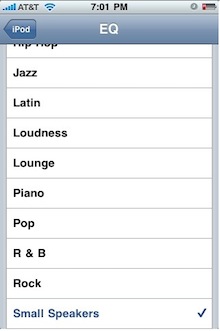
The equalizer settings still exist, and still work the same, regardless of appearance however.
On the desktop side of things, iTunes has a much more complete equalizer with fine-tune controls in addition to the standard default preset options for music genres and audio types, and that is accessible from both Windows and Mac OS X versions.






I can’t believe how much you guys are going around about this the equalizer only works one playing the Apple Music not anything streaming I am going to look for an outside source app for that is that is exactly what I’m looking for tonight if anybody can help me with that I’d appreciate it. Thank you good luck
Please can you recommend a present day equalizer app that I can use when streaming on either pandora or amazon prime music. Please be specific and provide step by step instructions for dummies on how to download and adjust bass, tremble, etc. please I am totally frustrated trying to find one for my iPhone 6 Plus 11.4 or higher is.
Thanks in advance
Hi,
Do you have any idea if there is an equalizer for iphone to use with internet radio like tunein or Anghami..
I appreciate it
Thanks
[…] the iTunes EQ it does not change music you have on your iPhone or iPod, but you can do that too directly on the iOS device so that your mobile music has custom equalization as […]
It’s in Music in iOS6+, not iPod.
[…] the iPhone EQ – turning off the iPhone equalizer provides a boost to battery life when listening to […]
it is slightly different on the iphone 5, after selecting setting instead looking for ipod, select music instead, then you can scroll down to select one of the preset eq that is available. thanks for the info
I think this is kind of pointless… Doesnt the iphone menu speak for itself?
Hi MMES,
Is that really works ? Can you describe me the steps more in detials ?
Thanks
If you customize the equalizer setting in iTunes, those settings will carryover to the iPhone and you can enjoy the sound quality with the iPhone equalizer presets turned off.
I tried this, but not working in my Iphone
The settings don’t carryover to the iphone.
Sanjay,
Did you ever get your computer’s iTunes EQ settings to carry over to your iPhone? It’s not working for me so far.
It would be nice if the equalizzer could remember your prefered eq setting dending on the output device used
rgrds
Pascal
Attention: Activating equalizer has serious impact on your battery lifetime!