
Create an Instant Web Server via Terminal Command Line and Python
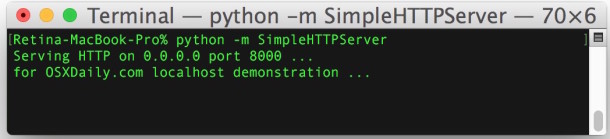
Want to quickly share a file, test some code, or broadcast something? You can instantly create a web server out of the current directory by using nothing but python, yup, no apache, no nginx, no litespeed, all python, which ships with pretty much every unix variation these days. The command is remarkably simple considering how useful it is, and test it out yourself open up a Terminal window and any web browser.
This trick starts a simple web server instantly with nothing but python, it works in Mac OS X, Linux, FreeBSD, and any other unix platform that has python.
How to Start an Instant Web Server with Python
To create the instant web server from the command line, type the following in whichever directory you wish to have accessible via browsers and HTTP:
Start a Simple Web Server in Python 2
python -m SimpleHTTPServer
Start Simple Web Server in Python 3
python -m http.server
This will publish the current directory as a web server immediately, so if you have an index.html file that will immediately be displayed, otherwise it will just list the directory contents at either your localhost IP or “0.0.0.0”. Note that port 8000 is the default port setting for this feature, meaning to access the web server from a browser one would enter the following address: http://0.0.0.0:8000
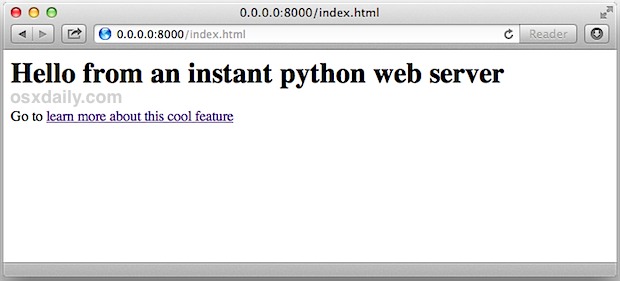
Remember, without an index.htm or index.html file in the directory, a simple directory listing of the CWD/PWD would show up to the browser instead.
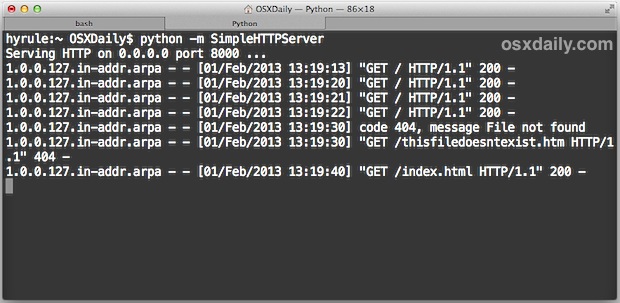
Once running, the terminal will update as pages and data are loaded from the python web server, showing standard http logging information like GET and PUSH requests, which files are being accessed and by whom, 404 errors, IP addresses, dates, times, and all that you would expect from a standard http log as if you were tailing an apache access log file.
You can get fancier if you’d like and specify a port, giving some level of obscurity to the web server if you’re hoping to only broadcast something to a specific individual, or if you just don’t want it showing up on a standard 8000 portscan. All you need to do is specify a port number at the end of the aforementioned command, like so:
python -m SimpleHTTPServer 4104
This would make the web server launch in the current directory at the IP with port 4104, for an example let’s assume the localhost IP: http://127.0.0.1:4104, or http://0.0.0.0:4104 depending on your settings.
This is a very handy tip if you’re doing some quick web development and want to immediately check it in a browser or show it to someone else, and you don’t want to take the time to sftp or commit it to a repository. This should work on any unix variant OS, including FreeBSD, Linux, Ubuntu, Redhat, and of course Mac OS X is included as well.
The video below demonstrates a python server being launched in a directory with a simple index.html file, it also shows how the running python command reflects what is going on with the http connection like a normal http server log would:
Let us know if you find any particularly worthwhile uses or additional secrets for this great little trick.






Hello, I have python code ex:app.py usually we run python code in terminal.I have hosted a webserver on ip address.Now I want to execute my python code on this ip address.Can any one suggest me how can I do this.Please it will be great help…
Thank You…
“world”
Working on a client side library right now and this will be a real time saver for running tests. Thanks!
Hello,
This works if I’m running the server and viewing files on the computer that’s running the server, but this doesn’t work on other computers for some reason. Can you tell me what the problem could be or does it not work that way?
Very useful and simple. Thank you very much.
You can go even further and create an alias on your ~/.bash_profile
# start server
alias webserver=”python -m SimpleHTTPServer”
This way you just have to invoke
$ webserver
@Altsanz php -S localhost:8000
Is there a way to customize the root directory for that.
Hi!
Very useful!
Is there something similar but with PHP capabilities?
I am running OSX leopard, and I can not access the server from another computer on the same local network.
Do you know how to open the port on OSX?
If you’re behind a router you’ll need to clear the port for outside access, but this is definitely helpful for quickly showing off projects and whatnot.
Personally I just run the web server built into Mac OS X, drop things in your Sites directory and you’re good to go.