
Broadcast Notification Style Messages in Messages & iChat on Mac
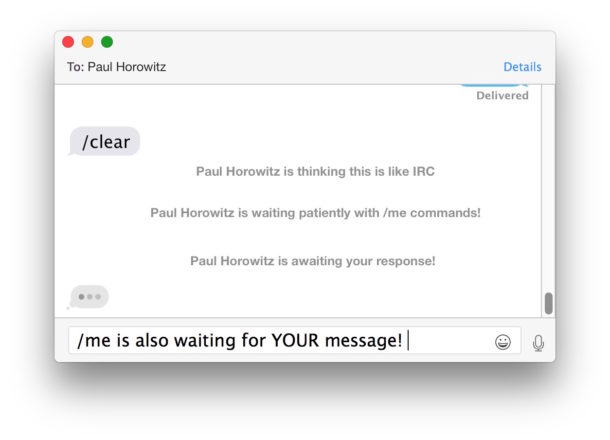
Did you know you can broadcast IRC-style notification commands in Messages for Mac? Indeed you can, even with Messages in modern MacOS releases.
This fun trick was originally discovered with iChat (back when Messages was known as iChat, remember that?) and it’s fair to say that many people never knew about the uses of an IRC like command to broadcast a notification type of message…
Here’s how it works:
In an active Messages for Mac conversation, type:
/me is doing something cool
The key is the /me command.
If you type /me followed by anything, it puts your name into the iChat window followed by the text in a notification style just like the “So-and-so is now online.” and “So-and-so is now offline.”
This only works with Messages to Messages (or iChat to iChat if you’re rocking an older Mac OS X release), as other IM clients will simply see the ‘/me is saying hello!’ text written out.
But in Messages and iChat, it will look like the notification broadcast seen on old school IRC and BBS chat clients. How cool is that!
Of course above you see the Messages app in MacOS Catalina, but this goes way back. Here’s a retro iChat screenshot just in case you forgot what that looked like, with the friendly bubbles and avatars and all:

I found this trick on Andy Ihnatko’s blog via Ihnatko: Stupid iChat Tricks, and the above attached screenshot is from there too.
You learn something new every day!
It does not appear that other IRC style slash / commands work, but if you happen to find one that does then by all means share it in our comments below!






This can also be used in Adium if you use it instead of iChat.
I’ve seen the “/” command before, but didn’t know that it functioned in iChat. Thanks for the tip!
Anybody who ever used a traditional IRC (Internet Relay Chat) client will be familiar with this (and other “/” commands).
http://www.ircbeginner.com/ircinfo/ircc-commands.html
Yea this is a trick that you can use in IRC too, that’s probably where they got it from.