
How to Change the Background Picture of Google
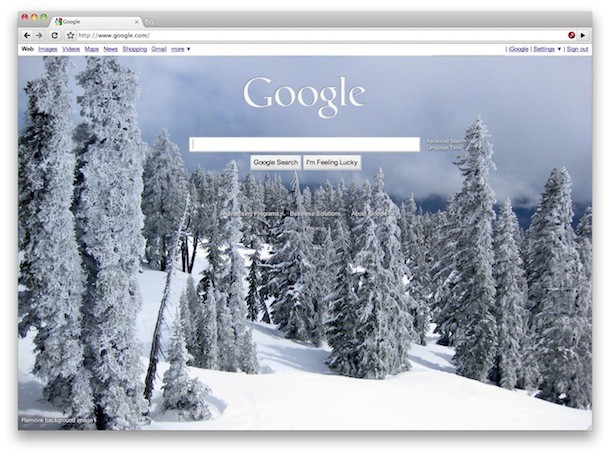
Google is rolling out a feature that allows you to change the background picture of Google.com to a user defined image. Here’s how to customize your Google.com landing page background image.
Change the Google Background Image
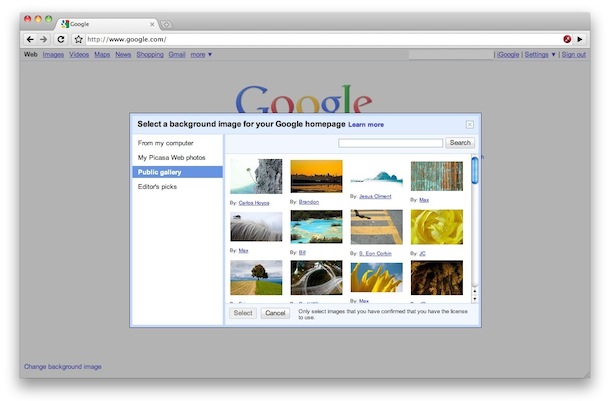
* Go to Google.com and be sure you are logged into your Google account
* Hover over the bottom left corner of Google.com and click on “Change background image”
* Select an image either from the Public gallery, Editor’s picks, your Picasa album, or an image from your own computer
* Click ‘select’ and close the window.
Your Google.com background is now set to a custom image!
Google.com has long been very minimalist, but this is obviously taking a page from the Bing playbook. Bing has long included attractive images as the search engine home pages background picture, it’s not particularly functional it’s just attractive.
I for one welcome the addition regardless of where it’s from, I’m big on customizing things whether it’s changing the login screen on my Mac or adjusting the background picture of the iPad.
Remove the Google Background picture
Removing the Google.com background wallpaper is just a matter of hovering over the lower left corner of the Google homepage and click on “Remove background image”

You can also use an alternate Google local search engine, set the custom background to white, and some other techniques to remove the Google background if you hate it.






I don’t see how to do it either.
I don’t have that stupid app at the bottom left corner
I can’t find it!!!! The owner of google is soo stupid to remove the availability to change the background. I AM SOOO MAD!!!!!!!! They are just plain out dumb.
it’s not available anymore
thanks a lot google,now i`ve got to find another search engine that`s not a totaly boring white background!
anyone got any suggestions??
My “change the background picture” is no shows there. Any idea on how to get it?
wwoooowww, thats pretty dumb,
As of 11/16 Google has done away with background images. whatever was your background picture has disappeared forever, so you have no way of getting a background picture; your going to stare at a blank Google background.., how boring is that?
i dont have a “change background in my lower left area in google homepage!! grrrr. and i am logged onto google but still there is no “change background i found
I wanted to change my background image but then when I removed it,it went back to the original google page and I can’t change it anymore!!pls. help me!!
On 11/16/2012 Google is removing the feature.
If you want to keep please sign this petition:
http://www.change.org/petitions/google-don-t-get-rid-of-custom-background-images-on-the-google-search-page#
or
http://www.change.org/petitions/google-inc-don-t-get-rid-of-custom-background-images-on-the-google-search-page
I can’t change my background image in google
WOW…..you must really think people are, (I’m not going to say it…), not very bright. Yes, I am familiar with the little blurb on the bottom left of the GOOGLE PAGE screen, regarding, “change the background picture”…DUH! OK, now that that’s off my chest, what about the scenario where that little “blurb” no longer presents itself on the screen? What then? Because that is exactly what I am dealing with today. I really don’t know where it went or how to get it back, (like ones’ youth)…..Help me please.
Thanks you!!!!!
My “change the background picture” is no longer there either. Any idea on how to get it back?
Not to insult you Greg but why do you say people who have the same question That they don’t have it either…according to you, Everyone is “Not so bright??? Do you know how to change the Google background without the “change Google background”? then suggesting ‘DUH’ like you think we should know?
If you do know why don’t you tell us instead of calling others
instead of being high on your pedestal if I offended you being Rude, well we would all like to know how to fix this problem. You seem to know…
The button to change the background, the ‘change background image’ isnt on mine…
mine tooo
What worked for me;
just use the numeric ip-address of http://www.google.com
http://72.14.213.147
for your safety you may check that it truely is google:
http://whatismyipaddress.com/ip/72.14.213.147
[…] so anyone that uses Google has probably noticed by now that you can change the background image of Google.com and set it to something you’d like. Today though people are finding a surprise; whether they […]
HOW to change background on Google page?
I do not have “Change background” in the left hand corner??
It’s advertising, careers. etc.. I have a MAC OX
Google has chosen to remove this feature.
Grrrrr! I can find no way to put it back the way it was. If I tell it to remove a background image, it supplies a default image. You can set the image to an all white jpg, but the fonts are not good. I want my minimalist Google back!
Did you try reloading Google.com after clicking to remove the background image?
Google seems to be making a pretty heavy push for this feature to its users so it’s possible it’s gone for now, they are supplying a default image at the moment.
Outstanding! I hadn’t noticed that link before.