
Play Tetris, Pong, and Other Games in the Terminal
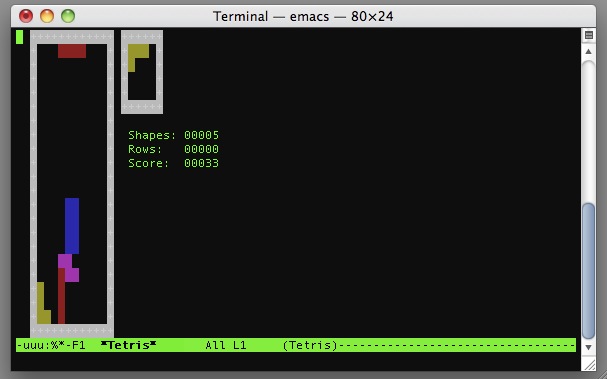
With any installation of Mac OS X comes Emacs (Extensible, customizable, self-documenting real-time display editor – yes that’s what EMACS stands for, now you know!) and with Emacs, some easter eggs that let you play some good old 70’s games directly at the command line.
Yes really, there are retro video games embedded in your text editor! Here is how you can play them.
In order to access these games, simply type into the command prompt:
emacs -q --no-splash -f game
Replace “game” with the game you want to play. Here are some of the most popular: tetris, snake, pong, doctor, hanoi. So to launch Tetris you would type:
emacs -q --no-splash -f tetris
To play tetris simply use the arrow keys and the spacebar. As for pong, it is a two player game (or a contest of your left hand versus your right). Player one uses Left/Right (or 4/6) and Player Two uses Up/Down (or 2/8).
Or to play the popular ‘snake’ game you would type:
emacs -q --no-splash -f snake
You can see the full list of games and other fun animations, type into the terminal prompt:
ls /usr/share/emacs/22.1/lisp/play/
The complete list of games available to play in emacs in Mac OS X is as follows:
5×5.el.gz doctor.elc hanoi.elc snake.elc
5×5.elc dunnet.el.gz landmark.el.gz solitaire.el.gz
animate.el.gz dunnet.elc landmark.elc solitaire.elc
animate.elc fortune.el.gz life.el.gz spook.el.gz
blackbox.el.gz fortune.elc life.elc spook.elc
blackbox.elc gamegrid.el.gz meese.el.gz studly.el.gz
bruce.el gamegrid.elc meese.elc studly.elc
cookie1.el.gz gametree.el.gz morse.el.gz tetris.el.gz
cookie1.elc gametree.elc morse.elc tetris.elc
decipher.el.gz gomoku.el.gz mpuz.el.gz yow.el.gz
decipher.elc gomoku.elc mpuz.elc yow.elc
dissociate.el.gz handwrite.el.gz pong.el.gz zone.el.gz
dissociate.elc handwrite.elc pong.elc zone.elc
doctor.el.gz hanoi.el.gz snake.el.gz
Me personally, I’m partial to snake and tetris, but have fun!
Thank you to Carl Gravel for the tip!






What about windows? Is there something similar for Windows?
I haven’t seen this command to get to Tetris Easter egg before!
My method:
1. Invoke emacs
2. Hit Escape
3. Type x
4. Type tetris (or snake or whatever)
5. Hit Enter
Much faster and easier to remember!
[…] een t bij contact En hier is nog een leuk artikel wat je misschien kunt gebruiken op je website, klik. Antwoord met Citaat + Plaats een Reactie « Komplet heeft […]
[…] OSX Daily) Tagged as: Mac, OSX, Pong, Snake, Terminal, Tetris Leave a comment Comments (0) […]
A personal favorite:
emacs -q –no-splash -f psychoanalyze-pinhead