
How to Adjust Display Brightness on Mac Precisely
If you need to adjust the brightness of a Mac display precisely, you can turn to two different tricks that offer precision control on just how bright a Macs screen is.
First is a handy and little-known keyboard modifier that allows for precision adjustment, and second, we’ll show how to access the brightness slider in Display preference panel.
Precision Adjustments with Option+Shift Brightness Buttons on Mac Keyboards
Hold down the Option+Shift keys while you adjust screen brightness to precisely adjust the displays brightness by allowing you to have 64 levels of varying brightness vs the default 16.

The incremental adjustment allows for precision when setting a screen brightness level, offering tremendous control over exactly how bright or dim you want the Mac display to be.
As you can see in the screenshot, this is done by breaking each brightness step into four stages. I find this kind of precision really useful on my MacBook Pro when in dimmer lighting conditions, but it works on desktop Macs too, and with just about every version of Mac OS X.
You can do the same type of precise adjustments when changing your Mac volume levels too, which also offers the incremental controls through the same keyboard modifier trick.
Note that new versions of Mac OS still allow for this feature, but with Lion through Yosemite and Mac OS X El Capitan, Mojave, Catalina, etc a slightly different modifier key is required for the incremental precision adjustments using the function keys for volume levels and brightness levels on the newest Mac keyboard.
How to Adjust Mac Screen Brightness through Display Panel in Mac OS X
If you have multiple screens or would prefer to use a slider, you can precisely adjust the brightness of a connected Mac display with the System Preferences, just go to the “Displays” preference panel and under the ‘Display’ tab adjust the slider to the brightness level desired.
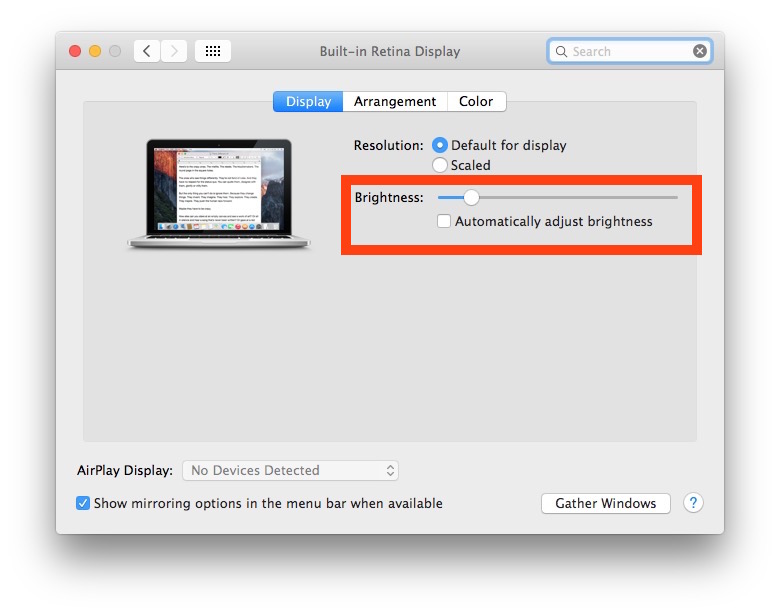
The display brightness slider exists in all versions of Mac OS X with all Macs, so regardless of the machine being an iMac, MacBook, MacBook Pro, MacBook Air, or an external display, you will have those display brightness options.
Do note that some third party displays from particular manufacturers only allow for brightness adjustments on the actual panel itself, using physical buttons on the display. But if that’s the case, simply pressing the appropriate buttons for higher or lower brightness will have the desired effect.






[…] you remember how you could make small and precise 1/4 incremental changes to brightness and audio volume in Mac OS X Snow Leopard by holding down the Option key? Many thought this feature […]
Doesn’t work on Lion
won’t work on Mac OS X 10.7 Beta 1
[…] eye fatigue on late nights in front of my Mac. I let Flux adjust the displays warmth, and then I manually adjust the display brightness to a lower […]
Does not work on 10.5.x
only on 10.6.x
..volume works on both
Hmm I can get it to work for the volume but not the backlight, does something need to be changed in my settings?
oops, the information was there already…sorry.
The same procedure is valid for volume control!
Pamike-Chile