
How to Increase or Decrease a Songs Volume in iTunes
 If you come across a song playing in iTunes that is not playing at an appropriate level, perhaps it’s playing back way too loud, or maybe it’s far too quiet and it doesn’t play loud enough for your preference, you can individually increase the volume level of any specific song in your iTunes Library. Likewise, if a song plays too loud, you can lower the volume using the same controls, which are presented as an easy to use slider.
This song-based volume adjustment ability works in all versions of iTunes on Mac and Windows, and the song volume adjustments is handled through iTunes settings on a per-song basis. This is a really easy setting adjustment to make, here’s what you’ll want to do:
How to Change a Songs Volume Output Level in iTunes
This changes a specific songs volume output level in itunes, you can make a song more quiet or louder using this volume slider. This is not the same as adjusting the general iTunes volume level.
- Open iTunes and navigate to the song you want to adjust the audio level for
- Right click on the song name and select “Get Info”
- Click on the ‘Options’ tab
- Slide the Volume Adjustment slider in the direction you want to change:
- Increase a songs volume by sliding all the way to the right
- Decrease a songs volume by sliding all the way to the left
- Anywhere in between works well for finer adjustments to a songs volume level, 0% is the default playback volume for a song
- Click OK to set the change for that song
Here’s an example of changing the audio of a song to play a bit softer:
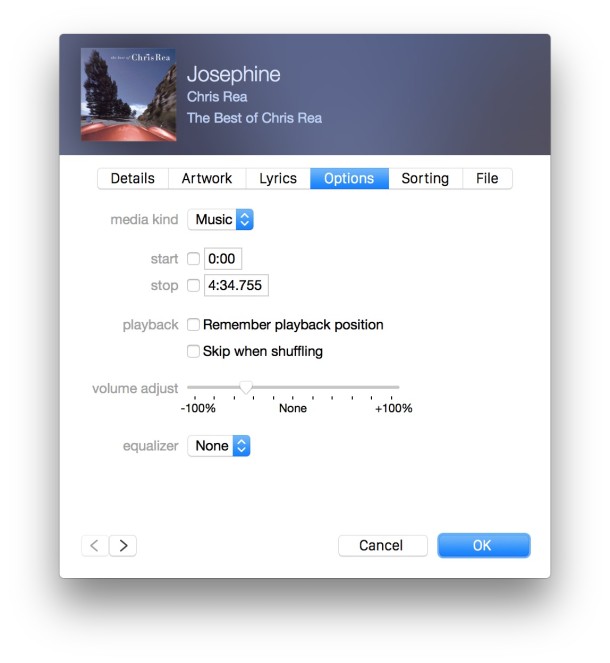
If you set it to 100%, the song will now play at twice the volume level it did before, and so on. If you change it to -50%, it will play half as loud as it used to play.
Going all the way to the right will make that specific song play much louder:
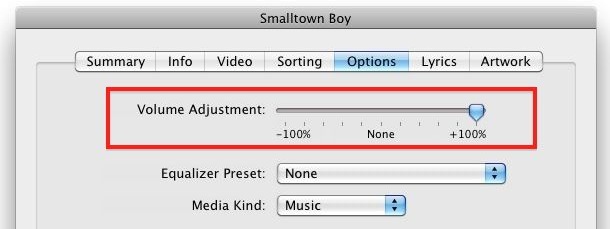
In my experience this does not degrade the quality of the audio whatsoever, though it really depends on bitrate and the overall audio quality of the song file, so but generally speaking it’s a pretty safe choice.
Boosting the song volume like this on a per song basis is a good way to fix the way a single song plays, which often vary tremendously with a variety of volume levels depending on what the source of the audio file was. Another trick that users can also use is to set iTunes to automatically adjust song volume levels, and iTunes will attempt to play all music files at the same volume level, functioning as a volume equalizer of sorts.
This tricks works in Mac OS X and Windows in all versions of iTunes.






Hey everyone,
I am looking for an update. I can no longer bring up the options menu on a song in iTunes by right clicking, the steps you described above is how I have been doing this for years. Must have been an update to this…..I hope I am jot the only one with this problem. I am a fitness instructor and it’s so important that the volume is consistent song to song. Thanks
if you change volume on each song in playlist will that setting stay on a burnt CD ?
LMAO @ Unai, Michael and Confused
But do the changes stay in place when you burn the songs onto a CD?
Good question. I’m about to find out.
Tom,
Based on my first attempt at this – and I spent a lot of time adjusting the volume levels – the answer to your question is sadly: no.
The odd thing is that I can adjust the length of a song by going to the same page where you can supposedly change the volume (some songs have several seconds of silence after all sound from the song has ceased completely – sometimes up to 7 seconds; if I don’t want that 7 seconds between songs I can always adjust it via iTunes). This bit works and translates to burning the songs to CD so I have no idea why it didn’t work with the volume levels.
thanks alot.
Thanks so much! I had my setting set to make all songs at the same volume, but this one song would blow my ears out when it came on when using my earbuds. Ouch! I couldn’t stop the pain fast enough! Anyway, I’ve changed the volume on individual songs before, but it seemed to be a different method. Maybe the method got changed in one of the updates. You saved my sanity.
I’ve had similar issues, Susan. I was listening back to a mix CD I burned using the function that’s supposed to make all the songs the same volume only to find that at least a couple of songs were so quiet compared to the songs around them that it ruined the entire flow of the CD. Imagine listening to a song which displays a volume level of 60 on your tuner then turn the volume down to 45 for the next song. That’s the extremity in volume change I experienced.
Unfortunately turning the volume of the quietest song up still did not make it as loud as the songs around it. It’s definitely louder, but not louder, but still not loud enough. I moved the song on the CD so it would be surrounded by quieter, more mellow songs. Had I not increased the volume though, it would have sounded out of place no matter where it was on the CD.
PRECIATE IT YO :D
What if I want to apply this volume adjustment to all my songs? Is there a way to do a batch?
go to your main menu, click on one song. Press control and A on keyboard this will highlight all the songs. Right click on one of the songs and select ‘get info’, it will ask if you want to get info from multiple songs…. then you click ok, and go to the increasing volume method.
Mark I’ve always had to do it one by one for years,never thought it was this easy… You are a beast, good looking bro!!
Or use iVolume, a great utility for normalising individual songs or entire albums.
Iam disapointed about qulity of the tips sometimes,
Somes are really usefull like terminal, hidden feature, but some are integrated in system, is not a tips, is a feature ;)
Adam, this is how you change a songs volume level in iTunes, you want it more quiet, or more loud, that is how it is done, what is disappointing about that? Frankly Adam, I am disappointed in your english competency, you can barely type a coherent sentence, I hope you are back in school and working on that. Maybe increase the volume of your lessons using this tip.
Unai,
Your smarmy sarcastic comment five years ago (!) about Adam’s English reminds me of all the ugly Americans I grew up with. You apparently cannot imagine anyone as intelligent unless he/she can speak English. Typical provincialism by an American who sounds like he’s never left his village or met intelligent foreigners. I wonder if in the last five years you’ve grown less xenophobic. Look it up.
Michael,
Why do you assume Unai is an “American”? Maybe, you’ve had some bad experiences. I bet Unai is a “foreigner” who happens to speak English.