
How to Reopen & Restore Windows from Last Session in Safari on Mac
 Have you ever closed a window that you really wish you didn’t in Safari? It’s pretty common to accidentally close an important tab or browser window, and sometimes the Safari app will even crash too. But don’t freak out, you can re-open your last browser sessions in Safari regardless of why they were closed. Session restore is multi-featured on the Mac Safari app, and there are actually two ways to quickly restore your last browsing session, including all of its closed windows, tabs, and URL’s in Safari.
One of the features is automatic – just relaunch a crashed Safari app and modern versions of OS X will attempt to restore your prior browsing windows.
But, what if you closed a window on accident? Or what if you lost a browsing session for some reason, but the app didn’t crash? Or if Safari crashes, but the auto-restore function did not re-open your browser windows? Don’t sweat, because by doing the following simple trick once Safari has re-opened you’ll get your prior browser windows back in a jiffy in Mac OS X.
How to Re-open Windows from Last Browsing Session of Safari in Mac OS X
To restore your prior browser windows in Safari for OS X you can rely on any of these three approaches:
- Open Safari if you haven’t done so yet – modern releases of OS X will attempt to restore the last windows if the app crashed – OTHERWISE you can use the history option for all other sessions – even if you closed a window accidentally – as follows:
- Pull down the History menu and choose the option you want:
- Scroll down to “Reopen All Windows from Last Session” to recover all the windows from the last browsing session in Safari
- Choose “Reopen Last Closed Window” to open the last open window in Safari that is no longer open – if you accidentally closed a window this will immediately re-open that window in Safari and relaunch the site in question
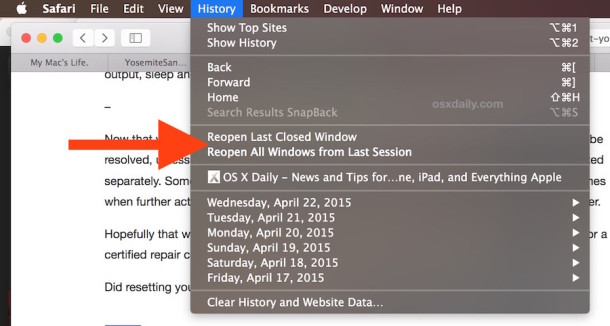
As you can see this is pretty thorough, with three levels of restoration of prior Safari browsing sessions: the system-level automatic approach, the last closed window approach, and the re-open all prior session approach.
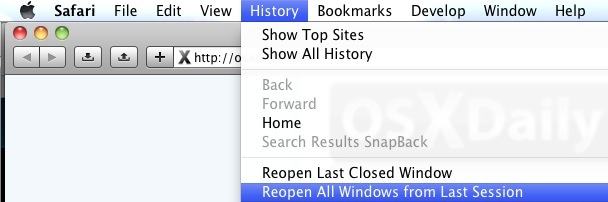
The “Reopen All Windows” trick will instantly relaunch every previously opened window and tab into new windows and tabs, effectively restoring your previous browsing session exactly where you left off. This is a huge time saver, particularly for those of us who live in web browsers but have the occasional misfortune of a Safari crash.
This even works if you accidentally closed an entire window full of tabs, you can instantly restore them all using that same “Reopen” trick.
Remember this, and don’t forget it! This has personally saved me from all sorts of stress and headaches when Safari crashes with important tabs and windows open, and you’re sure to get the same relief from it as well. Try it out the next time you have browser failure, you’ll be thrilled such a feature exists.
Note: as mentioned, modern versions of OS X have a separate system level window restore function, that works in addition to this, and you can effectively use both or either ways to restore prior browsing sessions on your Mac.
It’s probably worth mentioning that if you ever find that Safari crashes on the Mac, it’s possible that a plugin caused the error, or some type of browser add-on, maybe even blame Flash – Ok all jokes aside, if Safari has crashed in the midst of browsing the web, there are multiple possible causes. Regardless, restore your last browsing session, regain all those closed windows, tabs, and URL’s, and you’ll be back to where you were in no time.






why is it with macs you get the same stupid answers that dont work. I hit reopen last session, it crashed and all those tabs that would have opened …gone, erased from the last session cache. Safari is such a p.o.s. thanks for nothing
This does not work in Windows version of Safari. There is no History menu – History is in the Bookmarks folder.