
Watch Disk Use, CPU, and Load Average via Command Line

Here’s a nice trick if you need to continuously observe your Macs system usage, including disk usage, CPU, and load average. The great thing about this iostat trick is that it updates constantly, allowing for realtime monitoring of system performance, which can be extremely helpful for performance testing and tracking down various processes or activities that are resource heavy.
The secret is attaching this w1 flag to the iostat command you’ll get a constant stream of updated load information:
iostat -w1
You’ll then get a continuously updated stream of your hard disk usage, CPU split into user/system/idle, and your Macs load average:
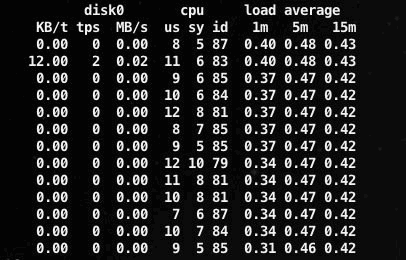
iostat will keep running in this mode until you stop it with Control+C to halt it. You can also just run iostat on it’s own and it’ll spit out a one-off look at the system stats, or you can just use the top command for similar effect.
If mucking around in the command line isn’t your thing, you can get most of this information from the activity monitor, which functions as a task manager of sorts for Mac OS X but also details system usage information.
By the way, this works in Mac OS X and linux, so for users who span unix platforms, it’s particularly helpful to know tricks like this.






Didn’t work for me… I have a macbook pro 13″ Any idea?
Try just ‘iostat’ and if that doesn’t work you may need to install Developer Tools which comes on your Mac OS X installer disk.