
How to Set a Static IP Address on a Mac

If you want to set your Mac to always have the same IP address (also known as a static IP address), you can easily configure this to be set in the Network settings of OS X. This can be valid for both wi-fi networks and wired ethernet networks, and it can also be set under a specific network location if desired.
We’ll walk through how to set a manual IP address in Mac OS X, this is the same in all versions of OS X system software so it will not matter what version is on your Mac.
Setting a Manual Static IP Address in OS X
- Launch System Preferences from the Apple menu
- Click on “Network”
- Click on the protocol you are using, let’s say we’re using Wi-Fi with a wireless connection so click on “Wi-Fi” so that the network interface is selected, and then click on the “Advanced” button in the lower right corner
- Click on the “TCP/IP” tab
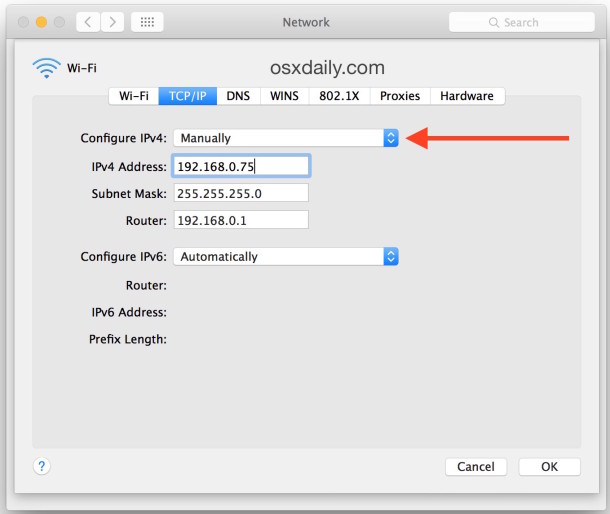
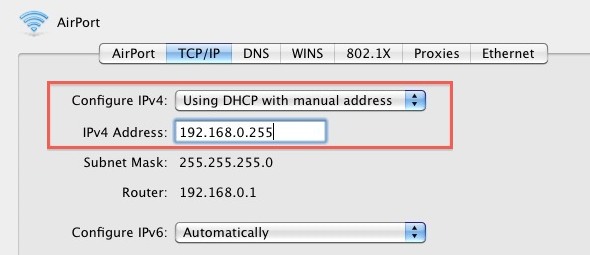
- You now have multiple options for manual IP address assignment. For the sake of this exercise, let’s assume you want to maintain DHCP but set a manual static IP address, so click on the drop-down menu next to “Configure IPv4” and select “Using DHCP with manual address”, but you can also use full manual mode by choosing “Manually”
- Select a static IP that will not conflict with anything else on the network. It’s best to pick a number far out of the normal range of assigned IP’s, in the example below we chose 192.168.0.245 because most of the machines on this network stop at 192.168.0.150
- After you have selected your static IP address, click on “OK” in the corner
- Click on the “Apply” button in the lower right corner
- Your IP will now manually set to the static address you provided, you will briefly disconnect from the network while this occurs
- Close Network settings and System Preferences
This is what a complete manual IP address assignment would look like in OS X Network settings:
This is what the DHCP with manual address setting would look like:
Now your Mac has a static IP address that will not change if the router resets or the Mac rejoins the network. As long as the IP does not collide with another network devices IP address, it will work just fine, this is why you pick an assigned IP far out of range of other potential devices.
 There are other ways to achieve assigned static IP addresses of course, and ideally you would set a static IP to your hardware from the router itself by determining it’s MAC address, but that is a more advanced solution and also varies from router to router, making it impractical to cover here. Instead, the software based method in OS X works quite well, and is an easy way to always carry the same defined IP address on a given network.






It didn’t work at first, and I have a linksys router so I went to Network->Advanced->DNS->and added in the left box 192.168.1.1 and it worked.
you are my savior, ive been swatted every day, and now they dont know my ip :)
I bought my MB pro about 2 weeks ago (first MAC) and once I realized I had a problem I began searching for a solution. Amazing how there are literally 100’s if not more posts on numerous websites-including the APPLE SUPPORT forums-yet NOTHING from the braintrust in Cupertino. …..;(
I tried many things-last of which was turning off IPv6-with no success. Earlier today I finally assigned a static IP to my MB pro on my D-Link router via web browser and viola!!! Problem appears to be solved. I’ve been online for several hours without any interruption.
It is an easy solution for an experienced user-but I’m certain this is no comfort to those that bought the Mac because “It’s so simple-ANYONE can use it,regardless of computer experience”……..
Thanks.
FWIW, if you have a router most will let you permanently assign an IP to a DHCP client based on the MAC address of the hosts ethernet NIC. And yes. x.x.x.255 for a 0xffffff00 netmask is the broadcast. Your text is right, just the screengrab shows the wrong addr.
Good catch Sebastian & Max, thanks for pointing that out
In a /24 network, the .255 address is the broadcast address. It cannot be used by an equipment. Same with .0 which is the network address.
Valid addresses are from 1 to 254
If you have a subnet which is larger than /24 (eg. /23 or /22), then .255 can be used in some cases.
please can you send me the details on how to set up a new ip address on my iphone 6.send it to my mail please
The IP address you have used in the screenshot are not valid in this network configuration. 192.168.0.255 is for broadcasting.
Address: 192.168.0.1 11000000.10101000.00000000 .00000001
Netmask: 255.255.255.0 = 24 11111111.11111111.11111111 .00000000
Wildcard: 0.0.0.255 00000000.00000000.00000000 .11111111
=>
Network: 192.168.0.0/24 11000000.10101000.00000000 .00000000 (Class C)
Broadcast: 192.168.0.255 11000000.10101000.00000000 .11111111
HostMin: 192.168.0.1 11000000.10101000.00000000 .00000001
HostMax: 192.168.0.254 11000000.10101000.00000000 .11111110
Hosts/Net: 254 (Private Internet)
See: http://jodies.de/ipcalc?host=192.168.0.1&mask1=24&mask2=