
Find your iPhone IMEI Number
IMEI stands for International Mobile Equipment Identity, you can think of IMEI like a serial number in that every iPhone, or other mobile phone for that matter, has a unique IMEI number used to identify it with carriers, manufacturers, and providers. There are several reasons you’d want to know your IMEI, and we’ll get into those in a moment, but before that let’s find the number. We’ll show you four different ways to get this info, either directly on the device itself, or with iTunes.
How to Find an iPhone IMEI Number: 4 Methods
We’ll cover four different ways to obtain a devices IMEI number, these are unique to each mobile phone and iPhone, and you can retrieve them either through the device itself in iOS, through software like iTunes, or even on the physical hardware itself. Use any method that is appropriate for your situation, the IMEI returned will always be the same.
1: Dial *#06# to get any IMEI
Before trying anything else, you can try simply dialing *#06# on your iPhone (or any mobile phone), this should retrieve the IMEI number. Give it a moment and the IMEI will appear on the screen – this little number dial trick actually works to retrieve the IMEI on other cell phones too, not just the iPhone.
If that doesn’t work for whatever reason, or if the phone is turned off, has a dead battery, or whatever, you can use one of these other methods to retrieve the IMEI.
2: Get iPhone IMEI from the iPhone
You can also retrieve the IMEI number from the Settings app on the iPhone. This is the same on any iPhone and any iOS version:
- Tap Settings
- Scroll down to and tap on “General”
- Tap on “About”
- Scroll down and look for “IMEI”
- These numbers are your IMEI, on the iPhone they are usually listed like: xx xxxxxx xxxxxx x
You can also find IMEI from iTunes:
3: Get an iPhone IMEI Number from iTunes
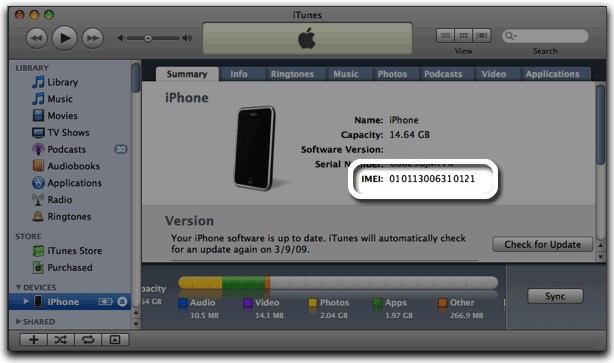
If your iPhone is connected to iTunes you can grab the IMEI number from the app:
- Select your iPhone from the iTunes menu
- In the “Summary” tab click on your phone number to reveal the IMEI number
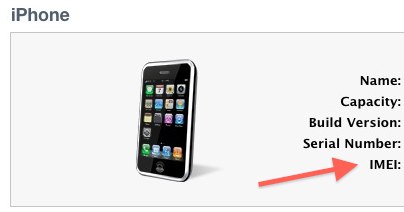
This can look a little different depending on the version of iTunes in use, but it works the same for iPhones connected to a Mac or Windows PC with iTunes:
4: Get the IMEI number from the iPhone back or SIM card holder
All iPhone models will include the IMEI number on the actual device itself.
For new iPhones, iPhone 5, iPhone 6, and later, you will find the IMEI printed on the back of the phone in small print.
With iPhone 4S and older, the IMEI is printed on the actual SIM card slot, so just eject the card holder and read the printed numbers.
Why would you need the IMEI number?
There are plenty of reasons, ranging from theft protection and insuring a device, to setting up an iPhone as a pay-go phone but here’s a few of the most common reasons people need a devices identity number:
- If your phone ever gets stolen: your cellular provider can typically ban a phone from accessing the network via it’s IMEI, this is nice because the IMEI is attached to the phone itself and not the SIM card, meaning the entire phone can be blacklisted from a network which renders a stolen phone mostly useless.
- Checking iCloud Activation Lock: if you want to be check the iCloud Lock status of an iPhone, you can use the IMEI number to do so
- iPhone Pay-As-You-Go: You’ll need the IMEI when you call AT&T for setting up an iPhone 4 as a pay-go phone on their network, this is how they identify the phone
- Permanent iPhone unlock services: these require the use of your iPhone IMEI number, which is then added to an unlock database at a carrier. These services are sometimes questionable, so be cautious with signing up for them
- Unlock with AT&T: If you request an official unlock through AT&T’s web unlocking service, you will need to have an IMEI number so that they can reference the device and complete the request
Know of any other methods of obtaining an iPhone IMEI, or another usage for the iPhone IMEI once you have found it? Let us know in the comments!






hello sir please reply. my iphone model is 5s/silvar/64GB was lost . Model A1530. my IMEI code is tel:352023063180182i so sad and
Knowing your iPhone IMEI number is helpful for some situations but it is not going to be helpful except for reporting it to your cellular phone company.
Since you lost your iPhone your best bet if you lost your iPhone is to use Find My iPhone to lock the device, find it on a map, then make it ping and make noises. No IMEI number needed.
https://osxdaily.com/2013/08/14/find-lost-iphone-icloud/
Try that out. Good luck finding your iPhone!
Can anyone tell me that by looking on imei number can we guess that the iphone is an American or a Chinese version?
Yes I have an iPhone 6s I got from someone I can’t do anything with it all the person stuff still in it but I can’t get in it
How do I find my lost iPhone 7plus without knowing the imei code.. thanks
My iphone 6 was deactived .. please help me .. imei354429061261312
My iphone 6 was deactived
Is IMEI # on the back of S6 apple ?
I found my imei 013270001990823
my iphone 6 is stolen with sim no emi no. no box. bought from USA . any information… plz
I need to get into my iPhone but I can’t get the password neither the apple I’d
how I check the imei number of my iphone 4s..its been off for sometime now…and when I put it in I am told the phone is stolen
hello sir please reply. my iphone model is 5s/silvar/64GB was lost . Model A1457. my IMEI code is 358829056312952. i so sad and my – See more at: https://osxdaily.com/2011/04/13/iphone-imei/
hello sir please reply. my iphone model is 5s/silvar/64GB was lost . Model A1457. my IMEI code is 358829056312952. i so sad and my
Imei 358267061672268
imei 01300200159036
Location accuracy is improved when wi fi is turned on
sir i nead to open my iphone 5 i just buy it.my imei 013736000800684.i hope sir can help me to open it
I lost my I phone 4s I hav imei n given police complaint too but no use I haven’t synchronised and not even created any accounts like find my iphone like that , help please
My iPhone 4s IMEI is
01 307000 897725 6.
Please help me
I lost my phone but know the iemi number. Can I track it to see where it is?
my iphone 5s is severely broken and it was never set up to an itunes account, is there any way to retrieve my IMEI number without my iphone 5s being turned on?
hello sir please reply. my iphone model is 5s/Gold/32GB was lost . Model A1530. my IMEI code is 358843053171071. i so sad
[…] the phones IMEI number beforehand, there are a few ways to find it on the iPhone itself or in iTunes, or just dial *#06# to retrieve it […]
[…] Find the iPhone IMEI number by dialing *#06# on the phone – you do not need cell service to dial that number, the iPhone just has to be turned on. If the *#06# trick doesn’t work, you can also find the IMEI from iTunes, on the back of iPhone 5, on the devices SIM card slot, or through the iPhone itself as described here […]
[…] The iPhone IMEI number found in Settings > General > About […]
Hello sir/ma I,m texting you from Nigeria i got an Iphone from a friend of mine and it has been giving me issues daily . I need to get the ime for the phone Model A1387, Emc 2430,ID Bcg-E2430A IC 579C.Pls i need to get it activated. And the IME. Thanks
[…] unlock your phone, you first need to find the IMEI number of your phone. This can be done by typing *#06# on your dial pad. You can also browse through your phone’s settings or remove the battery […]
Good morning! I would like to officially open my iPhone 4. My name is Fuhua Ma. My friend bought this phone in store Apple, as a gift this iphone for me. I am not a resident of the U.S., so I can not use it with local operators.
My IMEI is:012418008959132
I really appreciate your help in my problem.Please send me an email when my requirements will be accepted.
[…] iPhone IMEI number […]
[…] directly to walk through the unlock process with a representative. Typically this requires the IMEI number of the iPhone in question, which can be easily found on the iPhone itself or through iTunes. The phone number for […]
Dear Sir/Madam,
My iPhone 3G is stolen and I have no IMEI number so, I am in deeply trouble with my stolen iphone. Please let me know how i can get the IMEI no of Iphone? Is it possible to get it from picture information which is taken by my stolen phone. Please let me know the process how i can get the IMEI no without iphone.Please find the necessary information of my iphone cellular.
Model : MB046LL
Storage : 7.1GB
Buy : From US
Waiting for prompt reply and will be gateful for any help in my situation.
Thanking you
Abror
If you don’t know your IMEI and your phone is already stolen you are out of luck –
UNLESS you ever connected that phone to your computer through itunes. In this case, you’re in luck.
Your IMEI number will be found in an XML file on your computer in one of the two places:
c:\Documents and Settings\ \Local Settings\Application Data\Apple Computer\iTunes\iPodDevices
c:\Users\ \Local Settings\Application Data\Apple Computer\iTunes\iPodDevices
In that file, look for
IMEI
blah blah
your number will appear instead of ” blah blah “.
Careful though – if more than one iphone was EVER connected, you’lll have multiple. Make sure you identify the right phone and report the correct number.
How can you do this when using my Mac – do you know?
Dear Sir.
I am in deeply trouble with my stolen iphone. here i need to know how i can get the IMEI no of Iphone which i have lost. Please let me know the process how i can get the IMEI no without iphone.Please find the necessary information of my iphone cellular.
Model : NOA1241
FCC – IDBCCA1241
SCC-0682
Storage : 8GB
Buy : From Spain (Bercelona)
Waiting for prompt reply.
Thanking you
Jahirul Islam
Hi, the best way to find your I phone IMEI; look at the box from outside. If you do not have try contacting the dealer you purchased from, They should have it.
Good Luck!
Sonny
[…] You might be looking at a prototype iPhone 5 running on the worlds largest cellular carrier, China Mobile. The iPhone pictured looks very similar to the iPhone 4, but clearly shows an unreleased baseband version 06.10.01, and like other Apple prototype iPhones, there is no IMEI number. […]
.. i didn´t know that.
Type *#06# in ANY pone for IMEI.
Where do you type it?
type it like you are dialing a phone number
Amy’s in the gene pool
Just a thought, but if providers blacklist phones by IMEI, chances are that is exactly what is going to happen to anyone who uses the IMEI unlock services. Unlocked or not, the iPhone will be blocked from accessing any network with any SIM.
[…] would this be possible? The $169 service apparently whitelists your iPhone IMEI number by manually adding them to Apple’s databases. How exactly they are doing that is in […]