
Add Your Own Folders to the Finder Sidebar in Mac OS X
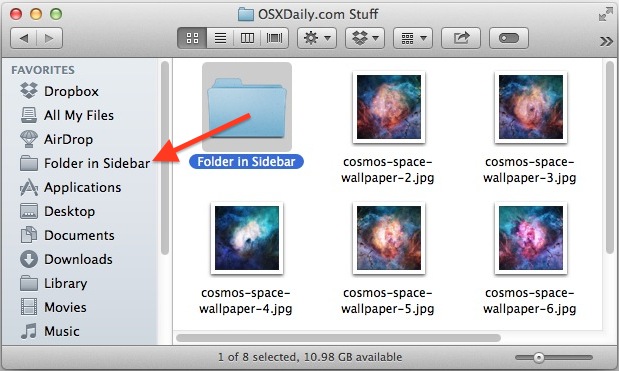
Want to add your own folders or items the Mac OS X sidebar to customize it a bit more, perhaps by adding shortcuts to your most recent work, or a regularly used folder, directory, or drive? A great way to do this is by adding your own specific folders to the Finder sidebars. There are two simple ways to add your own files and folders into the Mac sidebar panels, they’re both fast and you can use whichever method you prefer:
Add Any Folders to Finder Sidebars with Drag & Drop
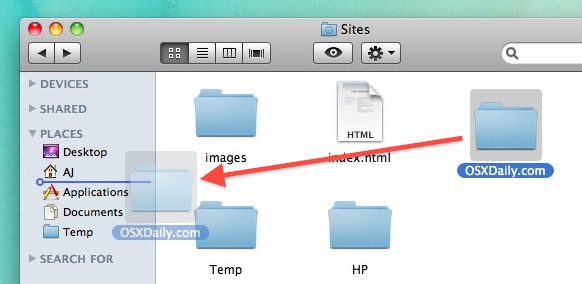
Simply taking any folder (or file), and then dragging and dropping it directly into an open Finder windows sidebar will add that item to the sidebar as a quick access link. This is super easy. You can even control where it goes by paying attention to where you drop it within the sidebar, a little blue line will indicate where the folder will end up, so you can place a folder precisely between two other sidebar items easily, or put it at the top or the bottom of the list, whatever you prefer.
This works the same in all versions of the Mac Finder, regardless of Mac OS X version.
Add Items to Mac Finder Sidebars with a Keyboard Shortcut
Like many other things in Mac OS X, there’s a keyboard shortcut to add items to the Finder sidebars. The shortcut is slightly different depending on your version of Mac OS. To get started, select any file or folder in the Finder and use the appropriate keystroke below:
- macOS Big Sur, Catalina, Sierra: Select an item in the Finder then hit Command + Control + T to add to the sidebar
- OS X Mavericks and newer: Command+Control+T to add selected item to the Finder sidebar
- OS X Mountain Lion and older: Command+T to add selected item(s) to Finder sidebar windows
Whether using drag or drop or the keystroke method, you’ll find this to be especially useful for accessing frequently accessed folders and projects that you don’t want clogging up your Dock or cluttering the desktop.
Removing Folders / Files from the Mac Sidebars
When you want to remove the folder from the sidebar, you can easily do so with a drag and drop trick too, the secret is to hold down the Command key and drag items from the sidebar to remove them instantly. Easy.
You can also right-click on an item and choose to “Remove from Sidebar” that way too.
–
This trick idea came via a comment on a post about customizing the Finder window toolbar that sits across the top of the screen, thanks to Bikorchi for the tip inspiration!






How do I make USB storage devices always appear in the sidebar?
Question, MacBook Air and home PC/Win7 – shared folder on Win7 ‘Photos’… can see it from Mac – Can’t add folder… can add any of the sub-folders easily to the sidebar – just not the top-level one that seems to be the share.. Any ideas?
[…] like you can drag your own folders into the sidebar, you can also drags apps into Finder window sidebars for quick […]
This is awesome news but.. How do I remove/erase the stuff I place there?…
Hold down the Command key, click on an item, and drag it out of the sidebar
Holy Cow! I needed that!
A few months ago, I found a way to add the alias of a network share to the Finder sidebar. Since then, I had removed the share from the network, but the link I had added to the sidebar remained. Unlike the other items on the list, where an Option+click gave multiple options (including remove), this single icon and label would not be removed.
But success! Holding the Command key and dragging it off the sidebar did the trick! Thanks for the tip from a comment!
A lot of tricks can seem useless to “old” Mac users.
But they surely are very useful to “young” Mac users and to switchers.
Contrary to the others, I like these usability tips. Keep it up.
Are you people serious??? Just don’t tell me in order to use my mac I should plug it in the wall outlet first. And hook up a monitor.
This site should go beyond such ultra basic stuff.
Doctor K,
We have a diverse readership and try to cover a wide variety of tips at various skill levels to accomodate everyone.
You are always welcome to submit ideas, tricks, tips, and feedback to our group address at osxdailycom@gmail.com
Regardless, thanks for the feedback and for reading!
– Will
oops. touchy subject
my apologies to editorial stuff and readers
LOL, no apology needed, but thank you for understanding.
– Will
whow :P
lol, to shutdown your mac, press power :p