
Enable “Click to Play” for Plug-ins & Flash in Google Chrome Web Browser
 Rather than disabling Flash completely in Chrome, an excellent option is to enable a hidden “Click to Play” feature that prevents that plugin and all others from automatically loading. With Click To Play turned on, if you want Flash or another browse plug-in to run and load, you simply click on it to play or load the plugin. This feature is cross platform compatible, and it works the same in Mac OS X, Windows, and Linux, and it can actually speed up your web browsing experience a bit since it reduces load times on many web pages.
Best of all, the Click to Play in Chrome option does not require any additional plugin downloads, it’s built right into new versions of the Chrome browser. Here is how to enable it in the newest versions and prior Chrome settings too.
How to Enable “Click to Play” for Plug-ins & Flash in Google Chrome
In modern versions of Google Chrome web browser, Click To Play is an option for plugin handling, here’s how to enable it:
- Pull down the “Chrome” menu and select Preferences (or go to chrome://settings/content in your URL bar)
- Click to show the “Advanced” settings
- Scroll down in Advanced to click on the “Content Settings” button
- Under “Plugins” select “Click to Play” from the selections, then click on “Done” to set this change immediately
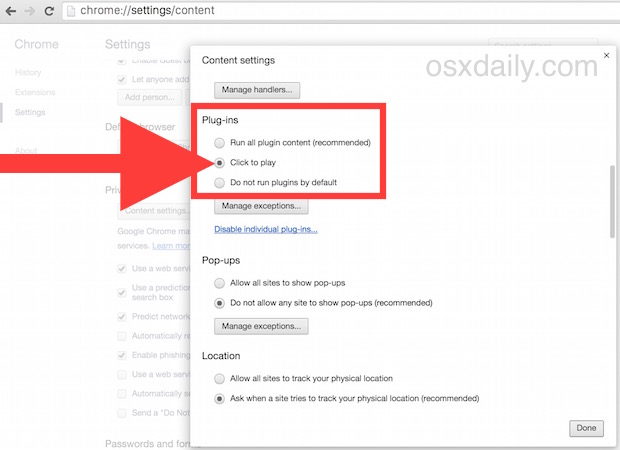
This is the same in Chrome for OS X, Windows, and Linux. The next time you run into a plugin, it will not automatically load without you clicking on it. You do not need to relaunch Chrome for this to take effect, simply navigate the browser to another web page that is likely to have Flash or a plugin in use and you will see the Click to Play window in place of the plugin content, which appears as a gray box with a little puzzle piece icon on it like this:
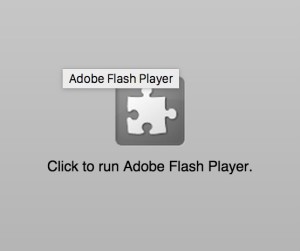
If and only if that is clicked, the plugin will run (in this screen shot example, this is a Flash animation which will not load without the click action)
Enabling Click to Play on Older Chrome Browsers
In older versions of Google Chrome browser, the Click To Play setting is hidden as an option within the about:flags panel, accessible by doing the following:
- Open a new Chrome window and enter “about:flags” into the URL bar and hit return
- Scroll down until you see “Click to Play” and enable the feature
- Relaunch Chrome
- Enter Chrome Preferences either through the Chrome menu or by going to “chrome://settings” in the URL bar
- Click on “Under the Hood” and then click on “Content Settings”
- Alongside “Plug-ins” you will see a newly enabled “Click to Play” option, select that
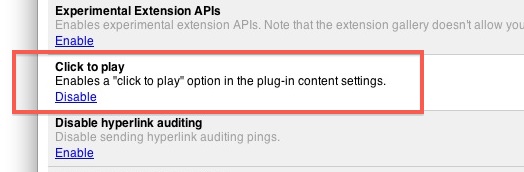

From here on out you’ll see the click to play image on any embed that uses a plugin. In some ways this is not as simple as just installing FlashBlock, but if you’re opposed to adding extensions and don’t want the kill-all approach of an ad blocker, this works just fine and it’s baked right into the browser.
Oh and while you’re in about:flags menu, be sure to enable Tab Overview if you have a newer trackpad on your Mac, it’s basically Exposé for your Chrome tabs and windows and works wonders if you use tons of simultaneous browser sessions.






[…] – you won’t experience that with Chrome. Chrome is fast, memory efficient, has simple Click-To-Plugin support, includes a built-in sandboxed Flash plugin (meaning if Flash crashes, your browser […]
It seems that latest Chrome browser shows ‘Click to play’ option by default.
Try Settings – Under the Hood – Content settings…
I can’t find this option in Chrome 18.0.1025.163
[…] Enable Click To Plugin in Chrome […]
naturally like your website but you have to take a look at the spelling on several of your posts. Several of them are rife with spelling issues and I find it very bothersome to inform the truth then again I’ll certainly come again again.
[…] on the iPad and iPhone. It’s also why we generally recommend using things like ClickToFlash, Click-to-Play, and to some extent even selectively using ad blockers, it just makes for a better web experience […]