
Turn Off Auto Correct in Mac OS Mojave, MacOS Sierra, OS X Mavericks, Yosemite, etc
 The Mac has an autocorrect feature that can range from excellent to annoying, and it works by attempting to automatically correct typos and misspellings of words as they appear, which are instantly compared to an extensive dictionary and replaced on the fly. It can be a great feature but it’s not perfect, and how you feel about auto-corrections really depends on what you’re trying to type, how often you make typos, and what your individual experience is with the corrections themselves, much of which can depend on typing habits themselves.
If you find yourself on the annoyed end of things with macOS Mojave, MacOS High Sierra, MacOS Sierra, OS X El Capitan, Lion, Mountain Lion, Mavericks, and OS X Yosemite new auto correct feature, you will be pleased to discover all of autocorrect can be disabled quickly.
Disabling Auto-Corrections in macOS Mojave, MacOS High Sierra, MacOS Sierra, Mac OS X El Capitan, Yosemite, & OS X Mavericks
In macOS Mojave 10.14.x, MacOS High Sierra 10.13.x, MacOS Sierra 10.12.x, OS X 10.11 El Capitan, 10.0 Yosemite, and OS X 10.9 Mavericks, the autocorrect setting remains the same but the location has changed slightly from prior versions of Mac OS X (as described below):
- Open System Preferences from the Apple menu as usual, then go to “Keyboard”
- Choose the “Text” tab
- Uncheck the box next to “Correct spelling automatically”
This is what the Keyboard > Text > “Correct Spelling Automatically” option looks line in new versions of MacOS and Mac OS X.
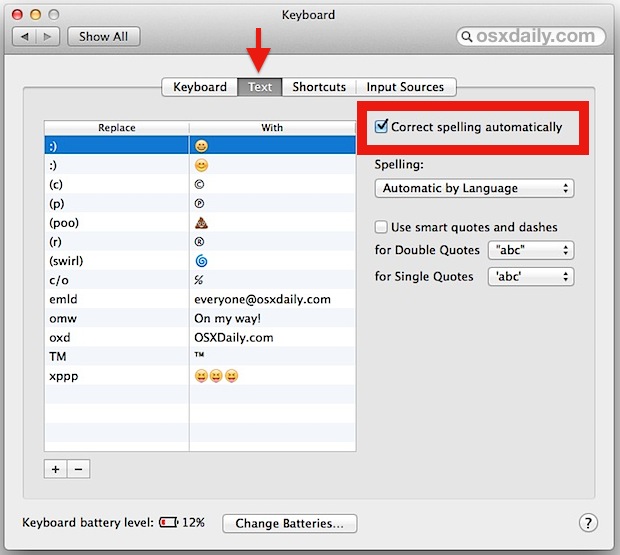
In other words, if your Mac is fairly new this is what you’ll find in the Keyboard preference panel.
As mentioned before, prior versions of Mac OS X are handled just slightly differently because the setting was relocated in modern versions. If you don’t find the option available in the Keyboard settings, you probably just need to look in Language & Text options instead, as described next…
Disabling Auto-Correct in Mac OS X (Mountain Lion, Lion, etc)
Disabling autocorrect is slightly different in earlier versions of Mac OS X, the following applies to OS X 10.7 (Lion), OS X 10.8 (Mountain Lion), whereas OS X 10.9 (Mavericks) is slightly different and described a above:
- Launch System Preferences from the Apple menu, then choose on “Language & Text”
- Click on the “Text” tab and uncheck the box next to “correct spelling automatically”
Here is what the OFF setting will look like in the preference panel for these versions of Mac OS X:
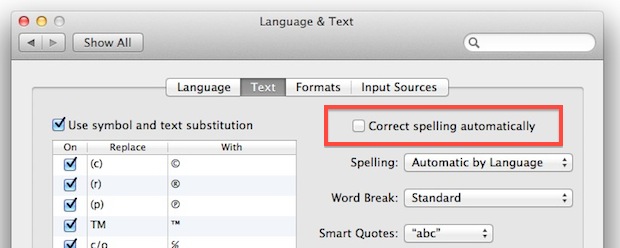
The end effect is the same, and Mac OS X will no longer try to correct your typing, typos or not.
Auto correct first arrived to Mac OSX with Lion, and overall it’s seemingly a lot more intelligent than it was when first introduced in iOS. As a cross OS feature, it has gotten much better as the autocorrect dictionary will learn from your typing habits, words, and even mistakes, but it can still be frustrating from time to time, and it’s not uncommon for it to be improperly triggered and make the wrong assumptions when you are typing unique names of people, products, companies, slang, and even various tech terms.
Obviously if you want auto-corrections enabled again, you just need to venture back into Language & Text preferences to recheck that box, which is then toggled back on.
Update: If you are experiencing annoying autocorrections like ‘colour’ to ‘color’ this is a language priority setting that must be adjusted separately in Mac OS X.






Thanks for the tip! Finally able to disable auto-correct.
I can not turn off the predictive text no matter what I try! I have Mojave 10.14.4, help!!
Same thing here. You can turn those checkboxes off all you want, certain apps simply ignore that setting. Which is infuriating when you’re writing a text that has words in 3 languages. Worst feature ever!
Same here. This is a Mojave bug and should be fixed asap!
Thank You.
I have not tried it yet but hope that this will help with mail and how it corrects things.
THANK YOU! A thousand times, THANK YOU! No, wait… a MILLION times THANK YOU!!!
Thank you for this wonderful Article!
Thank you for your tips!
Does it work the same on MacOS sierra? I hope it does. The autocorrect is freaking annoying.
Yes you can disable autocorrect in Mac OS Sierra, and I agree it is very annoying! I turn off autocorrect on the Mac but leave it enabled on iPhone.
Thank you for your tips!
Thanks for the tip! Finally able to disable auto-correct.
I don’t like the auto correct option. Most of the time it distracts my writing.
I got a loaner mac (by linux broke) and the first time I noticed the machine correcting me, I looked into disabling the feature. I strongly believe that the machine must not correct without asking permission. The machine may suggest a change, but then it must wait for approval. Correcting “aws” for “was” was a deal breaker for me. AWS happens to be an entity. Also, I’m worried that the more you let machines think for you, the dumber you become. I’ll live with my mistakes thank you. ;)
Thank you! I’d already turned off the spelling checker within Mail and it was STILL meddling as I typed. Now turned off within Keyboard settings and autocorrect has finally decided to leave me alone :)
This auto correcting feature in OS X was annoying.. and there was no hope even after turning it off from Preferences. It was killing me when I use the Messaging app.. But now thanks to @shoota… Just realized that we can indeed turn off auto correct completely by using the “Edit > Spelling and Grammar” menu option. Just uncheck “Check Spelling While Typing” and it’s possible to select different option for different app.
Thanks a ton!
Has anybody noticed that this setting will undo itself with updates? I don’t know what happened, but I fixed this a few months back, and recently I started noticing my text getting autocorrected again.
You made a typo : “This is what the Keyboard > Text > “Correct Spelling Automatically” option looks line in new versions of OS X”
…”Looks LINE” instead of “Looks LIKE”
Autocorrect probably F’ed you on that one too… If it didn’t autocorrect it you probably would have seen the red squiggle and would have fixed it accordingly. Instead it put in some word you never intended there and you missed it. THAT is my biggest issue with it.
thank you. what an irritating ‘feature.’
Hi, for my expericence, the autocorrect or spellchecker in OSX (each and every one since SL) is the worst implementation ever!
I disable it globally in the systemsettings and every application (ie. textedit) does not care about that settings.
I disable it in any application (ie. textedit) and after closing the application and starting it again, the setting is ignored again and those nasty little red lines are back in town….
thats barefaced behaviour I ever have seen….
Thank you!
I don’t know in which world the pro auto-correct leaves because there is nothing more annoying to type a word numerous time and being “corrected” by this dumb feature of Mavericks.
Thank you! That was driving me nuts!
Thank you, thank you, thank you! This is very helpful!
Thank you so much! My computer was set to British English and was constantly “correcting” all of my American English text. This has been driving me crazy for months and your instructions finally enabled me to fix the problem!
OMG thanks, pretty sure this is the worst feature apple’s ever come out with. what a nuisance.
Agreed!
The problem with autocorrect is that it’s akin to running spell-check and always choosing the default option. A lot of the time it’s right, but when it’s wrong, the typo goes from being an obvious mistake to something you have to proofread carefully to find. I would use the feature if the corrections remained highlighted so I could quickly verify them.
Autocorrect may work for english on a Mac. I keep it off either way.
It just sucks for other languages, specially when it came to slangs and region specific dialects, something pretty common worldwide…
What I hate about it, is correcting what I’ve typed on skype (without looking). Then I press send and see the terrible result. Off with you autocorrect.
There is no Language & Text in Mavericks damn it. Why does every single one of these how-tos give Mountain Lion and not Mavericks instructions.
The setting is the same but the location in OS X Mavericks is in the “Keyboard” preference panel, not “Language & Text”
The fact that you cannot turn this crap off is beyond me, I cannot understand how these morons can get something so simple so damn frikken wrong.
[…] bug was first reported on OpenRadar and is thought to relate to the spell checking and autocorrection features, though the bug is also replicable in prior versions of Mac OS X suggesting that may not […]
Okay, found it. There is the global setting in Sys Prefs, but two places in pages (Pages, Preferences and Edit, Spelling)!
I’ve turn it off in System Prefs and in Pages and in Safari and it still in correcting, wrongly! Help, where else do I turn it off?
[…] are the same that are underlined in red for typos, or underlined in green for improper grammar. For auto-corrected words, you’ll find them underlined in […]
I have spell-check turned off on the Text system preference panel. But every time I launch an application that uses text I have to turn it off in the app preferences; it’s never saved anymore. This started with 10.7.4 and it’s driving me mad. I loathe those red squiggles while I’m typing, and they’re rarely correct, anyway. Before, it was just a matter of setting the preference once with each application. Now, it I’m not allowed for it to be my “preference” at all.
Thanks! Helpful post.
[…] Turn off OS X auto correct ! […]
thank you for this! auto correct has been driving me insane! I work in a technical field and every time we get into jargon, that damn thing decreased my productivity by 1000?%
[…] of text editors that has carried over into OS X. The keyboard shortcut is most useful if you have autocorrect disabled, otherwise those minor typos tend to fix […]
I’m new to the whole iMac and apple stuff and I need help please. I’m using pages 09 to type some documents in English and Swedish. The auto correct is driving me nuts because it keeps replacing Swedish words with English. I did the above step and disabled the auto correct, however, it still replaces the Swedish words. I have a Swedish keyboard and typing words correct but pages just won’t accept them. I just want it to stop replacing/correcting words automatically.
Any suggestions or help would be great. Thanks
Hi Tonya
Be sure to select Swedish or English as the chose language for the document you are writing.
What is really insane is when it “corrects” passwords. The damn things are supposed to be unique so correction virtually never makes sense.
For some reason when I go into my system preferences and click on the Text and Language tab there is no option to uncheck correct spelling automatically like shown in the picture. My computer still continues to autocorrect but I cant de-activate it because I don’t have that box.
Thanks…. it put an o in calling somebody a count and I realised it had to go!
[…] I was typing in OmniOutliner and I realized that OSX was trying to correct my spelling. It reminded me too much of using a mobile phone because it wasn’t my spelling that was off — it was picking on names. Best way is to turn off auto correct for spelling. […]
Thank you! It’s been bugging the hell out of me every day, I know the word is spelled right but it corrects it to something else anyway. Particularly bad when talking about Dragonball Z character names and music producing gear like the Maschine (corrects it to Machine)
[…] autocorrect feature is very useful, so instead of turning it off, set a language priority and you’ll alleviate the aforementioned […]
[…] you disabled spelling auto-correct in Mac OS X Lion but find yourself still being autocorrected as you type various words in Safari, […]
Ah, safari has it’s own. Edit > Spelling and Grammar, there it is
THANK YOU :)
Mine is still auto correcting too. Lion is a huge PITA so far
I really like some aspects of lion. But 60% of its new “features” I’ve had to disable. Apple really need to abandon the stupid “no focus groups ” idea.
seriously… thank you. I am so sick of typing things twice. I spend all day coding and using business names… they love to change them on me.
i have unchecked it and its still auto correcting me even on msn! please help! x
same here… first i tried turning the feature off within the TextEdit application, but it didn’t work.. then read this thread and turned it off at the OS level, and STILL didn’t work, autocorrect is still on…
naughty naughty
Said in my best Irish/English accent, “have you tried turning it off and on again?”
I found it! Edit > Spelling!
you are my hero, this has been driving me crazy
Wow! Thanks for that! I’ve been looking high and low for that solution and your post is the only place I’ve seen it!
Phew. I have OSX 10.9.2 and Pages 5.0 and all of the obvious settings were not working. So, again – to everyone looking….within the Pages menu – go to:
Edit / Spelling and Grammar / and then you can uncheck “Check Spelling Automatically” and YOU can also make other related preferences there too. Amazing how disruptive it can be to your flow when you need a simple setting like that turned off and can’t figure it out. THANK YOU AGAIN!!!!!
After disabling from System Preferences, it shows as the blue bubble while typing, need to press the Esc before Space. I think that’s the max you can get for your money :)
– and, of course, the auto-correct feature is annoying to people trying to type words -or entire documents, even- in a language other than english.
Exactly.
or Code.
Haha AMEN to that! Coding in Lion is hell with auto-correct.
Holy crap, is it being enabled in IDEs? Thats just…… bad.
intellisense type tools are more than capable of that without some stupid spelling checker converting “writeln” to “written”.
I didn’t had any trouble with Xcode, but yes with foreign english typing and other text like ‘waterlog’ becomes ‘waterloo’
I like the spelling corrections and I haven’t found it to be a nuisance in Lion. I completely agree about iOS’s version though, it is overly aggressive and replaces words with other words, despite being spelled properly.