
Show Available Disk Space in Mac OS X by Showing the Folder Status Bar
 In Apple’s quest to simplify the Mac user experience, they hid the windows status bar in Mac OS X starting with Lion and continuing through with Mountain Lion, Mavericks, OS X Yosemite, El Capitan, and Sierra. Obviously that change is here for good, and while this definitely makes for a cleaner appearance when looking at folders on the Mac, if you actually like to know how much disk space you have available at a quick glance, it’s kind of annoying.
Fortunately, if you want to see those status details of any Finder windows, including the disk space and file counts of an active folder or directory, you can change the status bar visibility and make the available space indicator visible again. This is extremely easy and just a quick toggle adjustment away.
How to Show Finder Status Bar in Mac OS
Mac users can show the Status Bar in the Mac OS X Finder in one of two ways, either in the view menu as described:
- Go to the “View” menu from the Mac OS X Finder and choose “Show Status Bar”
Or you can toggle the Finder status bar on or off by using a command keystroke, simply by hitting Command+/ – this will either show or hide the status bar depending on what is currently set.
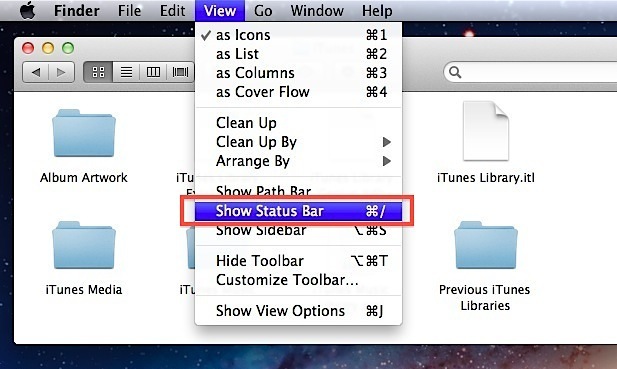
The folder status bar actually shows immediately in all windows once it has been made active, and more than just available disk space is displayed, it will also give you the active folders item count, and give you the slider to adjust icon size. If you have no idea what I’m talking about, here’s a screen shot highlighting the details in the status bar, note the difference is the bar visible at the bottom of the Finder window, which was omitted in the prior screen shot as it was hidden:
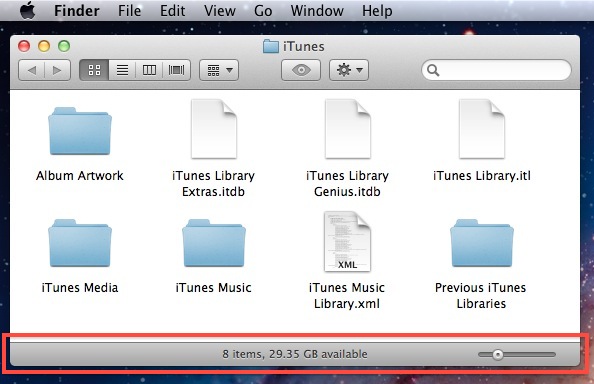
If you decide you don’t want to have the status bar visible in Finder windows again, simply hit the command keystroke again to disable it, or deselect it from the View menu so that it’s hidden again.






Hi, I just wanted to say thanks for this small, but very comfortable help. (I have been going nuts not being able to search correct term to help me with the issue.)
Just wondering if you know how to show drive space instead cloud space. I really am far more concerned about how much space I have on my local machine. thanks!
Thank You very much for this. It works great. Why Apple keeps removing features makes no sense. They did the same thing with “Spaces”. It worked much better than mission control. Apple keeps removing all the good things about OS X…..
Thank you!!!
Thanks SO much! Missed that info so much when I recently jumped to Mtn Lion until finally googled and found your article.
[…] available disk space, so you won’t be surprised by that error message in the future. This is very easy to […]
Thank you very, very much.
Thanks so much !
This also completely drove me crazy, since I would get these warnings about a full disk having to delete files in a panic each time, before, when the status bas showed by default, you would just start cleaning up the disk when it got below 10GB
Thank You. These new OS versions seem to hide more useful features than they add…. They add launchpad (useless) and eliminate critical data on file/disk usage.
Awesome! Thanks for posting this tip; was missing the info daily…
GT
[…] out of disk space is no fun and Mac users with smaller drives need to be particularly aware of available disk space. The OS X Finder Search feature can be used to find large files but if you’re really serious […]
[…] see available disk space by hitting Command+/ to show a Finder window status bar, if it’s less than 5% of total disk space, delete unnecessary files until you can recoup a […]
Yes! I was kinda pissed when I upgraded and thought they had completely removed this feature, thank you!
thanks man
Thank you :)
Thank you so much !!!!!!!!!!!!!!!!
I searched the Mac AppStore and found an app called Freespace. It displays all drives’ available space in the menu bar. I can also eject all my USB drives with single click.
you can also click the “Apple” menu >>About this mac>>more info>>storage
Thank you! I asked the people at the apple store and they didn’t know how to enable this information on the window.
Nice disc scan utility is Nektony Disk Inspector.
It scans any supported drive and generates a chart representing the file system usage.
Thank you
Whew! I was going nuts. I wish the updates were more clear about changes made and how to find what you’re looking for. I’m grateful for the help!
Lion almost drove me mad. thnx mate.
it’s crazy not to have these things visible by default.
gr.
sven
Bless you! This was driving me crazy!
thumbs up! i was bummed when they removed it and hadn’t realized they added the option until i read this post. thanks for the info.
[…] via OS X Daily […]
[…] at a quick glance, it’s kind of annoying. You can show the Status […]View full post on OS X DailyGet more Daily Mac Tips View full post on MacFanboys – Mac Tips & Tutorials← […]