
Set Language Priority in Mac OS X Auto Correct to Prevent Inaccurate Corrections Like “Colour” to “Color”
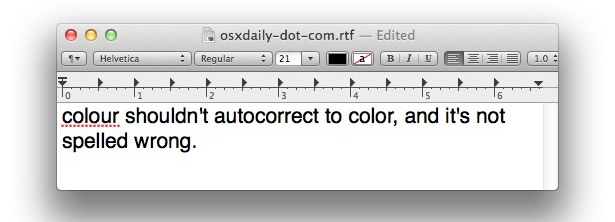
Is autocorrect in Mac OS X driving you nuts? We’ve received a fair amount of complaints regarding Mac OS X spelling autocorrect feature erroneously correcting things like British English words to American English words, and changing the spelling of some words like “colour” to “color” and so on. The reason for this is a language priority setting that should be set beyond just specifying a generic language, and you can set a region specific form of English (or Spanish, Portuguese, etc) that will alleviate this behavior.
How to Choose Auto Correct Language Priorities in Mac OS X
The autocorrect feature is very useful, so instead of turning it off, set a language priority and you’ll alleviate the aforementioned annoyance.
- Open up ‘System Preferences’ and click on “Keyboard” (in new MacOS versions) or the “Language & Text” (in older Mac OS X versions) icon
- Click on the “Text” tab and select the pull-down menu next to “Spelling” (the default is ‘Automatic by Language’)
- Scroll down the menu and choose “Set Up”
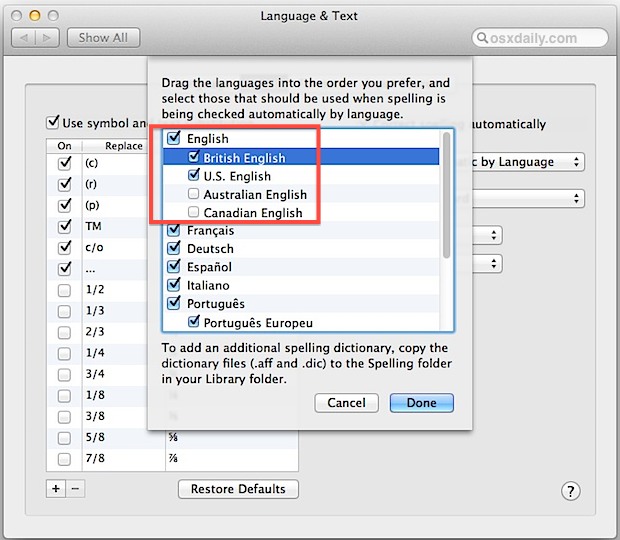
- Click on the checkbox next to the language variation and spelling that you want to prioritize, for example “British English”
- Now drag “British English” (or your language preference) to the top of the language list, above “American English”
- Click “Done” and close out System Preferences
Now anytime you type ‘colour’ it shouldn’t tell you it’s a typo, but recognize it as the proper spelling of that word for your country. Most of the complaints of this behavior come from English speakers, and Mac OS X Lion onward has at least four sets: American English, British English, Canadian English, and Australian English, so be sure to prioritize these as they are appropriate for you.
If you do want to disable autocorrect you can do that too, but remember that autocorrect must be disabled separately in Safari.
Anyway, if you’re having a frustrating experience with autocorrect in Mac OS replacing words with spelling that is incorrect for your region, this trick should resolve that. If you know of another method for achieving the same result, share with us in the comments!






Thank you!
In OS Sierra this solution is no longer feasible -or no longer the same and not immediately obvious, as the ‘Language and Text” setting in Setup no longer exists.
All you have to do is go to Tools tab and then click Language. It took me three days to figure this out…
Some update just switched my OS Yosemite preferred language to British English. It’s a similar fix, but you have to go into the “Keyboard” section of System Preferences. It’s nice to have the dialect preference within English – rather than just declaring one dialect – so you can leave on the “Automatic by language” setting. That’s helpful if you sometimes write in second or third languages.
I changed all the language settings to ‘British English’ as you suggested above – still corrects in american english! :@
I tried changing the dictionary and the spelling as described above, but still my iMac wants to change everything to American English. Can someone please advise?
Colo(u)r derives ultimately from Latin color, so color is right all along and the u in colour is vestigial. Same for honor, favor, labor, ardor, rigor, etc. ad infinitum.
[…] you use auto-correct it’s a good idea to set Language Priority for the new location too. stLight.options({ […]
The setup panel “drag the languages into the order you prefer…” does not have any languages listed. What should I do?
Thanks for this! It saved my sanity. :)
Having problems with pages too.
Trying to set this up so that at uni I won’t get docked marks for using american english but pages is still defaulting to american despite me doing the changes outlined above in system preferences.
Hmm this does not sam to work in pages unfortunately.
My wife has to do a lot of transcribing for a US website to a British one and since Snow Leopard arrived it seems that US spellings like color, labor, practiced have been included in the British dictionary. So while it does not flag British words it also misses US ones.
This is next to useless as she reports on a persecution in China where 100’s of thousands of Falun Gong practitioners languish in labour camps. As you can imagine the word labour and practised, among others, come up very frequently. Therefore she has not been able to upgrade from Leopard yet!
I would have thought this would be fixed by now, but it seems that, along with the slide toward txt spk, British is dissolving. Maybe in the futur spell chck will diss altogethr as anythng wll go. However for now, Firefox does not suffer this idiosyncrasy and so I want to put Firefox’s spell check dictionary into the Mac library. Any ideas how to do this as there seems to be several sources? Thanks very much.
OMG THANK YOU!!!! I was thinking this was a “BUG” in Lion, because I removed all the other languages from a list on the LANGUAGES tab — but I TOTALLY missed THE spelling list on the TEXT tab!
Apple phails in terms of intuitiveness here…!
Here’s an interesting problem: I have to work in two languages (English & French) and while there is no hassle with TextEdit and Mail, Pages (08) is very peculiar. Even if I set Language & Text prefs. to “français”, when I switch on the spellchecker (very quick & useful for putting in accents) the language always reverts back to English.
The only remedy I have found so far is to copy & paste into a TextEdit document, but this is a pain.
Any ideas gratefully received.
what’s really annoying is that I’m English, but also a web developer so it keeps changing my css! Would be useful if it could be turned off on a per app basis!
Same! I have just spent an AGE wondering what the hell was wrong with my websites because of this!
It seems to auto-correct ‘color’ to ‘colour’ (something that would normally be welcome) whether I actually go near the word or not. I’ve just been editing various colour values, without even clicking into the word ‘color’ and it has been “correcting” them regardless. 2 hours wasted!
Proper fix, about time.
“The autocorrect feature is very useful”
Erm…if you insist. Frankly i find it annoying and intrusive—the opposite of “very useful”. But you go on ahead and use it if you like it. I’m fine with it turned off. Maybe I’m a better spellar then ewe. ;)
‘… it’s not spelt incorrectly’.
;-)
Just to clarify, I am (British) English, living in the UK. The USA, as you suggest, is the exception to the rule.
When you say British English, like most Americans, you suggest that English is spelt differently in just the British Isles. Whereas the truth is that the spelling you refer to as British is how English is spelt throughout the English speaking world with the exception of North American. Perhaps I am doing the Canadians an injustice here, much of their spelling is also English as she is written across the world.
The only thing that annoys me is that it’s called British English in the first place. It should be English or American English.
[…] | OSXDaily En Applesfera | OS X Lion: nueva manera de acentuar palabras e introducir símbolos me gusta 0 […]
mmm. British or Australian it’s spelt not spelled :)
Did you know that spelt is also a kind of wheat?
It is wrong not just in American English, but pre 19th century England. Colour came out of England’s obsession of France.
@Rip: Forsooth, dost thou speake as once they did in the eighteenth century?
Didn’t think so.
Whether you do or do not, colour is wrong.
So by this logic, any law created since the 18th century are invalid?
Hear hear!